Skip to content
  • Categories
  • Recent
  • Tags
  • Popular
  • Users
  • Groups
  • Search
  • Get Qt Extensions
  • Unsolved
Collapse
Brand Logo
  1. Home
  2. Qt Development
  3. General and Desktop
  4. Problems changing from qt 5.9.6 to 5.12.0

Problems changing from qt 5.9.6 to 5.12.0

Scheduled Pinned Locked Moved Solved General and Desktop
6 Posts 3 Posters 816 Views 1 Watching
  • Oldest to Newest
  • Newest to Oldest
  • Most Votes
Reply
  • Reply as topic
Log in to reply
This topic has been deleted. Only users with topic management privileges can see it.
  • M Offline
    M Offline
    Mogli123
    wrote on last edited by Mogli123
    #1

    Hello,

    I am currently using qt 5.9.6 MinGW 32bit and would like to switch to qt 5.12.0, because in version 5.9.6 the OPC UA biblioteces are not available.

    Can someone give me a tip on what to look for or how to proceed exactly?

    I have already tried it myself, but now I can not compile my current programs with the new version.

    Error:

    Error creating / deploying the project test_screen (Kit: Desktop Qt 5.12.0 MSVC2017 32bit)
    The Kit Desktop Qt 5.12.0 MSVC2017 32bit contains configuration issues that could be the cause of this problem.
    When performing step "Make"

    Thank you in advance.

    Regards Mogli

    jsulmJ 1 Reply Last reply
    0
    • M Mogli123

      Hello,

      I am currently using qt 5.9.6 MinGW 32bit and would like to switch to qt 5.12.0, because in version 5.9.6 the OPC UA biblioteces are not available.

      Can someone give me a tip on what to look for or how to proceed exactly?

      I have already tried it myself, but now I can not compile my current programs with the new version.

      Error:

      Error creating / deploying the project test_screen (Kit: Desktop Qt 5.12.0 MSVC2017 32bit)
      The Kit Desktop Qt 5.12.0 MSVC2017 32bit contains configuration issues that could be the cause of this problem.
      When performing step "Make"

      Thank you in advance.

      Regards Mogli

      jsulmJ Offline
      jsulmJ Offline
      jsulm
      Lifetime Qt Champion
      wrote on last edited by
      #2

      @Mogli123 said in Problems changing from qt 5.9.6 to 5.12.0:

      The Kit Desktop Qt 5.12.0 MSVC2017 32bit contains configuration issues that could be the cause of this problem.

      Check the Kit to see what exactly is wrong with it...

      https://forum.qt.io/topic/113070/qt-code-of-conduct

      1 Reply Last reply
      1
      • M Offline
        M Offline
        Mogli123
        wrote on last edited by
        #3

        At first thank you for your help :)

        I have never done anything like this before and am quite new to qt (since about 3 months) and am very grateful for any help to learn something.

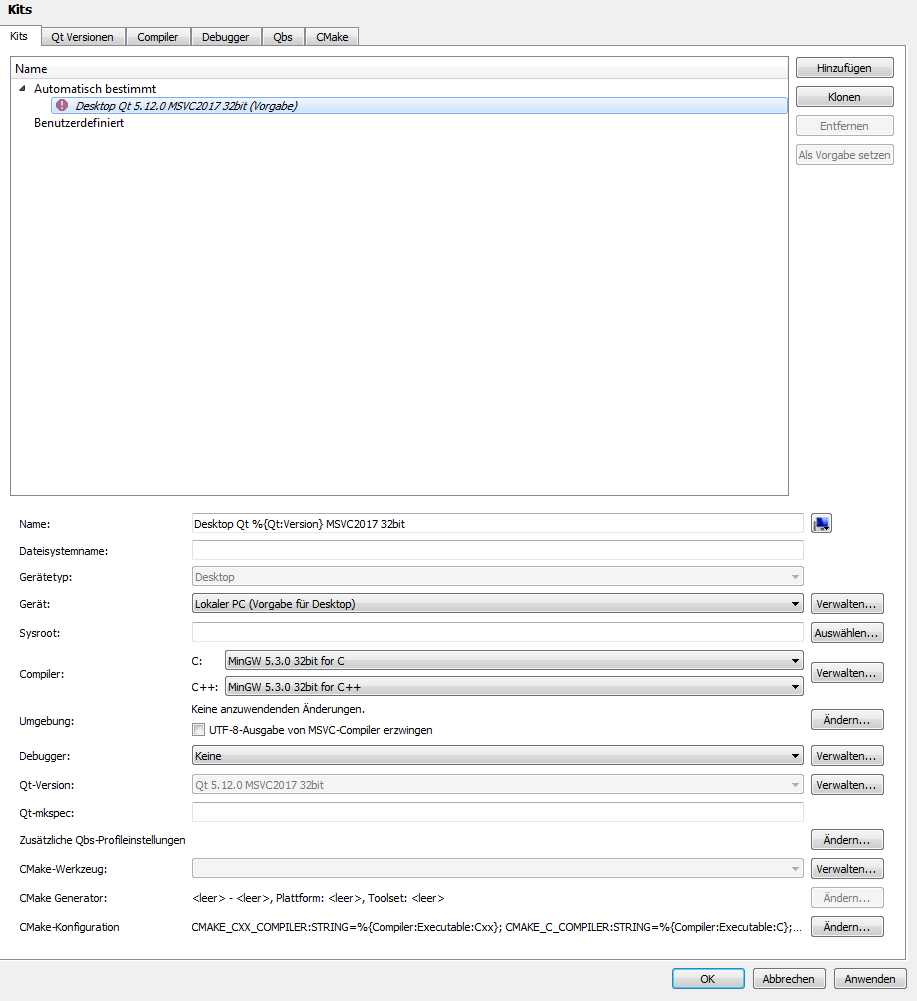
        screenshot from my kits:
        0_1544793422904_kids.PNG

        I have no idea what I can do.

        1 Reply Last reply
        0
        • M Offline
          M Offline
          Mogli123
          wrote on last edited by
          #4

          I found my mistake
          I forgot a pack at the instalation

          J.HilkJ 1 Reply Last reply
          0
          • M Mogli123

            I found my mistake
            I forgot a pack at the instalation

            J.HilkJ Offline
            J.HilkJ Offline
            J.Hilk
            Moderators
            wrote on last edited by
            #5

            @Mogli123 there is more to it, from the screenshot, you're trying to use Mingw compiler for your MSVC project, that can't work!


            Be aware of the Qt Code of Conduct, when posting : https://forum.qt.io/topic/113070/qt-code-of-conduct


            Q: What's that?
            A: It's blue light.
            Q: What does it do?
            A: It turns blue.

            M 1 Reply Last reply
            2
            • J.HilkJ J.Hilk

              @Mogli123 there is more to it, from the screenshot, you're trying to use Mingw compiler for your MSVC project, that can't work!

              M Offline
              M Offline
              Mogli123
              wrote on last edited by Mogli123
              #6

              @J.Hilk
              yes your right
              MinGW was the missing package

              1 Reply Last reply
              0

              • Login

              • Login or register to search.
              • First post
                Last post
              0
              • Categories
              • Recent
              • Tags
              • Popular
              • Users
              • Groups
              • Search
              • Get Qt Extensions
              • Unsolved