Unsolved z-index of LineSeries
-
Hello everyone,
I am developing an application in QML which includes a chart. In the ChartView I have an AreaSeries and a LineSeries defined declaratively in QML. Once the application is loaded, I would like to be able to add new LineSeries to the plot, in such a way that the AreaSeries covers them. In short, I'm looking for a way to set the z-index of LineSeries and AreaSeries.
Here a code sample that shows the problem.
import QtQuick 2.9
import QtQuick.Window 2.2
import QtCharts 2.0

Window {
    visible: true
    width: 640
    height: 480
    title: qsTr("z-index of Series")

    ChartView {
        id: chartView
        anchors.fill: parent;
        title:  "z-index of Series"
        antialiasing: true
        legend.visible: false;

        ValueAxis {
            id: xAxis
            min: 0
            max: 10;
        }

        ValueAxis {
            id: yAxis
            min: 0
            max: 10
        }

        AreaSeries {
            id: greenArea
            color: "#00ff00"
            axisX: xAxis
            axisY: yAxis

            upperSeries: LineSeries {
                axisX: xAxis
                axisY: yAxis
                Component.onCompleted: {
                    for(var j=axisX.min; j<axisX.max+1; j++){
                        append(j, 2+j/2);
                    }
                }
            }
        }

        LineSeries {
            id: redLine
            color: "#ff0000"
            width: 4
            axisX: xAxis
            axisY: yAxis
            Component.onCompleted: {
                append((xAxis.max - xAxis.min) * 2/3 + xAxis.min, yAxis.min - 10 )
                append((xAxis.max - xAxis.min) * 2/3 + xAxis.min, yAxis.max + 10 )
            }
        }
    }


    Component.onCompleted: {
        for(var i=0; i<2; i++){
            var series = chartView.createSeries(chartView.SeriesTypeLine, "Generated LineSeries "+i, xAxis, yAxis)
            for(var j=xAxis.min; j<xAxis.max+1; j++){
                series.append(j, Math.random()*10 );
            }
        }
    }

}
What I get now looks like this:
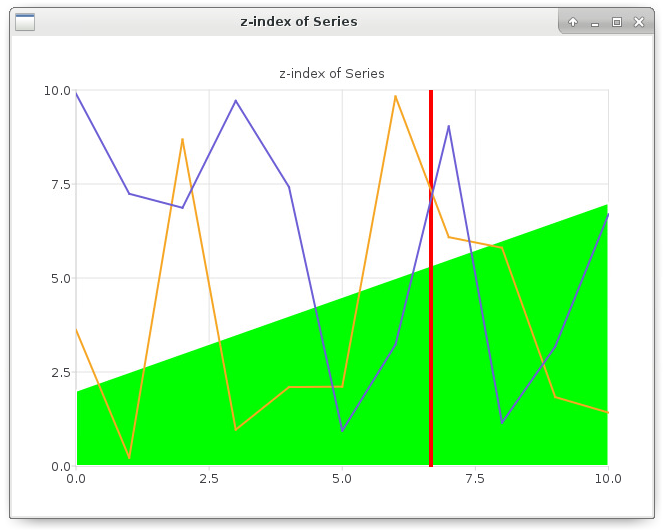
While this is what I'd like to achieve:
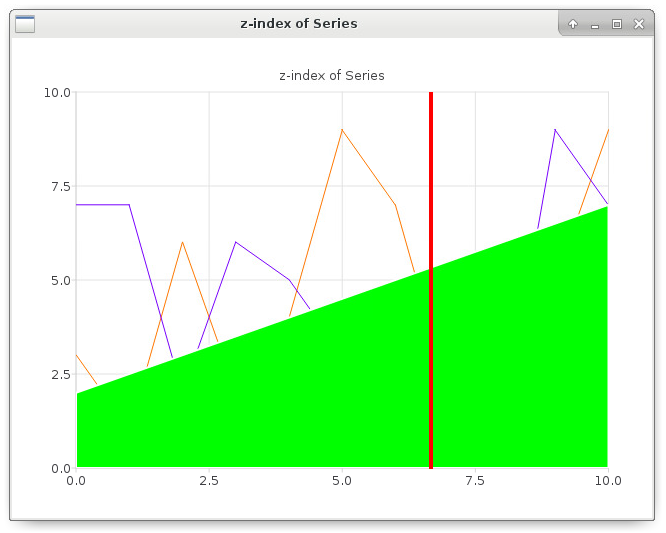
If possible I would really prefer to have the green area and the red line declared in QML.
-
Sorry if this is a dumb question, but I would like to avoid having to instantiate everything in JavaScript (as I do now to achieve the correct result): it makes the script much longer and difficult to maintain. I would like to use QML properly and not overload it. Is there no other way to do so?
-
Hi ,did you get the solution for setting z index for lineseries ? am looking for the same help