Solved Can't compile my Application with Qt 5.11.1 and Visual Studio
-
Hello everyone
I'm trying to compile my application in windows 7 with Qt5.11.1 and cmake through Jenkins build.this is my shell script
call "C:\Program Files (x86)\Microsoft Visual Studio 14.0\VC\vcvarsall.bat" x64

set PATH=C:\Qt\5.11.1\msvc2015_64\bin;C:\icu\bin64;C:\OpenSSL-Win64\bin;C:\Program Files (x86)\Inno Setup 5;%PATH%

set CMAKE_PREFIX_PATH=C:\Qt\5.11.1\msvc2015_64\lib\cmake
set CL=/MP

rmdir /S /Q build
mkdir build
cd build

cmake -G "Visual Studio 14 2015 Win64" ../godzilla -DJENKINS_URL=xxx.xxx.xxx.xxx:8080 -DCMAKE_BUILD_TYPE=Release -DGIT_BRANCH=release/4.3

"C:\Program Files (x86)\MSBuild\14.0\Bin\MSBuild.exe" btb.sln /verbosity:minimal /maxcpucount:1 /property:Configuration=Release

copy C:\OpenSSL-win64\bin\libeay32.dll bin\Release
copy C:\OpenSSL-win64\bin\ssleay32.dll bin\Release
copy C:\Windows\Sysnative\msvcp100.dll bin\Release
copy C:\Windows\Sysnative\msvcr100.dll bin\Release
copy C:\Jenkins\opengl32sw-64.dll bin\Release\opengl32sw.dll

REM del \s bin\Release\test_*
REM del \s bin\Release\u_test_*
"C:\Program Files (x86)\MSBuild\14.0\Bin\MSBuild.exe" mkinstaller.vcxproj /verbosity:minimal /maxcpucount:1 /property:Configuration=Release
My build fail with this message
CMake Error at CMakeLists.txt:151 (find_package):
  By not providing "FindQt5WebEngineWidgets.cmake" in CMAKE_MODULE_PATH this
  project has asked CMake to find a package configuration file provided by
  "Qt5WebEngineWidgets", but CMake did not find one.

  Could not find a package configuration file provided by
  "Qt5WebEngineWidgets" with any of the following names:

    Qt5WebEngineWidgetsConfig.cmake
    qt5webenginewidgets-config.cmake

  Add the installation prefix of "Qt5WebEngineWidgets" to CMAKE_PREFIX_PATH
  or set "Qt5WebEngineWidgets_DIR" to a directory containing one of the above
  files.  If "Qt5WebEngineWidgets" provides a separate development package or
  SDK, be sure it has been installed.
I'm spending too much time to fix this error.
Can someone help me please?Thanks in advanced
GG -
Hi @GGAllin, did you install the Qt WebEngine module?
-
Hello!
Finally solved my problem reading this post https://github.com/bincrafters/community/issues/411
i've installed Qt 5.11.2 (snapshot) and also Visual Studio 2017 with visual studio build tools.Note: You need a Cmake Version greater than 3.6 , so 3.7 works perfectly. (I have installed 3.12.x)
After in the shell command i have modified all the paths
call "C:\Program Files (x86)\Microsoft Visual Studio\2017\Community\VC\Auxiliary\Build\vcvarsall.bat" x64

set PATH=C:\Qt\5.11.2\msvc2017_64\bin;C:\icu\bin64;C:\OpenSSL-Win64\bin;C:\Program Files (x86)\Inno Setup 5;%PATH%

set CMAKE_PREFIX_PATH=C:\Qt\5.11.2\msvc2017_64\lib\cmake
set CL=/MP

rmdir /S /Q build
mkdir build
cd build

cmake -G "Visual Studio 15 2017 Win64" ../godzilla -DJENKINS_URL=xxx.xxx.xxx.xxx:8080 -DCMAKE_BUILD_TYPE=Release -DGIT_BRANCH=release/4.3

"C:\Program Files (x86)\Microsoft Visual Studio\2017\Community\MSBuild\15.0\Bin\MSBuild.exe" yourSolution.sln /verbosity:minimal /maxcpucount:1 /property:Configuration=Release

copy C:\OpenSSL-win64\bin\libeay32.dll bin\Release
copy C:\OpenSSL-win64\bin\ssleay32.dll bin\Release
copy C:\Windows\Sysnative\msvcp100.dll bin\Release
copy C:\Windows\Sysnative\msvcr100.dll bin\Release
copy C:\Jenkins\opengl32sw-64.dll bin\Release\opengl32sw.dll

REM del \s bin\Release\test_*
REM del \s bin\Release\u_test_*
"C:\Program Files (x86)\Microsoft Visual Studio\2017\Community\MSBuild\15.0\Bin\MSBuild.exe" mkinstaller.vcxproj /verbosity:minimal /maxcpucount:1 /property:Configuration=Release
And magically it works!
Thanks to all! -
I am using Windows 8.1 , cmake version 3.15.2
I am trying to run https://github.com/nextcloud/desktop on my local.
I have already installed visual studio 2017 community .
And QT version is just 5.13.0
I tried to do as your guide.
Still I can see this error.
Add the installation prefix of "Qt5WebEngineWidgets" to CMAKE_PREFIX_PATH
or set "Qt5WebEngineWidgets_DIR" to a directory containing one of the above
files. If "Qt5WebEngineWidgets" provides a separate development package or
SDK, be sure it has been installed.
Call Stack (most recent call first):
src/CMakeLists.txt:7 (find_package)
Please help me with this problem.
Thanks . fw -
This problem was just resolved successfully.
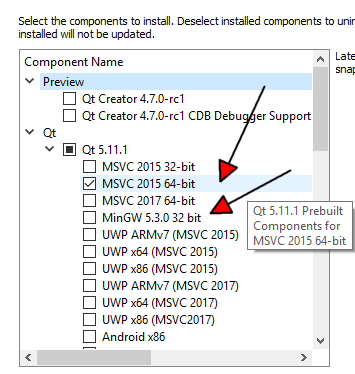
I added module to QT .
For that , I re-installed QT. Total is 70GB. -
@jc325 said in Can't compile my Application with Qt 5.11.1 and Visual Studio:
I re-installed QT. Total is 70GB.
That means you installed many, many versions of Qt.
Next time, expand the menu and only select the version that you want (for example, MinGW 7.3.0 32-bit only, or MSVC 2017 64-only):