Skip to content
  • Categories
  • Recent
  • Tags
  • Popular
  • Users
  • Groups
  • Search
  • Get Qt Extensions
  • Unsolved
Collapse
Brand Logo
  1. Home
  2. Qt Development
  3. General and Desktop
  4. How to draw an outline offset from a QPainterPath?
Qt 6.11 is out! See what's new in the release blog

How to draw an outline offset from a QPainterPath?

Scheduled Pinned Locked Moved Unsolved General and Desktop
3 Posts 3 Posters 1.7k Views 3 Watching
  • Oldest to Newest
  • Newest to Oldest
  • Most Votes
Reply
  • Reply as topic
Log in to reply
This topic has been deleted. Only users with topic management privileges can see it.
  • P Offline
    P Offline
    patrickkidd
    wrote on last edited by
    #1

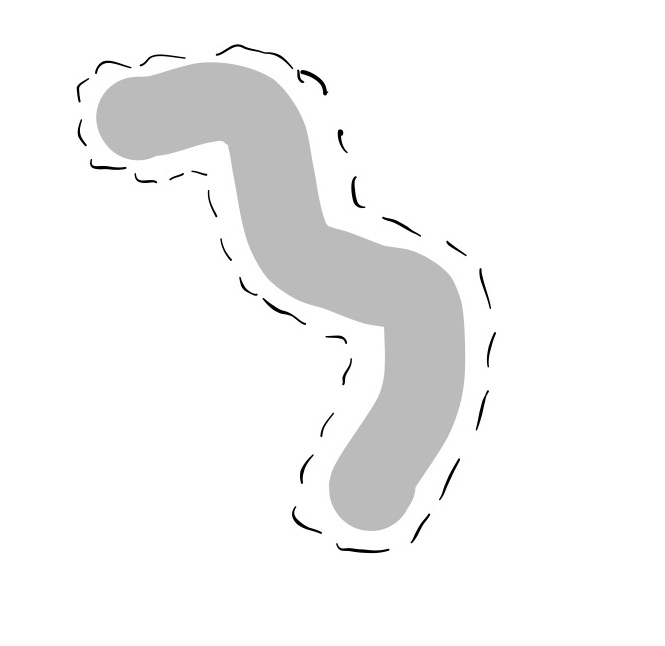
    I am trying to draw a dashed outline a number of pixels around a QPainterPath which is just a series of points (see attached mock-up). I have had no luck with QPainterPathStroker, which seems to draw the stroke right at the edge of the original path and also closes the path around the beginning and ending points drawing a straight line between them.

    Any idea how to do this?
    0_1531502166014_Note Jul 13, 2019.jpg

    https://alaskafamilysystems.com/

    K kshegunovK 2 Replies Last reply
    0
    • P patrickkidd

      I am trying to draw a dashed outline a number of pixels around a QPainterPath which is just a series of points (see attached mock-up). I have had no luck with QPainterPathStroker, which seems to draw the stroke right at the edge of the original path and also closes the path around the beginning and ending points drawing a straight line between them.

      Any idea how to do this?

      0_1531502166014_Note Jul 13, 2019.jpg

      K Offline
      K Offline
      kenchan
      wrote on last edited by kenchan
      #2

      @patrickkidd
      That could be quit difficult to do without actually drawing a dotted offset path around it.
      You might try drawing three paths on top of each other. First the fattest one with a stipple pattern, then a white one which is slightly smaller to mask the fat one, then the grey one on top of both. You can use the same points and end types for all of them, just change the width of each.
      Not sure if it will actually look like what you want though. If you draw the path and stroker correctly it will not close it if you don't want it to. Use pen up and pen down correctly.

      1 Reply Last reply
      0
      • P patrickkidd

        I am trying to draw a dashed outline a number of pixels around a QPainterPath which is just a series of points (see attached mock-up). I have had no luck with QPainterPathStroker, which seems to draw the stroke right at the edge of the original path and also closes the path around the beginning and ending points drawing a straight line between them.

        Any idea how to do this?

        0_1531502166014_Note Jul 13, 2019.jpg

        kshegunovK Offline
        kshegunovK Offline
        kshegunov
        Moderators
        wrote on last edited by
        #3

        Look here, Chris' answer in particular:
        https://forum.qt.io/topic/62142/qpainterpath-from-list-of-points/21

        Read and abide by the Qt Code of Conduct

        1 Reply Last reply
        2

        • Login

        • Login or register to search.
        • First post
          Last post
        0
        • Categories
        • Recent
        • Tags
        • Popular
        • Users
        • Groups
        • Search
        • Get Qt Extensions
        • Unsolved