Skip to content
  • Categories
  • Recent
  • Tags
  • Popular
  • Users
  • Groups
  • Search
  • Get Qt
  • Unsolved
Collapse
Brand Logo
  1. Home
  2. Qt Development
  3. General and Desktop
  4. QStyleOptionButton cloud be set background color?
Qt 6.12 LTS is out! See what's new in the release blog

QStyleOptionButton cloud be set background color?

Scheduled Pinned Locked Moved Solved General and Desktop
11 Posts 4 Posters 4.8k Views 2 Watching
  • Oldest to Newest
  • Newest to Oldest
  • Most Votes
Reply
  • Reply as topic
Log in to reply
This topic has been deleted. Only users with topic management privileges can see it.
  • qazaq408Q Offline
    qazaq408Q Offline
    qazaq408
    wrote on last edited by
    #1

    QStyleOptionButton cloud be set background color?

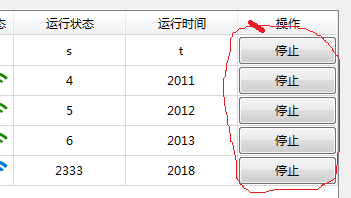
    There's a table that's show some information of a group device, I use model+qtableview,one column of the table is show switch for user, and user need the power of control the switch.so i use QStyledItemDelegate to show a button in this column.For better user experience,i hope the switch(QStyleOptionButton)is yellow when the device is running and green when the deivce is stop.
    alt text

    void ChooseWatchObjectDelegate::paint(QPainter* painter, const QStyleOptionViewItem& option, const QModelIndex& index) const
    {
        QStyleOptionButton btn;
        btn.rect = option.rect;
        bool fg = index.model()->data(index).toBool();
        if(fg == true)
        {
            btn.palette.setBrush(QPalette::Button,QBrush(QColor(Qt::green)));//it doesn't work.....
            btn.text = tr("启动");
        }
        else
        {
            btn.palette.setBrush(QPalette::Background,QBrush(QColor(Qt::red)));//it also doesn't work.....
            btn.text = tr("停止");
        }
        btn.state |= QStyle::State_Enabled;
        painter->setBrush(QColor(Qt::red));  //it's still unuseful...
        if(option.widget != NULL)
            QApplication::style()->drawControl(QStyle::CE_PushButton,&btn,painter);
        else
            option.widget->style();
    }
    
    1 Reply Last reply
    0
    • qazaq408Q Offline
      qazaq408Q Offline
      qazaq408
      wrote on last edited by
      #2

      I try to use setStyleSheet in the delegate

      setStyleSheet("QPushButton{background-color:red}");
      

      it still doesn't work....

      1 Reply Last reply
      0
      • SGaistS Offline
        SGaistS Offline
        SGaist
        Lifetime Qt Champion
        wrote on last edited by SGaist
        #3

        Hi,

        You are modifying the painter object but you are then calling the style of QApplication to paint. Why don't use use painter ?

        Misread the code.

        [edit: SGaist]

        Interested in AI ? www.idiap.ch
        Please read the Qt Code of Conduct - https://forum.qt.io/topic/113070/qt-code-of-conduct

        qazaq408Q 1 Reply Last reply
        0
        • SGaistS SGaist

          Hi,

          You are modifying the painter object but you are then calling the style of QApplication to paint. Why don't use use painter ?

          Misread the code.

          [edit: SGaist]

          qazaq408Q Offline
          qazaq408Q Offline
          qazaq408
          wrote on last edited by
          #4

          @SGaist
          Thank you..

          you mean that's create a new painter?

           painter->setBrush(QColor(Qt::red));  //it's still unuseful...
          

          It doesn't work...

          1 Reply Last reply
          0
          • SGaistS Offline
            SGaistS Offline
            SGaist
            Lifetime Qt Champion
            wrote on last edited by
            #5

            Sorry, my bad, I misread your code.

            What platform are you on ?
            With which version of Qt ?

            Can you also show what you are currently getting ?

            Interested in AI ? www.idiap.ch
            Please read the Qt Code of Conduct - https://forum.qt.io/topic/113070/qt-code-of-conduct

            qazaq408Q 1 Reply Last reply
            0
            • SGaistS Offline
              SGaistS Offline
              SGaist
              Lifetime Qt Champion
              wrote on last edited by
              #6

              You might want to call

              painter->fillRect(btn.rect, btn.palette.brush(QPalette::Button));

              Before drawing the button on top of it.

              Interested in AI ? www.idiap.ch
              Please read the Qt Code of Conduct - https://forum.qt.io/topic/113070/qt-code-of-conduct

              1 Reply Last reply
              0
              • SGaistS SGaist

                Sorry, my bad, I misread your code.

                What platform are you on ?
                With which version of Qt ?

                Can you also show what you are currently getting ?

                qazaq408Q Offline
                qazaq408Q Offline
                qazaq408
                wrote on last edited by
                #7

                @SGaist
                win7 + Qt5.9 + mingw32

                I had tried

                    if(option.widget != NULL)
                    {
                        painter->fillRect(btn.rect,btn.palette.brush(QPalette::Button)); //It doesn't work
                        QApplication::style()->drawControl(QStyle::CE_PushButton,&btn,painter);
                    }
                    else
                        option.widget->style();
                

                I also tried

                    if(option.widget != NULL)
                    {
                        btn.palette.setBrush(QPalette::Background,QBrush(QColor(Qt::red)));
                        painter->fillRect(btn.rect,btn.palette.brush(QPalette::Button));  //unused.......
                        QApplication::style()->drawControl(QStyle::CE_PushButton,&btn,painter);
                    }
                    else
                        option.widget->style();
                

                0_1531099806126_23333.png
                It's a question ~。~

                J 1 Reply Last reply
                0
                • qazaq408Q Offline
                  qazaq408Q Offline
                  qazaq408
                  wrote on last edited by
                  #8

                  Could someone give me help......
                  on those days,I trid to use a pix to replace the button,but when I clicked the button(It's is a pix in fact),it doesn't look like a button,because the button will changed when it clicked by mouse but pix not
                  More important,my boss denied my plan that's replace the button by a pix....
                  alt text

                  1 Reply Last reply
                  0
                  • mrjjM Offline
                    mrjjM Offline
                    mrjj
                    Lifetime Qt Champion
                    wrote on last edited by
                    #9

                    Hi
                    I think i used QStyle::CE_PushButtonLabel instead to get it to be transparent as
                    QStyle::CE_PushButton ignored all QBrush.
                    If that fails too, you could use icon on button to show state.

                    1 Reply Last reply
                    2
                    • qazaq408Q qazaq408

                      @SGaist
                      win7 + Qt5.9 + mingw32

                      I had tried

                          if(option.widget != NULL)
                          {
                              painter->fillRect(btn.rect,btn.palette.brush(QPalette::Button)); //It doesn't work
                              QApplication::style()->drawControl(QStyle::CE_PushButton,&btn,painter);
                          }
                          else
                              option.widget->style();
                      

                      I also tried

                          if(option.widget != NULL)
                          {
                              btn.palette.setBrush(QPalette::Background,QBrush(QColor(Qt::red)));
                              painter->fillRect(btn.rect,btn.palette.brush(QPalette::Button));  //unused.......
                              QApplication::style()->drawControl(QStyle::CE_PushButton,&btn,painter);
                          }
                          else
                              option.widget->style();
                      

                      0_1531099806126_23333.png
                      It's a question ~。~

                      J Offline
                      J Offline
                      JohnMPaine
                      wrote on last edited by
                      #10

                      @qazaq408 said in QStyleOptionButton cloud be set background color?:

                      btn.palette.setBrush(QPalette::Background,QBrush(QColor(Qt::red)));
                      painter->fillRect(btn.rect,btn.palette.brush(QPalette::Button)); //unused.......

                      Have you tried
                      painter->fillRect(btn.rect, btn.palette.brush(QPalette::Background));
                      instead of
                      painter->fillRect(btn.rect, btn.palette.brush(QPalette::Button));

                      qazaq408Q 1 Reply Last reply
                      0
                      • J JohnMPaine

                        @qazaq408 said in QStyleOptionButton cloud be set background color?:

                        btn.palette.setBrush(QPalette::Background,QBrush(QColor(Qt::red)));
                        painter->fillRect(btn.rect,btn.palette.brush(QPalette::Button)); //unused.......

                        Have you tried
                        painter->fillRect(btn.rect, btn.palette.brush(QPalette::Background));
                        instead of
                        painter->fillRect(btn.rect, btn.palette.brush(QPalette::Button));

                        qazaq408Q Offline
                        qazaq408Q Offline
                        qazaq408
                        wrote on last edited by
                        #11

                        @JohnMPaine
                        tried....
                        And then ,the whole button has filled....the txt of button can't be seen.....

                        1 Reply Last reply
                        0

                        • Login

                        • Login or register to search.
                        • First post
                          Last post
                        0
                        • Categories
                        • Recent
                        • Tags
                        • Popular
                        • Users
                        • Groups
                        • Search
                        • Get Qt
                        • Unsolved