Skip to content
  • Categories
  • Recent
  • Tags
  • Popular
  • Users
  • Groups
  • Search
  • Get Qt Extensions
  • Unsolved
Collapse
Brand Logo
  1. Home
  2. Qt Development
  3. General and Desktop
  4. QScrollArea layout tips in designer?
Forum Updated to NodeBB v4.3 + New Features

QScrollArea layout tips in designer?

Scheduled Pinned Locked Moved Solved General and Desktop
4 Posts 3 Posters 972 Views 1 Watching
  • Oldest to Newest
  • Newest to Oldest
  • Most Votes
Reply
  • Reply as topic
Log in to reply
This topic has been deleted. Only users with topic management privileges can see it.
  • M Offline
    M Offline
    Mr Pang
    wrote on last edited by
    #1

    Hi,
    I meet an inconvenient operation when adding a lot of widgets into a QScrollArea. If I set layout first, then I can see scrollbar, but it is not possible to put the widgets to any position I want when layout is set. If I don't set layout, QScrollArea can only see the size as much as screen size. I can not put widgets to area outside the screen .
    How to you deal with such situation?

    Thanks!

    1 Reply Last reply
    0
    • mrjjM Offline
      mrjjM Offline
      mrjj
      Lifetime Qt Champion
      wrote on last edited by
      #2

      Hi
      Layouts determine where widgets are placed. You cannot freely position them.
      However, you could use a Grid layout. That allows widgets to be placed on a grid
      and offer more freedom. But no layout allows freely placing widgets in any position you wish.

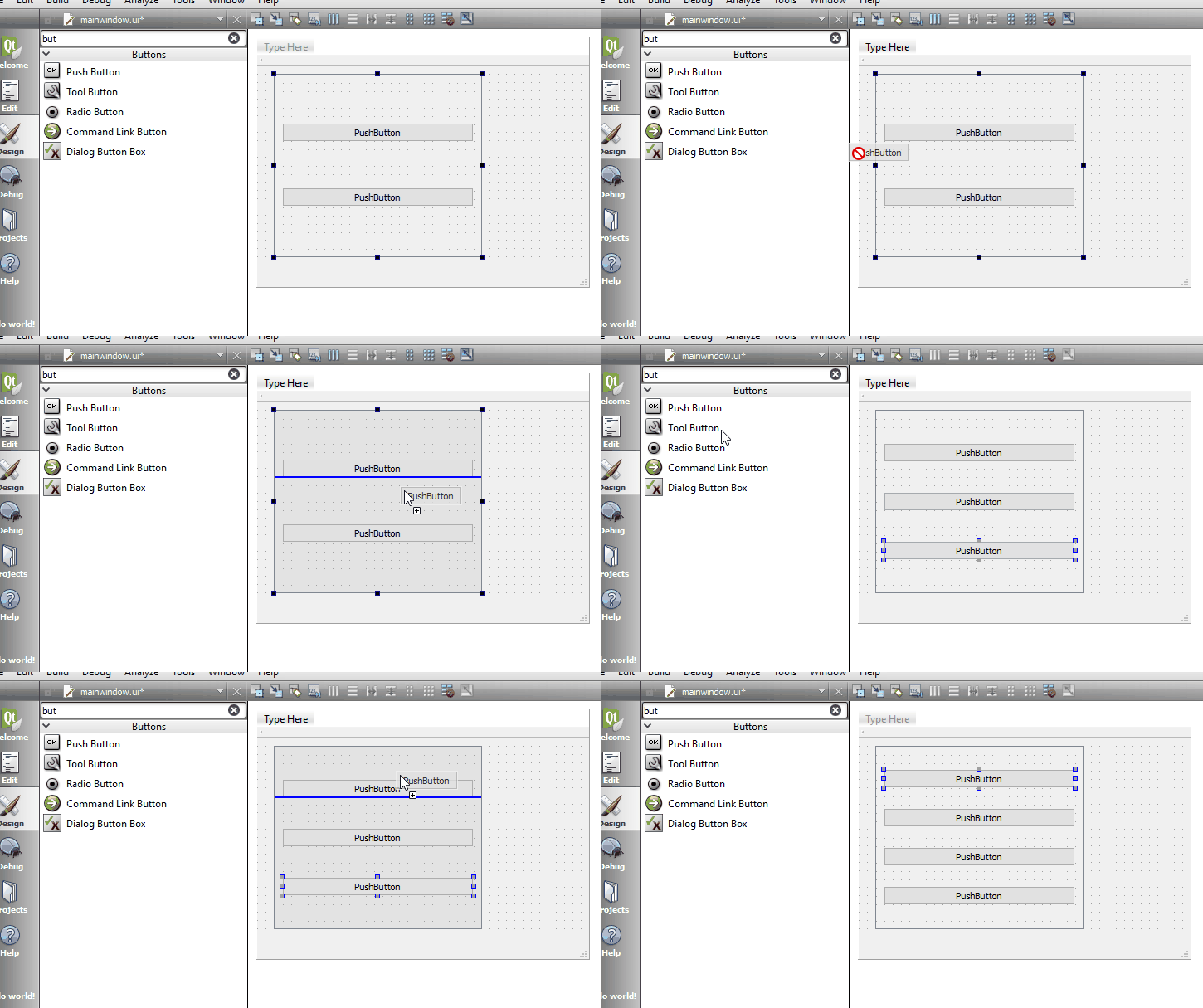
      Note however, with all the layout you can drag widgets to a position and the other widgets will be moved.
      A blue line is shown for the insertion point.
      alt text

      However, there is widgetResizable. If you set it to false and call
      widget()->resize() to something larger than screen. it might allow scrolling with no
      layouts. You might need to set scrollbars to show always.
      alt text

      M 1 Reply Last reply
      2
      • mrjjM mrjj

        Hi
        Layouts determine where widgets are placed. You cannot freely position them.
        However, you could use a Grid layout. That allows widgets to be placed on a grid
        and offer more freedom. But no layout allows freely placing widgets in any position you wish.

        Note however, with all the layout you can drag widgets to a position and the other widgets will be moved.
        A blue line is shown for the insertion point.
        alt text

        However, there is widgetResizable. If you set it to false and call
        widget()->resize() to something larger than screen. it might allow scrolling with no
        layouts. You might need to set scrollbars to show always.
        alt text

        M Offline
        M Offline
        Mr Pang
        wrote on last edited by
        #3

        @mrjj
        Your first tip is good. But sometimes I want to append a sub-layout and then put two or more widget into it.

        jsulmJ 1 Reply Last reply
        0
        • M Mr Pang

          @mrjj
          Your first tip is good. But sometimes I want to append a sub-layout and then put two or more widget into it.

          jsulmJ Online
          jsulmJ Online
          jsulm
          Lifetime Qt Champion
          wrote on last edited by
          #4

          @Mr-Pang said in QScrollArea layout tips in designer?:

          But sometimes I want to append a sub-layout and then put two or more widget into it

          Then do it. A layout can contain other layouts and so on...

          https://forum.qt.io/topic/113070/qt-code-of-conduct

          1 Reply Last reply
          2

          • Login

          • Login or register to search.
          • First post
            Last post
          0
          • Categories
          • Recent
          • Tags
          • Popular
          • Users
          • Groups
          • Search
          • Get Qt Extensions
          • Unsolved