Skip to content
  • Categories
  • Recent
  • Tags
  • Popular
  • Users
  • Groups
  • Search
  • Get Qt Extensions
  • Unsolved
Collapse
Brand Logo
  1. Home
  2. Qt Development
  3. QML and Qt Quick
  4. Trouble getting Item of PathView to center
Forum Updated to NodeBB v4.3 + New Features

Trouble getting Item of PathView to center

Scheduled Pinned Locked Moved Unsolved QML and Qt Quick
5 Posts 3 Posters 1.0k Views
  • Oldest to Newest
  • Newest to Oldest
  • Most Votes
Reply
  • Reply as topic
Log in to reply
This topic has been deleted. Only users with topic management privileges can see it.
  • D Offline
    D Offline
    DavidM29
    wrote on last edited by DavidM29
    #1

    Hello,

    I'm trying to make a PathView. It works quite well for now exceptfor one detail.
    When I move the PathView with a drag and stop it, it can stop anywhere. Wich make it not centered as it should be.
    Here is an example of the wrong behaviour :
    0_1529566020073_7b4e09db-9de1-426f-a500-c98947b19e07-image.png
    I'm expecting that result : (I got this result most of the time but I just want to avoid the behaviour I described above)
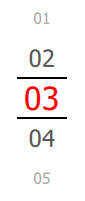
    0_1529566147098_5e30cdf9-ece9-41b5-8815-3be7a05b4b75-image.png
    I tried to play with the snapMode property but nothing changed.
    Here is the code of the PathView :

        PathView {
            id: pathView
            anchors.fill: parent
            model: tumblerModel
            pathItemCount: 5
            preferredHighlightBegin: 0.5
            preferredHighlightEnd: 0.5
            highlightRangeMode: PathView.StrictlyEnforceRange
            
            delegate: tumblerDelegate
            path: Path {
                startX: parent.width/2; startY: 0
                PathAttribute { name: "iconScale"; value: 0.7 }
                PathAttribute { name: "iconOpacity"; value: 0.2 }
                PathLine {x: parent.width/2; y: 100 }
                PathAttribute { name: "iconScale"; value: 2 }
                PathAttribute { name: "iconOpacity"; value: 1 }
                PathLine {x: parent.width/2; y: 200 }
            }
    
        }
    

    Does anybody know how can I force the item to center ?

    DiracsbracketD 1 Reply Last reply
    0
    • D DavidM29

      Hello,

      I'm trying to make a PathView. It works quite well for now exceptfor one detail.
      When I move the PathView with a drag and stop it, it can stop anywhere. Wich make it not centered as it should be.
      Here is an example of the wrong behaviour :
      0_1529566020073_7b4e09db-9de1-426f-a500-c98947b19e07-image.png
      I'm expecting that result : (I got this result most of the time but I just want to avoid the behaviour I described above)

      0_1529566147098_5e30cdf9-ece9-41b5-8815-3be7a05b4b75-image.png
      I tried to play with the snapMode property but nothing changed.
      Here is the code of the PathView :

          PathView {
              id: pathView
              anchors.fill: parent
              model: tumblerModel
              pathItemCount: 5
              preferredHighlightBegin: 0.5
              preferredHighlightEnd: 0.5
              highlightRangeMode: PathView.StrictlyEnforceRange
              
              delegate: tumblerDelegate
              path: Path {
                  startX: parent.width/2; startY: 0
                  PathAttribute { name: "iconScale"; value: 0.7 }
                  PathAttribute { name: "iconOpacity"; value: 0.2 }
                  PathLine {x: parent.width/2; y: 100 }
                  PathAttribute { name: "iconScale"; value: 2 }
                  PathAttribute { name: "iconOpacity"; value: 1 }
                  PathLine {x: parent.width/2; y: 200 }
              }
      
          }
      

      Does anybody know how can I force the item to center ?

      DiracsbracketD Offline
      DiracsbracketD Offline
      Diracsbracket
      wrote on last edited by
      #2

      @DavidM29
      What about using PathPercent elements as in the Qt Cadaques book:
      https://qmlbook.github.io/ch06/index.html#the-pathview

      The example below demonstrates how the PathView element is used to create view of cards that the user can flip through. It employs a number of tricks to do this. The path consists of three PathLine elements. Using PathPercent elements, the central element is properly centered and provided enough space not to be cluttered by other elements.
      

      Hope it helps.

      1 Reply Last reply
      0
      • D Offline
        D Offline
        DavidM29
        wrote on last edited by
        #3

        I'm looking into it ! Thanks

        1 Reply Last reply
        0
        • 6thC6 Offline
          6thC6 Offline
          6thC
          wrote on last edited by 6thC
          #4

          http://doc.qt.io/qt-5/qml-qtquick-pathview.html#snapMode-prop

          snapMode : PathView.SnapToItem
          

          ?

          1 Reply Last reply
          0
          • D Offline
            D Offline
            DavidM29
            wrote on last edited by
            #5

            @6thC
            I tried this but it does not change anything... I don't know why. But I found out that the problem is present only in my virtual environment, it works fine on the final device, at least for now.

            1 Reply Last reply
            0

            • Login

            • Login or register to search.
            • First post
              Last post
            0
            • Categories
            • Recent
            • Tags
            • Popular
            • Users
            • Groups
            • Search
            • Get Qt Extensions
            • Unsolved