Skip to content
  • Categories
  • Recent
  • Tags
  • Popular
  • Users
  • Groups
  • Search
  • Get Qt Extensions
  • Unsolved
Collapse
Brand Logo
  1. Home
  2. Qt Development
  3. General and Desktop
  4. Qt Release build application (windows 7) works when invoked with debugger but not standalone
Qt 6.11 is out! See what's new in the release blog

Qt Release build application (windows 7) works when invoked with debugger but not standalone

Scheduled Pinned Locked Moved Solved General and Desktop
6 Posts 3 Posters 1.2k Views 1 Watching
  • Oldest to Newest
  • Newest to Oldest
  • Most Votes
Reply
  • Reply as topic
Log in to reply
This topic has been deleted. Only users with topic management privileges can see it.
  • K Offline
    K Offline
    KRP1
    wrote on last edited by
    #1

    I have a project that I am working on using OpenCV. I have both Release and Debug libs (version 3.0 from site) of OpenCV installed. I link to the Release library when building the Release build. I am using a 64bit build of Qt 5.2.1 with VS2012.

    The gui application crashes straightaway, no gui comes up. The gui is just one window with a couple of buttons and a space to show images.

    The main entry is this:

    int main(int argc, char *argv[])
    {
        QApplication a(argc, argv);
        MainWindow w;
        w.show();
    
        return a.exec();
    }
    

    The crash occurs in the moc generated code for setupUI:

    void setupUi(QMainWindow *MainWindow)
        {
            if (MainWindow->objectName().isEmpty())
                MainWindow->setObjectName(QStringLiteral("MainWindow"));
            MainWindow->resize(905, 587);
            MainWindow->setMinimumSize(QSize(0, 340));
            actionQuit = new QAction(MainWindow);
            actionQuit->setObjectName(QStringLiteral("actionQuit"));
            centralWidget = new QWidget(MainWindow);
            centralWidget->setObjectName(QStringLiteral("centralWidget"));
            verticalLayout = new QVBoxLayout(centralWidget);
            verticalLayout->setSpacing(6);
            verticalLayout->setContentsMargins(11, 11, 11, 11);
            verticalLayout->setObjectName(QStringLiteral("verticalLayout"));
            widgetScreen = new ImageView(centralWidget);
            widgetScreen->setObjectName(QStringLiteral("widgetScreen"));
            QSizePolicy sizePolicy(QSizePolicy::Expanding, QSizePolicy::Expanding);
            sizePolicy.setHorizontalStretch(0);
            sizePolicy.setVerticalStretch(0);
            sizePolicy.setHeightForWidth(widgetScreen->sizePolicy().hasHeightForWidth());
            widgetScreen->setSizePolicy(sizePolicy);
    
            verticalLayout->addWidget(widgetScreen);
    
            checkBoxFlipRegistration = new QCheckBox(centralWidget);
            checkBoxFlipRegistration->setObjectName(QStringLiteral("checkBoxFlipRegistration"));
            checkBoxFlipRegistration->setToolTipDuration(-1);
    
            verticalLayout->addWidget(checkBoxFlipRegistration);
    
            horizontalLayout = new QHBoxLayout();
            horizontalLayout->setSpacing(6);
            horizontalLayout->setObjectName(QStringLiteral("horizontalLayout"));
            horizontalLayout->setContentsMargins(-1, 0, -1, -1);
            pushButtonLoad = new QPushButton(centralWidget);
            pushButtonLoad->setObjectName(QStringLiteral("pushButtonLoad"));
    
            horizontalLayout->addWidget(pushButtonLoad);
    
            horizontalSpacer = new QSpacerItem(80, 20, QSizePolicy::Minimum, QSizePolicy::Minimum);
    
            horizontalLayout->addItem(horizontalSpacer);
    
            ///////////////////////////////////////////////////////////////////////
            // APPLICATION CRASHES HERE
            pushButtonDesine = new QPushButton(centralWidget);
            pushButtonDesine->setObjectName(QStringLiteral("pushButtonDesine"));
    
            horizontalLayout->addWidget(pushButtonDesine);
    
            pushButtonExport = new QPushButton(centralWidget);
            pushButtonExport->setObjectName(QStringLiteral("pushButtonExport"));
    
            horizontalLayout->addWidget(pushButtonExport);
    
    
            verticalLayout->addLayout(horizontalLayout);
    
            MainWindow->setCentralWidget(centralWidget);
            menuBar = new QMenuBar(MainWindow);
            menuBar->setObjectName(QStringLiteral("menuBar"));
            menuBar->setGeometry(QRect(0, 0, 905, 21));
            menuFile = new QMenu(menuBar);
            menuFile->setObjectName(QStringLiteral("menuFile"));
            MainWindow->setMenuBar(menuBar);
            statusBar = new QStatusBar(MainWindow);
            statusBar->setObjectName(QStringLiteral("statusBar"));
            MainWindow->setStatusBar(statusBar);
    
            menuBar->addAction(menuFile->menuAction());
            menuFile->addAction(actionQuit);
    
            retranslateUi(MainWindow);
            QObject::connect(actionQuit, SIGNAL(triggered()), MainWindow, SLOT(close()));
    
            QMetaObject::connectSlotsByName(MainWindow);
        }
    

    I've seen similar problems occur when I have failed to initialize my objects correctly, but in those cases I would see a crash in the Release build whether I ran it from the debugger or standalone. It doesn't look like an OpenCV debug/release issue as we don't even get to code that loads that library.

    Does anyone have any thoughts on what to do next? I'm stumped.

    Thanks!

    raven-worxR 1 Reply Last reply
    0
    • K KRP1

      I have a project that I am working on using OpenCV. I have both Release and Debug libs (version 3.0 from site) of OpenCV installed. I link to the Release library when building the Release build. I am using a 64bit build of Qt 5.2.1 with VS2012.

      The gui application crashes straightaway, no gui comes up. The gui is just one window with a couple of buttons and a space to show images.

      The main entry is this:

      int main(int argc, char *argv[])
      {
          QApplication a(argc, argv);
          MainWindow w;
          w.show();
      
          return a.exec();
      }
      

      The crash occurs in the moc generated code for setupUI:

      void setupUi(QMainWindow *MainWindow)
          {
              if (MainWindow->objectName().isEmpty())
                  MainWindow->setObjectName(QStringLiteral("MainWindow"));
              MainWindow->resize(905, 587);
              MainWindow->setMinimumSize(QSize(0, 340));
              actionQuit = new QAction(MainWindow);
              actionQuit->setObjectName(QStringLiteral("actionQuit"));
              centralWidget = new QWidget(MainWindow);
              centralWidget->setObjectName(QStringLiteral("centralWidget"));
              verticalLayout = new QVBoxLayout(centralWidget);
              verticalLayout->setSpacing(6);
              verticalLayout->setContentsMargins(11, 11, 11, 11);
              verticalLayout->setObjectName(QStringLiteral("verticalLayout"));
              widgetScreen = new ImageView(centralWidget);
              widgetScreen->setObjectName(QStringLiteral("widgetScreen"));
              QSizePolicy sizePolicy(QSizePolicy::Expanding, QSizePolicy::Expanding);
              sizePolicy.setHorizontalStretch(0);
              sizePolicy.setVerticalStretch(0);
              sizePolicy.setHeightForWidth(widgetScreen->sizePolicy().hasHeightForWidth());
              widgetScreen->setSizePolicy(sizePolicy);
      
              verticalLayout->addWidget(widgetScreen);
      
              checkBoxFlipRegistration = new QCheckBox(centralWidget);
              checkBoxFlipRegistration->setObjectName(QStringLiteral("checkBoxFlipRegistration"));
              checkBoxFlipRegistration->setToolTipDuration(-1);
      
              verticalLayout->addWidget(checkBoxFlipRegistration);
      
              horizontalLayout = new QHBoxLayout();
              horizontalLayout->setSpacing(6);
              horizontalLayout->setObjectName(QStringLiteral("horizontalLayout"));
              horizontalLayout->setContentsMargins(-1, 0, -1, -1);
              pushButtonLoad = new QPushButton(centralWidget);
              pushButtonLoad->setObjectName(QStringLiteral("pushButtonLoad"));
      
              horizontalLayout->addWidget(pushButtonLoad);
      
              horizontalSpacer = new QSpacerItem(80, 20, QSizePolicy::Minimum, QSizePolicy::Minimum);
      
              horizontalLayout->addItem(horizontalSpacer);
      
              ///////////////////////////////////////////////////////////////////////
              // APPLICATION CRASHES HERE
              pushButtonDesine = new QPushButton(centralWidget);
              pushButtonDesine->setObjectName(QStringLiteral("pushButtonDesine"));
      
              horizontalLayout->addWidget(pushButtonDesine);
      
              pushButtonExport = new QPushButton(centralWidget);
              pushButtonExport->setObjectName(QStringLiteral("pushButtonExport"));
      
              horizontalLayout->addWidget(pushButtonExport);
      
      
              verticalLayout->addLayout(horizontalLayout);
      
              MainWindow->setCentralWidget(centralWidget);
              menuBar = new QMenuBar(MainWindow);
              menuBar->setObjectName(QStringLiteral("menuBar"));
              menuBar->setGeometry(QRect(0, 0, 905, 21));
              menuFile = new QMenu(menuBar);
              menuFile->setObjectName(QStringLiteral("menuFile"));
              MainWindow->setMenuBar(menuBar);
              statusBar = new QStatusBar(MainWindow);
              statusBar->setObjectName(QStringLiteral("statusBar"));
              MainWindow->setStatusBar(statusBar);
      
              menuBar->addAction(menuFile->menuAction());
              menuFile->addAction(actionQuit);
      
              retranslateUi(MainWindow);
              QObject::connect(actionQuit, SIGNAL(triggered()), MainWindow, SLOT(close()));
      
              QMetaObject::connectSlotsByName(MainWindow);
          }
      

      I've seen similar problems occur when I have failed to initialize my objects correctly, but in those cases I would see a crash in the Release build whether I ran it from the debugger or standalone. It doesn't look like an OpenCV debug/release issue as we don't even get to code that loads that library.

      Does anyone have any thoughts on what to do next? I'm stumped.

      Thanks!

      raven-worxR Offline
      raven-worxR Offline
      raven-worx
      Moderators
      wrote on last edited by
      #2

      @KRP1
      maybe your application is missing a dependency it cannot find outside QtCreator?
      Check with DependencyWalker.

      --- SUPPORT REQUESTS VIA CHAT WILL BE IGNORED ---
      If you have a question please use the forum so others can benefit from the solution in the future

      1 Reply Last reply
      0
      • K Offline
        K Offline
        KRP1
        wrote on last edited by
        #3

        I ran dependency walker and was able to resolve all the dlls correctly. I ran windeployqt and copied the remaining non-standard dlls by hand (opencv and litezip).

        I had commented the ui setup code to show exactly where the program crashes but you may not have noticed because you have to scroll to see the comment.

        To drill down further, I ran the release version and attached to QtCreator when it crashed. Here is the stack trace and loaded module information:
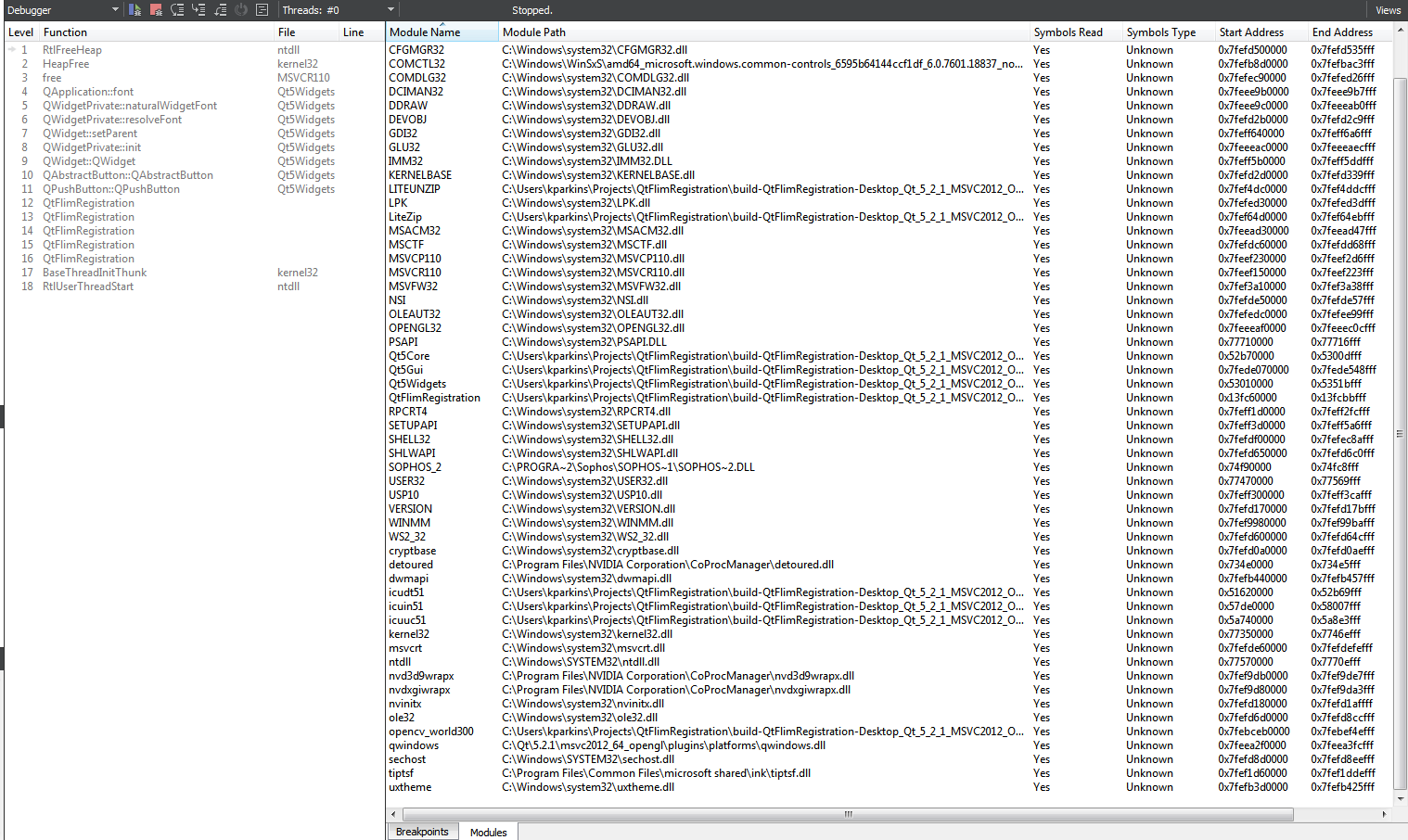
        0_1528295245959_FlimRegStackTrace.png

        Any ideas on why this is crashing here? When I run the code from the debugger (cdb), the same modules as listed above are loaded but it doesn't crash.

        raven-worxR 1 Reply Last reply
        0
        • K KRP1

          I ran dependency walker and was able to resolve all the dlls correctly. I ran windeployqt and copied the remaining non-standard dlls by hand (opencv and litezip).

          I had commented the ui setup code to show exactly where the program crashes but you may not have noticed because you have to scroll to see the comment.

          To drill down further, I ran the release version and attached to QtCreator when it crashed. Here is the stack trace and loaded module information:

          0_1528295245959_FlimRegStackTrace.png

          Any ideas on why this is crashing here? When I run the code from the debugger (cdb), the same modules as listed above are loaded but it doesn't crash.

          raven-worxR Offline
          raven-worxR Offline
          raven-worx
          Moderators
          wrote on last edited by
          #4

          @KRP1
          any special compiler flags you set in your .pro file?

          Otherwise try to delete the build directory and build it again

          --- SUPPORT REQUESTS VIA CHAT WILL BE IGNORED ---
          If you have a question please use the forum so others can benefit from the solution in the future

          1 Reply Last reply
          0
          • K Offline
            K Offline
            KRP1
            wrote on last edited by
            #5

            Compiler flags turns out to be the source of the problem, or rather a pragma I had for aligning a data structure generated from hardware.

            I had:

            #pragma pack(1)
            
            #include "hardware_struct.h"
            

            This was never reset. The fix.

            #pragma pack(push, 1)
            
            #include "hardware_struct.h"
            
            #pragma pack(pop)
            

            Thanks for your help.

            JonBJ 1 Reply Last reply
            0
            • K KRP1

              Compiler flags turns out to be the source of the problem, or rather a pragma I had for aligning a data structure generated from hardware.

              I had:

              #pragma pack(1)
              
              #include "hardware_struct.h"
              

              This was never reset. The fix.

              #pragma pack(push, 1)
              
              #include "hardware_struct.h"
              
              #pragma pack(pop)
              

              Thanks for your help.

              JonBJ Offline
              JonBJ Offline
              JonB
              wrote on last edited by
              #6

              @KRP1
              Lucky you didn't have other #includes with structs in that source file! And just as well you spotted it anyway :)

              1 Reply Last reply
              0

              • Login

              • Login or register to search.
              • First post
                Last post
              0
              • Categories
              • Recent
              • Tags
              • Popular
              • Users
              • Groups
              • Search
              • Get Qt Extensions
              • Unsolved