Unsolved Show events on the Calendar using QtQuick Controls 1.4?
-
I have customized the calendar based on the Calender in QtQuick 1.But I can't figure out how to add events on the calendar. The purpose is to add some rectangles to specific calendar cells when there is some schedule at that day.
What I have done is looks like this:

I want to add events like this:
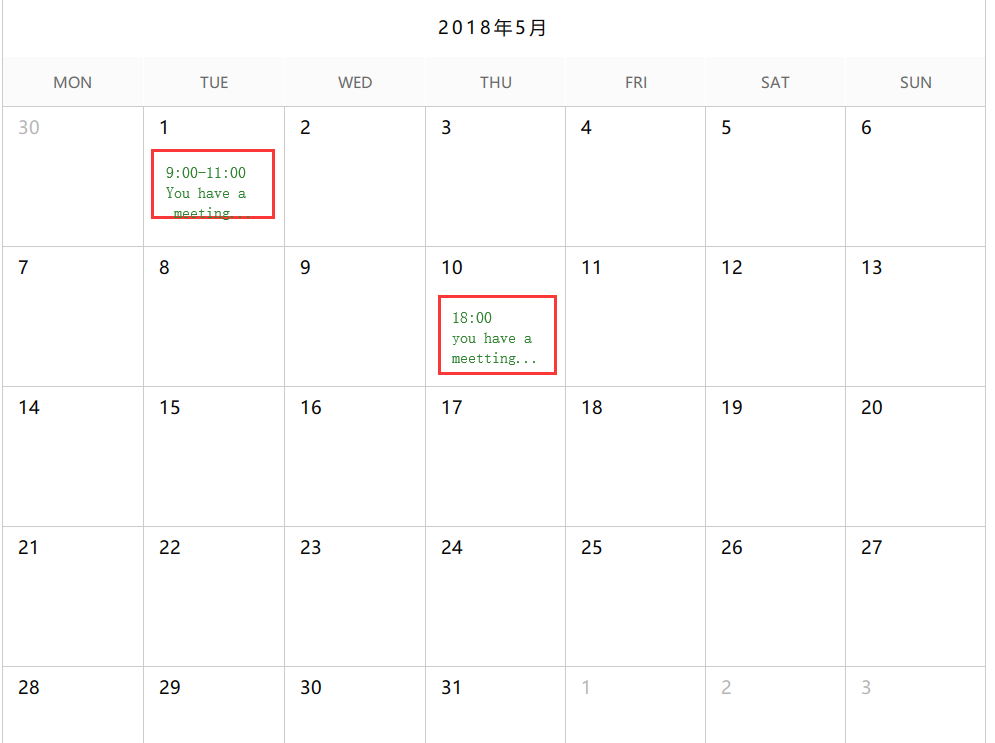
The events' data is considered to be get and update from remote server asynchronously, How can I achieve this?
here is the my current code. Thanks
import QtQuick 2.8
import QtQuick.Controls 2.1
import QtQuick.Window 2.0
import QtQuick.Layouts 1.1

import QtQuick.Controls 1.4 as QQC1
import QtQuick.Controls.Styles 1.4

ApplicationWindow {
width: 1024
height: 768
visible: true

Flickable {
    id: flickable
    width: parent.width
    height: parent.height
    contentHeight: calendar.height + calendar.anchors.topMargin*2
    clip: true
    boundsBehavior: Flickable.OvershootBounds
    ScrollBar.vertical: ScrollBar { }

    QQC1.Calendar {
        id:calendar
        width: parent.width-40
        anchors.top: parent.top
        anchors.topMargin: 17
        anchors.horizontalCenter: parent.horizontalCenter
        height: 140*6+49+60
        frameVisible: true
        minimumDate: new Date(2017, 0, 1)
        maximumDate: new Date(2099, 12, 31)

        style: CalendarStyle {
            gridVisible: true
            gridColor:"#ccc"

            dayDelegate: Rectangle {
                Text {
                    anchors.left: parent.left
                    anchors.leftMargin: 15
                    anchors.top:parent.top
                    anchors.topMargin: 8
                    color: "black"
                    opacity: styleData.visibleMonth ? 1:0.3
                    font.family: qsTr("微软雅黑")
                    font.pixelSize: 18
                    text: styleData.date.getDate()
                }
            }

            dayOfWeekDelegate: Rectangle{
                implicitHeight: 49
                //color: "#f9f9f9"

                color: "#fbfbfb"
                Text {
                    color: "#666"
                    font.family: qsTr("微软雅黑")
                    font.pixelSize: 15
                    anchors.centerIn: parent
                    text: {
                        switch(styleData.index){
                        case 0:
                            return "MON"
                        case 1:
                            return "TUE"
                        case 2:
                            return "WED"
                        case 3:
                            return "THU"
                        case 4:
                            return "FRI"
                        case 5:
                            return "SAT"
                        case 6:
                            return "SUN"
                        }
                    }
                }
            }

            navigationBar:Rectangle{
                width:calendar.width-2
                height: 60

                Text {
                    anchors.centerIn: parent
                    font.family: qsTr("微软雅黑")
                    font.pixelSize: 18
                    font.letterSpacing: 3
                    text:{
                        var month=calendar.selectedDate.getMonth()+1
                        return calendar.selectedDate.getFullYear()+"年"+month+"月";
                    }
                }
            }

        }

    }

}
}