Skip to content
  • Categories
  • Recent
  • Tags
  • Popular
  • Users
  • Groups
  • Search
  • Get Qt Extensions
  • Unsolved
Collapse
Brand Logo
  1. Home
  2. Qt Development
  3. General and Desktop
  4. Different behaviors of QDateEdit Widget on different PCs
Qt 6.11 is out! See what's new in the release blog

Different behaviors of QDateEdit Widget on different PCs

Scheduled Pinned Locked Moved Unsolved General and Desktop
3 Posts 2 Posters 794 Views
  • Oldest to Newest
  • Newest to Oldest
  • Most Votes
Reply
  • Reply as topic
Log in to reply
This topic has been deleted. Only users with topic management privileges can see it.
  • O Offline
    O Offline
    OmarAmin
    wrote on last edited by
    #1

    I'm using two identical QDateEdit widgets, they're used in the format MM/DD/YYYY, when I run the application, they work as expected, but when I generate the executable using pyinstaller, a weird behavior happens at the other PC I'm working on.
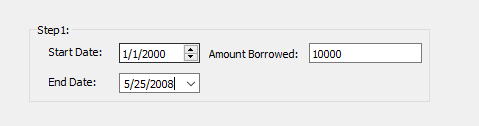
    0_1527342240817_65deb3c3-7fb2-405c-9bba-5a41246ac4f8-image.png

    Although, By default, QDateEdit prevents out of range dates.

    On the other PC, one of the QDateEdit widgets work with another format DD/MM/YYYY, and the other works as expected, I don't know where the problem might be, and any help would be great.
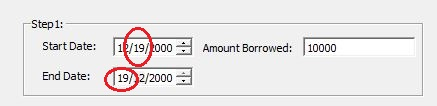
    0_1527342264198_eaffc2b7-1ab7-457f-8d28-a71ff9546e0c-image.png

    1 Reply Last reply
    0
    • Christian EhrlicherC Offline
      Christian EhrlicherC Offline
      Christian Ehrlicher
      Lifetime Qt Champion
      wrote on last edited by
      #2

      Without code it's hard to guess. I would create a simple test example which only consist of two dateedit to check if the behavior still exits. If not there must be something other wrong in your code.

      Qt Online Installer direct download: https://download.qt.io/official_releases/online_installers/
      Visit the Qt Academy at https://academy.qt.io/catalog

      1 Reply Last reply
      2
      • O Offline
        O Offline
        OmarAmin
        wrote on last edited by
        #3

        I've figured out the reason, one of the dateedit widgets was following the local date convention for the OS, but the other weren't.

        But I don't know how to make sure that on other PCs they won't follow OS convention.

        I did so by modifying displayformat for both widget to be M/d/yyyy in the qt designer instead of MM/dd/yyyy, But i think there must be another way as through this I don't know why this particular change made the widget not following the OS date display convention

        1 Reply Last reply
        0

        • Login

        • Login or register to search.
        • First post
          Last post
        0
        • Categories
        • Recent
        • Tags
        • Popular
        • Users
        • Groups
        • Search
        • Get Qt Extensions
        • Unsolved