Skip to content
  • Categories
  • Recent
  • Tags
  • Popular
  • Users
  • Groups
  • Search
  • Get Qt Extensions
  • Unsolved
Collapse
Brand Logo
  1. Home
  2. Qt Development
  3. QML and Qt Quick
  4. Trouble while changing color of rectangle in a Component
Qt 6.11 is out! See what's new in the release blog

Trouble while changing color of rectangle in a Component

Scheduled Pinned Locked Moved Solved QML and Qt Quick
3 Posts 2 Posters 738 Views
  • Oldest to Newest
  • Newest to Oldest
  • Most Votes
Reply
  • Reply as topic
Log in to reply
This topic has been deleted. Only users with topic management privileges can see it.
  • D Offline
    D Offline
    DavidM29
    wrote on last edited by DavidM29
    #1

    Hello,
    I'm new to QML and I'm trying to make a component wich is a Rectangle with 3 others smaller rectangles it look like that : 0_1527165199665_afc985c5-5509-4d75-9a65-ef8cc65e4f0a-image.png
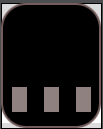
    For this component I have named the three rectangles rect1, rect2, rect3. I would like to change the rectX color depending on a value I give.
    For example when I send 2 I change the color of rect2 to red.

    From here I have a ui.qml and a .qml file I supposed this is normal.
    I supposed that the ui.qml is dedicated to UI only so I'm trying to make this function in the .qml file.

      signal changingState(int state)
    
        onChangingState: handlerChangingState(state)
    
        function handlerChangingState(state){
            switch(state){
            case 0:
                rect1.color: "grey";
                rect2.color: "grey";
                rect3.color: "grey";
                break;
            case 1:
                rect1.color: "red";
                rect2.color: "grey";
                rect3.color: "grey";
                break;
            case 2:
                rect1.color: "grey";
                rect2.color: "red";
                rect3.color: "grey";
                break;
            case 3:
                rect1.color: "grey";
                rect2.color: "grey";
                rect3.color: "red";
                break;
            }
        }


    But here my problem is that when I write rect1.color: "grey" I have this error :

    Expression statements should be assignments, calls or delete expressions only
    

    I don't really understand what is wrong with this code. Can you please help me. Maybe I'm totally wrong to make this kind of function in the .qml file please correct me If I am.

    Thank you

    ODБOïO 1 Reply Last reply
    0
    • D DavidM29

      Hello,
      I'm new to QML and I'm trying to make a component wich is a Rectangle with 3 others smaller rectangles it look like that : 0_1527165199665_afc985c5-5509-4d75-9a65-ef8cc65e4f0a-image.png
      For this component I have named the three rectangles rect1, rect2, rect3. I would like to change the rectX color depending on a value I give.
      For example when I send 2 I change the color of rect2 to red.

      From here I have a ui.qml and a .qml file I supposed this is normal.
      I supposed that the ui.qml is dedicated to UI only so I'm trying to make this function in the .qml file.

        signal changingState(int state)
      
          onChangingState: handlerChangingState(state)
      
          function handlerChangingState(state){
              switch(state){
              case 0:
                  rect1.color: "grey";
                  rect2.color: "grey";
                  rect3.color: "grey";
                  break;
              case 1:
                  rect1.color: "red";
                  rect2.color: "grey";
                  rect3.color: "grey";
                  break;
              case 2:
                  rect1.color: "grey";
                  rect2.color: "red";
                  rect3.color: "grey";
                  break;
              case 3:
                  rect1.color: "grey";
                  rect2.color: "grey";
                  rect3.color: "red";
                  break;
              }
          }


      But here my problem is that when I write rect1.color: "grey" I have this error :

      Expression statements should be assignments, calls or delete expressions only
      

      I don't really understand what is wrong with this code. Can you please help me. Maybe I'm totally wrong to make this kind of function in the .qml file please correct me If I am.

      Thank you

      ODБOïO Offline
      ODБOïO Offline
      ODБOï
      wrote on last edited by ODБOï
      #2

      @DavidM29 hello,

      In your handlerChangingState function you are using QML syntax :
      rect1.color : "grey"; // QML

      use js syntax :
      rect1.color = "grey"; // js

      and see if this is simpler solution for you :

      import QtQuick 2.0
      
      Rectangle {
      
          property int active : 0 
      
          Row{
              anchors.bottom: parent.bottom
                  height: parent.height/3
                  width:parent.width*0.8
                  anchors.horizontalCenter: parent.horizontalCenter
      
                  spacing: (width - (3*30)) / 2
              Rectangle{
                  width: 30
                  height: parent.height
                  color: active===1 ? "red" : "gray"
              }
              Rectangle{
                  width: 30
                  height: parent.height
                  color: active===2 ? "red" : "gray"
              }
              Rectangle{
                  width: 30
                  height: parent.height
                  color: active===3 ? "red" : "gray"
              }
          }
      
      }
      
      
      1 Reply Last reply
      3
      • D Offline
        D Offline
        DavidM29
        wrote on last edited by
        #3

        Thank you, it was simple...
        I take a look at your code

        1 Reply Last reply
        0

        • Login

        • Login or register to search.
        • First post
          Last post
        0
        • Categories
        • Recent
        • Tags
        • Popular
        • Users
        • Groups
        • Search
        • Get Qt Extensions
        • Unsolved