Skip to content
  • Categories
  • Recent
  • Tags
  • Popular
  • Users
  • Groups
  • Search
  • Get Qt Extensions
  • Unsolved
Collapse
Brand Logo
  1. Home
  2. Qt Development
  3. General and Desktop
  4. Change the spacing between the close button and the border
Forum Updated to NodeBB v4.3 + New Features

Change the spacing between the close button and the border

Scheduled Pinned Locked Moved Solved General and Desktop
6 Posts 3 Posters 1.6k Views 1 Watching
  • Oldest to Newest
  • Newest to Oldest
  • Most Votes
Reply
  • Reply as topic
Log in to reply
This topic has been deleted. Only users with topic management privileges can see it.
  • M Offline
    M Offline
    Mr Gisa
    wrote on last edited by Mr Gisa
    #1

    How to increase the spacing between the close button and the border of the tab?
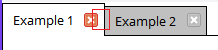
    0_1525158862894_4fe59b36-98e2-4880-a671-30bf2d62191c-image.png

    I'm using this example: https://gist.github.com/espdev/4f1565b18497a42d317cdf2531b7ef05

    But the close button is too close to the border of the tab for what I want to do, so I was wondering if it's possible to increase the spacing.

    JonBJ 1 Reply Last reply
    0
    • M Mr Gisa

      How to increase the spacing between the close button and the border of the tab?

      0_1525158862894_4fe59b36-98e2-4880-a671-30bf2d62191c-image.png

      I'm using this example: https://gist.github.com/espdev/4f1565b18497a42d317cdf2531b7ef05

      But the close button is too close to the border of the tab for what I want to do, so I was wondering if it's possible to increase the spacing.

      JonBJ Offline
      JonBJ Offline
      JonB
      wrote on last edited by
      #2

      @Mr-Gisa
      Dunno, but have you tried QTabBar::tab:right with margin-right or padding-right?

      1 Reply Last reply
      1
      • M Offline
        M Offline
        Mr Gisa
        wrote on last edited by
        #3

        @JonB said in Change the spacing between the close button and the border:

        TabBar::tab:right

        It doesn't work, unfortunately

        1 Reply Last reply
        0
        • M Offline
          M Offline
          Mr Gisa
          wrote on last edited by
          #4

          Anyone to help me with that?

          DiracsbracketD 1 Reply Last reply
          0
          • M Mr Gisa

            Anyone to help me with that?

            DiracsbracketD Offline
            DiracsbracketD Offline
            Diracsbracket
            wrote on last edited by Diracsbracket
            #5

            @Mr-Gisa said in Change the spacing between the close button and the border:

            Anyone to help me with that?

            This is apparently caused by the QTabBar::tab:top section of the stylesheet, which is really the only one relevant to your example: apparently, tab:right (and all the other orientations) does nothing because the right in there seems to refer to the tab location (at the top/bottom/left/right of the widget; in Qt Creator these are referred to North/South/West/East in the tabPosition property).

            If you remove the QTabBar::tab:top section altogether you get the original layout:
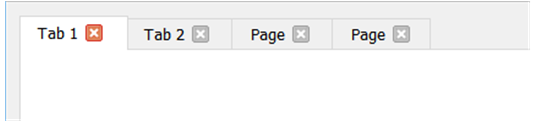
            0_1525359605357_40f3fdaa-0dfb-4413-ac0f-d71ff358f336-image.png

            The QTabBar::tab:top section as defined in the example css file, gives the small spacing you are unsatisfied with.

            This can be reproduced by the following minimal stylesheet:

                QString style = "\
                    QTabBar::tab:top {\
                        margin-right: -1px;\
                        padding: 5px 10px 5px 10px;\
                    }\
                    ";
            
                ui->tabWidget->setTabsClosable(true);
                ui->tabWidget->setStyleSheet(style);
            

            The result is:
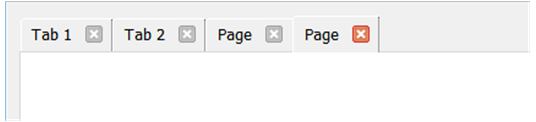
            0_1525359700900_94319133-0fa7-43d0-bb9b-18dffbf401eb-image.png

            If instead, I use:

                QString style = "\
                    QTabBar::tab:top {\
                        margin-right: -10px;\
                        margin-left: 10px;\
                        padding: 5px 20px 5px 20px;\
                    }\
                    QTabBar::tab:top:first {\
                        margin-left: 0px;\
                    }\
                    ";
            

            The result is like:
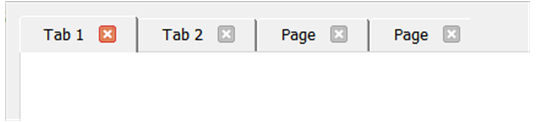
            0_1525361585298_5f245bc7-3831-4fe8-b162-548781a2c328-image.png

            So, playing with the settings in QTabBar::tab:top in addition to overriding certain of those settings for QTabBar::tab:top:first and/or QTabBar::tab:top:last (the first and last tabs), you can change the layout somewhat.

            1 Reply Last reply
            3
            • M Offline
              M Offline
              Mr Gisa
              wrote on last edited by
              #6

              Thank you very much. ♥

              1 Reply Last reply
              0

              • Login

              • Login or register to search.
              • First post
                Last post
              0
              • Categories
              • Recent
              • Tags
              • Popular
              • Users
              • Groups
              • Search
              • Get Qt Extensions
              • Unsolved