Unsolved The QLayer in Qt3D has an error, may be a bug
-
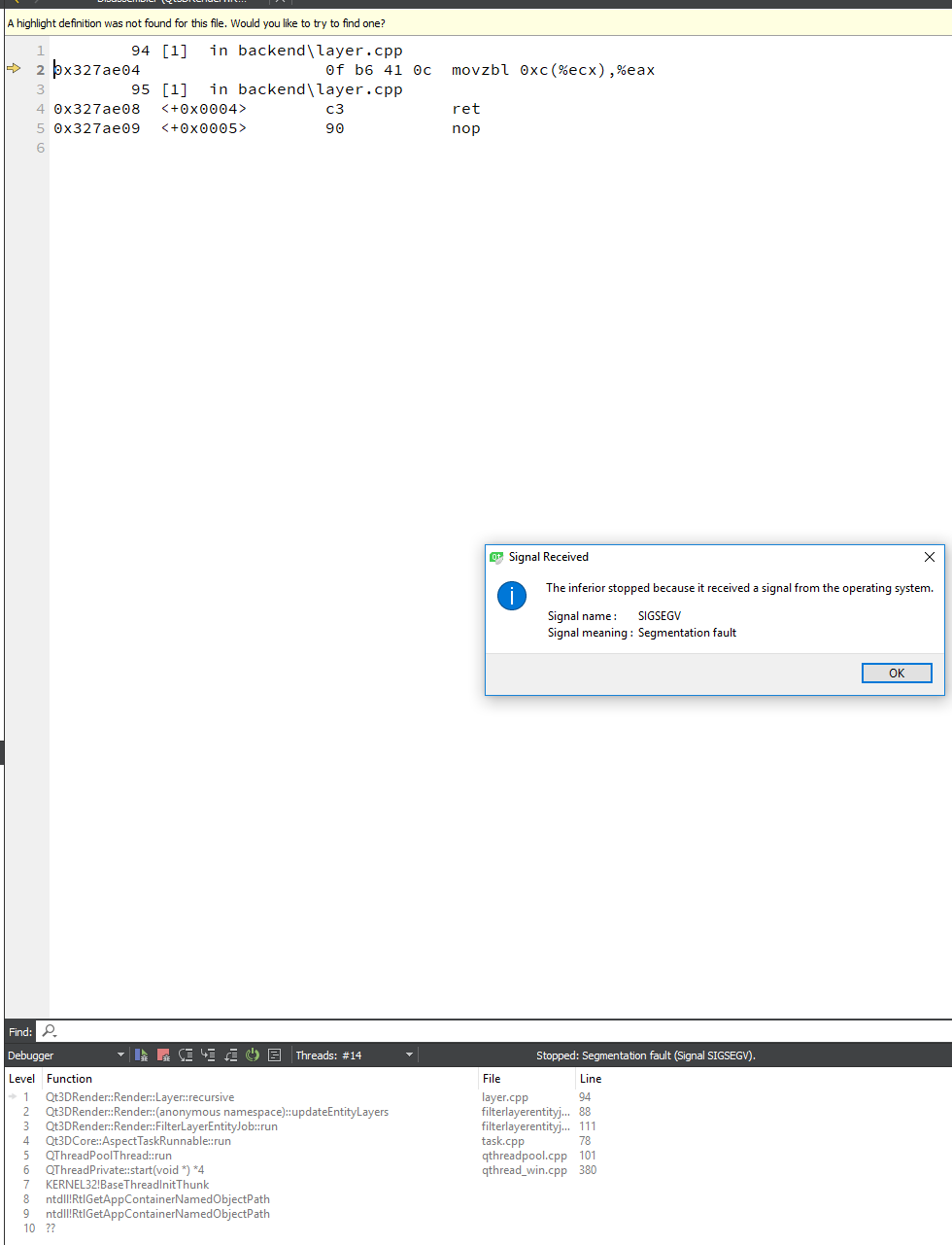
Please look at this picture. I have tried many times, but still cannot solve this problem.
-
Are you rendering from a secondary thread?
-
Hi VRonin,
Thanks for your reply. I didn't create any thread in my program.The following is the framegraph I made to show 4 viewports,
//Four viewports
//Framegraph top node
m_pSurfaceSelectorFourViewPorts = new Qt3DRender::QRenderSurfaceSelector();
m_pSurfaceSelectorFourViewPorts->setSurface(this);//Clear Buffer auto pClearBuffer = new Qt3DRender::QClearBuffers(m_pSurfaceSelectorFourViewPorts); auto PNoDraw = new Qt3DRender::QNoDraw(pClearBuffer); pClearBuffer->setBuffers(Qt3DRender::QClearBuffers::ColorDepthBuffer); pClearBuffer->setClearColor(QColor(95,105,115));//change the background color //View LeftUp auto pViewPortLeftUp = new Qt3DRender::QViewport(m_pSurfaceSelectorFourViewPorts); auto pCameraSelectorLeftUp = new Qt3DRender::QCameraSelector(pViewPortLeftUp); pViewPortLeftUp->setNormalizedRect(QRectF(0.0f,0.0f,0.5f,0.5f)); pCameraSelectorLeftUp->setCamera(m_pCameraLeftUp); //View RightUp, front view auto pViewPortRightUp = new Qt3DRender::QViewport(m_pSurfaceSelectorFourViewPorts); auto pCameraSelectorRightUp = new Qt3DRender::QCameraSelector(pViewPortRightUp); pViewPortRightUp->setNormalizedRect(QRectF(0.5f,0.0f,0.5f,0.5f)); pCameraSelectorRightUp->setCamera(m_pCameraRightUp); //View indicator viewport auto pViewPort_FourViewPorts_RightUpViewPort_ViewIndicator = new Qt3DRender::QViewport(m_pSurfaceSelectorFourViewPorts); auto pCameraSelector_FourViewPorts_RightUpViewPort_ViewIndicator = new Qt3DRender::QCameraSelector(pViewPort_FourViewPorts_RightUpViewPort_ViewIndicator); **auto pLayerFilter_FourViewPorts_RightUpViewPort_ViewIndicator = new Qt3DRender::QLayerFilter(pCameraSelector_FourViewPorts_RightUpViewPort_ViewIndicator);** pViewPort_FourViewPorts_RightUpViewPort_ViewIndicator->setNormalizedRect(QRectF(0.0f, 0.0f, 0.1f, 0.1f)); **pCameraSelector_FourViewPorts_RightUpViewPort_ViewIndicator->setCamera(m_pCameraRightUp); pLayerFilter_FourViewPorts_RightUpViewPort_ViewIndicator->addLayer(pLayerRightView);** //View LeftBottom auto pViewPortLeftBottom = new Qt3DRender::QViewport(m_pSurfaceSelectorFourViewPorts); auto pCameraSelectorLeftBottom = new Qt3DRender::QCameraSelector(pViewPortLeftBottom); pViewPortLeftBottom->setNormalizedRect(QRectF(0.0f,0.5f,0.5f,0.5f)); pCameraSelectorLeftBottom->setCamera(m_pCameraLeftBottom); //View RightBottom auto pViewPortRightBottom = new Qt3DRender::QViewport(m_pSurfaceSelectorFourViewPorts); auto pCameraSelectorRightBottom = new Qt3DRender::QCameraSelector(pViewPortRightBottom); pViewPortRightBottom->setNormalizedRect(QRectF(0.5f,0.5f,0.5f,0.5f)); pCameraSelectorRightBottom->setCamera(m_pCameraRightBottom);If I comment the two lines in bold, there will be no problem.
-
Hi VRonin,
My reply is considered as spam, so I put it in my google drive
https://drive.google.com/file/d/1USmQWEV-vnSDOezq1aTuIKmApOZJfPja/view?usp=sharingThanks for your help.
If you need, I can give you my source code.
