Skip to content
  • Categories
  • Recent
  • Tags
  • Popular
  • Users
  • Groups
  • Search
  • Get Qt Extensions
  • Unsolved
Collapse
Brand Logo
  1. Home
  2. Qt Development
  3. General and Desktop
  4. Client can't read
Forum Updated to NodeBB v4.3 + New Features

Client can't read

Scheduled Pinned Locked Moved Unsolved General and Desktop
7 Posts 2 Posters 1.4k Views 1 Watching
  • Oldest to Newest
  • Newest to Oldest
  • Most Votes
Reply
  • Reply as topic
Log in to reply
This topic has been deleted. Only users with topic management privileges can see it.
  • J Offline
    J Offline
    JadeN001
    wrote on last edited by JadeN001
    #1

    when I connect multiple client to the server , the client can't read the data I want it to read. So if I connect two clients , the first client goes to blocking mode and the second client works a bit properly.
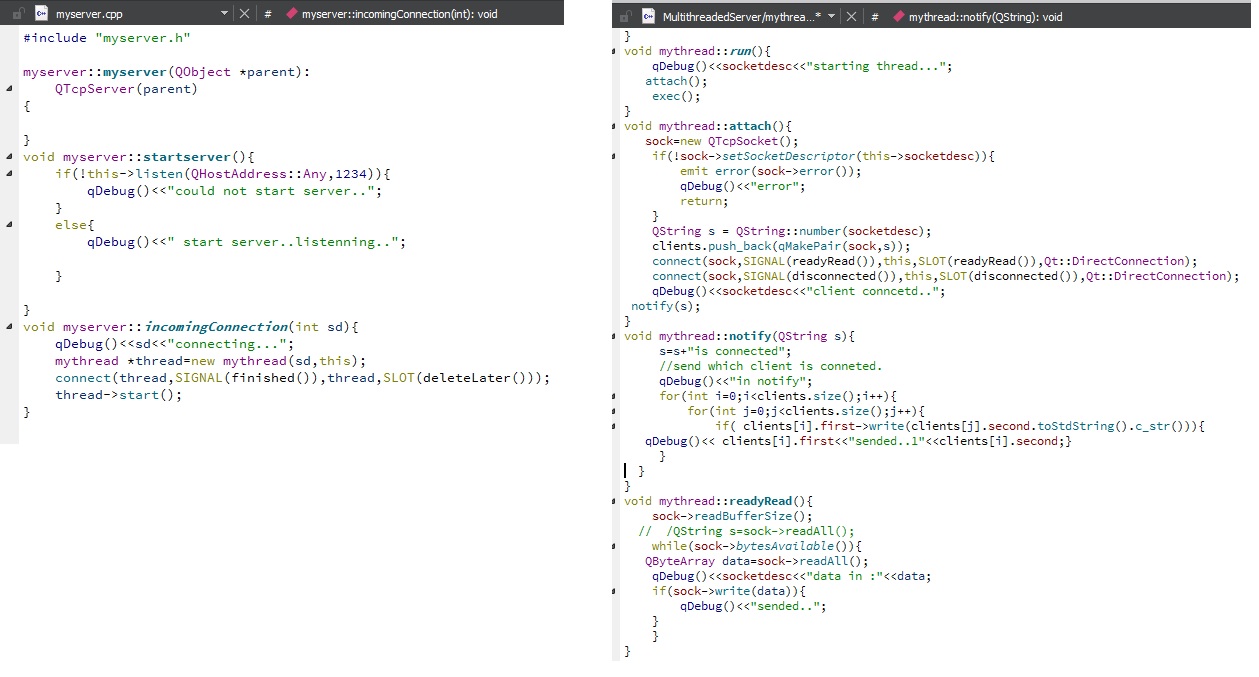
    client code:

    0_1523257929288_client.jpg
    server code:
    0_1523260611296_server.jpg

    client can't read the incoming data from server continuously.
    what should be done ?

    K 1 Reply Last reply
    0
    • J JadeN001

      when I connect multiple client to the server , the client can't read the data I want it to read. So if I connect two clients , the first client goes to blocking mode and the second client works a bit properly.
      client code:

      0_1523257929288_client.jpg
      server code:
      0_1523260611296_server.jpg

      client can't read the incoming data from server continuously.
      what should be done ?

      K Offline
      K Offline
      koahnig
      wrote on last edited by
      #2

      @JadeN001

      You need to show your code where you access your clients and also the server side.

      Vote the answer(s) that helped you to solve your issue(s)

      J 1 Reply Last reply
      2
      • K koahnig

        @JadeN001

        You need to show your code where you access your clients and also the server side.

        J Offline
        J Offline
        JadeN001
        wrote on last edited by
        #3

        @koahnig thank you
        I have uploaded client and servers code.

        K 1 Reply Last reply
        0
        • J JadeN001

          @koahnig thank you
          I have uploaded client and servers code.

          K Offline
          K Offline
          koahnig
          wrote on last edited by
          #4

          @JadeN001

          What is your actual problem? Please redescribe.

          At first I thought that you have problems with parallel reading. However, the end of your initial post reads a bit different.

          Looking at your code you anticipate to all at once. That is typically not possible, but for really small chunks. You will receive already a readyRead signal before all the data arrived. Therefore, when the signal trigegrs a slot routine, only a part has been received when the comms takes longer. Your readAll will beable to retrieve only what is available at that particular moment, since it does not have crystal ball and can know how much is all.
          Therefore, with socket comms you often need to make some reporting around. E.g. tell first how many bytes you send and possibly other stuff.

          Vote the answer(s) that helped you to solve your issue(s)

          J 1 Reply Last reply
          3
          • K koahnig

            @JadeN001

            What is your actual problem? Please redescribe.

            At first I thought that you have problems with parallel reading. However, the end of your initial post reads a bit different.

            Looking at your code you anticipate to all at once. That is typically not possible, but for really small chunks. You will receive already a readyRead signal before all the data arrived. Therefore, when the signal trigegrs a slot routine, only a part has been received when the comms takes longer. Your readAll will beable to retrieve only what is available at that particular moment, since it does not have crystal ball and can know how much is all.
            Therefore, with socket comms you often need to make some reporting around. E.g. tell first how many bytes you send and possibly other stuff.

            J Offline
            J Offline
            JadeN001
            wrote on last edited by JadeN001
            #5

            @koahnig I want my thread to work parallel with the main thread. in client code: I want my read function from thread and code which takes the userinput (after thread->start() command)to work at the same time without blocking one another.Current situation is that the read() function of thread doesn't work until it gets the user input.
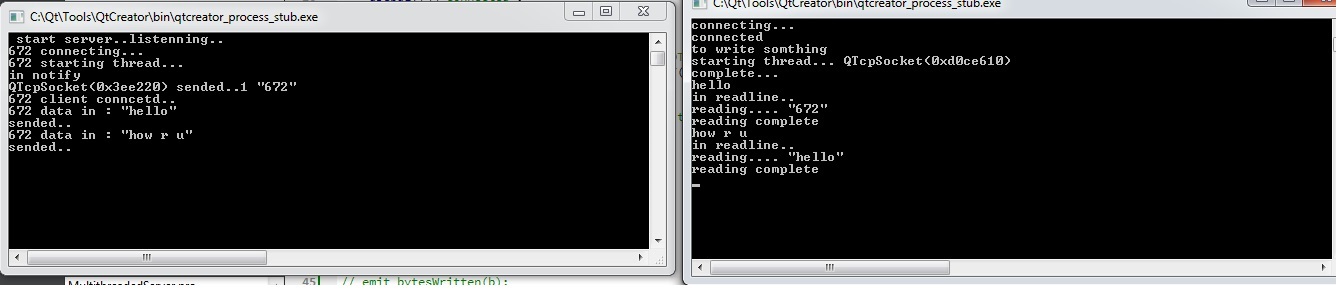
            here is output of this code: left side is SERVER and right side is CLIENT output
            0_1523269804964_output.jpg

            K 1 Reply Last reply
            0
            • J JadeN001

              @koahnig I want my thread to work parallel with the main thread. in client code: I want my read function from thread and code which takes the userinput (after thread->start() command)to work at the same time without blocking one another.Current situation is that the read() function of thread doesn't work until it gets the user input.
              here is output of this code: left side is SERVER and right side is CLIENT output
              0_1523269804964_output.jpg

              K Offline
              K Offline
              koahnig
              wrote on last edited by
              #6

              @JadeN001

              You should check the Network examples.Personally I like/used the Fortune Server and the Fortune Client examples. They give you a good starting point for experimenting.

              There is no need to have extra threading for your comms here. In most cases the implementations of TcpSocket and TcpServer handles this sufficiently. I have implemented a TcpServer redistribution of information retrieved from a Tcp Socket. In a test program I have used 2 Tcp servers and 2 tcp clients communicating criss-crossing and nothing was lost.

              The problem is probably the signal-slot handling in your app. Most likely nothing is blocked, but you do not receive another signal, since you are still in the slot routine.

              For instance the readyRead may be triggered with the first byte, when you are in the slot routine you can read already 10 byte, but there are still some bytes arriving until the functionality in the routine is finished. For longer incoming byte streams this is often not seen until the end, when a couple of bytes are missing.

              You can check bytesAvailable at the end of your routine and read teh rest when it is already in the buffer. However, beware that the is a danger with using bytesAvailable until nothing comes in anymore. For transmission with large amounts of data, you are actually blocking then.

              Once again have a look to the network examples. They give you already a lot of hints.

              Vote the answer(s) that helped you to solve your issue(s)

              J 1 Reply Last reply
              1
              • K koahnig

                @JadeN001

                You should check the Network examples.Personally I like/used the Fortune Server and the Fortune Client examples. They give you a good starting point for experimenting.

                There is no need to have extra threading for your comms here. In most cases the implementations of TcpSocket and TcpServer handles this sufficiently. I have implemented a TcpServer redistribution of information retrieved from a Tcp Socket. In a test program I have used 2 Tcp servers and 2 tcp clients communicating criss-crossing and nothing was lost.

                The problem is probably the signal-slot handling in your app. Most likely nothing is blocked, but you do not receive another signal, since you are still in the slot routine.

                For instance the readyRead may be triggered with the first byte, when you are in the slot routine you can read already 10 byte, but there are still some bytes arriving until the functionality in the routine is finished. For longer incoming byte streams this is often not seen until the end, when a couple of bytes are missing.

                You can check bytesAvailable at the end of your routine and read teh rest when it is already in the buffer. However, beware that the is a danger with using bytesAvailable until nothing comes in anymore. For transmission with large amounts of data, you are actually blocking then.

                Once again have a look to the network examples. They give you already a lot of hints.

                J Offline
                J Offline
                JadeN001
                wrote on last edited by
                #7

                @koahnig thank you..i will look into it...thanks again.

                1 Reply Last reply
                0

                • Login

                • Login or register to search.
                • First post
                  Last post
                0
                • Categories
                • Recent
                • Tags
                • Popular
                • Users
                • Groups
                • Search
                • Get Qt Extensions
                • Unsolved