Skip to content
  • Categories
  • Recent
  • Tags
  • Popular
  • Users
  • Groups
  • Search
  • Get Qt Extensions
  • Unsolved
Collapse
Brand Logo
  1. Home
  2. Qt Development
  3. General and Desktop
  4. Qt Inferior stopped because it triggered an exception
Forum Updated to NodeBB v4.3 + New Features

Qt Inferior stopped because it triggered an exception

Scheduled Pinned Locked Moved Unsolved General and Desktop
9 Posts 2 Posters 4.8k Views
  • Oldest to Newest
  • Newest to Oldest
  • Most Votes
Reply
  • Reply as topic
Log in to reply
This topic has been deleted. Only users with topic management privileges can see it.
  • M Offline
    M Offline
    magicstar
    wrote on last edited by
    #1
    This post is deleted!
    jsulmJ 1 Reply Last reply
    0
    • M magicstar

      This post is deleted!

      jsulmJ Offline
      jsulmJ Offline
      jsulm
      Lifetime Qt Champion
      wrote on last edited by
      #2

      @magicstar What is config?
      Do you have stack trace?

      https://forum.qt.io/topic/113070/qt-code-of-conduct

      M 1 Reply Last reply
      0
      • jsulmJ jsulm

        @magicstar What is config?
        Do you have stack trace?

        M Offline
        M Offline
        magicstar
        wrote on last edited by
        #3

        @jsulm
        Thanks for the reply.
        config is std::string variable. The value of it exactly same in VS and QT.
        May I please know what is stack trace? I am new to QT.

        jsulmJ 1 Reply Last reply
        0
        • M magicstar

          @jsulm
          Thanks for the reply.
          config is std::string variable. The value of it exactly same in VS and QT.
          May I please know what is stack trace? I am new to QT.

          jsulmJ Offline
          jsulmJ Offline
          jsulm
          Lifetime Qt Champion
          wrote on last edited by
          #4

          @magicstar Start you app with debugger in QtCreator (F5) and when it crashes you should have a stack trace

          https://forum.qt.io/topic/113070/qt-code-of-conduct

          M 1 Reply Last reply
          0
          • jsulmJ jsulm

            @magicstar Start you app with debugger in QtCreator (F5) and when it crashes you should have a stack trace

            M Offline
            M Offline
            magicstar
            wrote on last edited by
            #5

            @jsulm
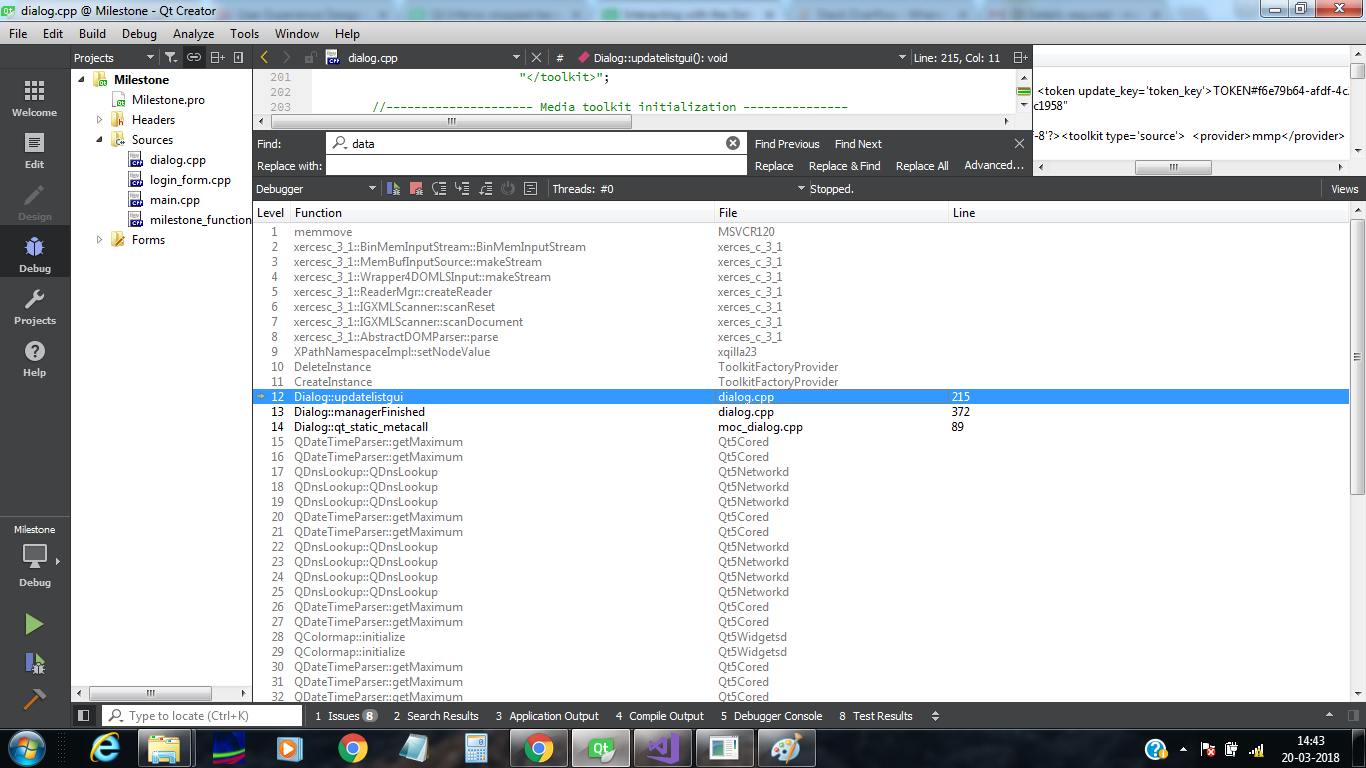
            0_1521535233827_stack_trace.png

            Here is the stack trace.

            jsulmJ 1 Reply Last reply
            0
            • M magicstar

              @jsulm
              0_1521535233827_stack_trace.png

              Here is the stack trace.

              jsulmJ Offline
              jsulmJ Offline
              jsulm
              Lifetime Qt Champion
              wrote on last edited by
              #6

              @magicstar this is not stack trace
              see http://doc.qt.io/qtcreator/creator-debug-mode.html

              https://forum.qt.io/topic/113070/qt-code-of-conduct

              M 1 Reply Last reply
              0
              • jsulmJ jsulm

                @magicstar this is not stack trace
                see http://doc.qt.io/qtcreator/creator-debug-mode.html

                M Offline
                M Offline
                magicstar
                wrote on last edited by
                #7

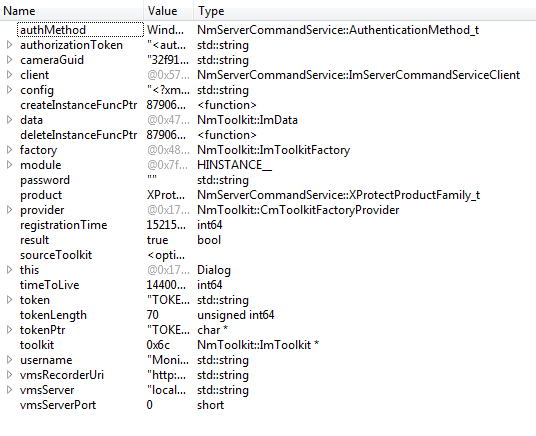
                @jsulm
                0_1521537614626_Untitled.png

                As the stack trace suggests, problem is indeed at

                ImToolkit *toolkit = factory->CreateInstance(config);
                
                jsulmJ 1 Reply Last reply
                0
                • M magicstar

                  @jsulm
                  0_1521537614626_Untitled.png

                  As the stack trace suggests, problem is indeed at

                  ImToolkit *toolkit = factory->CreateInstance(config);
                  
                  jsulmJ Offline
                  jsulmJ Offline
                  jsulm
                  Lifetime Qt Champion
                  wrote on last edited by
                  #8

                  @magicstar Why is there DeleteInstance just after CreateInstance?

                  https://forum.qt.io/topic/113070/qt-code-of-conduct

                  M 1 Reply Last reply
                  0
                  • jsulmJ jsulm

                    @magicstar Why is there DeleteInstance just after CreateInstance?

                    M Offline
                    M Offline
                    magicstar
                    wrote on last edited by magicstar
                    #9

                    @jsulm
                    There am just creating instance and actual deletion is happening at end of the code. Removing that line does not solve the issue.

                    I just realised, code is building and executing correctly in release mode. But, I still don't understand why is it not working in debug mode.

                    1 Reply Last reply
                    0

                    • Login

                    • Login or register to search.
                    • First post
                      Last post
                    0
                    • Categories
                    • Recent
                    • Tags
                    • Popular
                    • Users
                    • Groups
                    • Search
                    • Get Qt Extensions
                    • Unsolved