Skip to content
  • Categories
  • Recent
  • Tags
  • Popular
  • Users
  • Groups
  • Search
  • Get Qt Extensions
  • Unsolved
Collapse
Brand Logo
  1. Home
  2. Qt Development
  3. QML and Qt Quick
  4. why ToolButton have a tail
Forum Updated to NodeBB v4.3 + New Features

why ToolButton have a tail

Scheduled Pinned Locked Moved Unsolved QML and Qt Quick
3 Posts 2 Posters 783 Views
  • Oldest to Newest
  • Newest to Oldest
  • Most Votes
Reply
  • Reply as topic
Log in to reply
This topic has been deleted. Only users with topic management privileges can see it.
  • J Offline
    J Offline
    JoyBin
    wrote on last edited by
    #1

    Thank you for your patience to read my code !

    Here i want to put "Text"+"ToolButton" in a row, and make them recognizable with a line(a "Rectangle") between them.

    what shape of the "ToolButton" i want is a square, so i make the "Height" the same as the "Width".

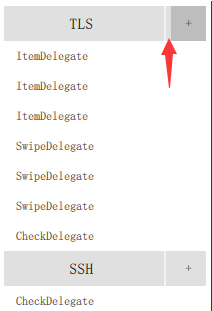
    At last, what i see is a "Rectangle" but not a "Square", and when i click the "ToolButton", the sink area of the "ToolButton" is a "Square" with deep color, at the same time, a light area appear at the right of the white parting line.

    So, what can i do to remove the tail ? And why it appear there ?

    win10 + Qt5.10

    Thanks for your help !

    import QtQuick 2.9
    import QtQuick.Controls 1.4
    import QtQuick.Controls 2.3
    import QtQuick.Controls 2.0 as MyCombo
    import QtQuick.Layouts 1.3
    import QtQuick.Controls.Material 2.1
    import QtQuick.Controls.Universal 2.1
    import Qt.labs.settings 1.0
    import QtQuick.Controls.Styles 1.4
    
            ListView {
                focus: true
                anchors.fill: parent
                anchors.margins: 5
                currentIndex: -1
                model: listModel
                delegate: listDelaget
    
                section.property: "type"
                section.delegate: Rectangle {
                    height: 35
                    width: parent.width
                    color: "#E0E0E0"
                    RowLayout {
                        anchors.fill: parent
                        Text {
                            text: section
                            Layout.fillWidth: true
                            Layout.fillHeight: true
                            font.pixelSize: 15
                            horizontalAlignment: Text.AlignHCenter
                            verticalAlignment: Text.AlignVCenter
                        }
                        Rectangle {
                            color: "white"
                            Layout.fillHeight: true
                            implicitWidth: 2
                            opacity: 0.6
                        }
                        ToolButton {//HERE NEED your help !
                            implicitHeight: parent.height
                            implicitWidth: parent.height
                            text: "+"
                        }
                    }
                }
            }
    
        ListModel {
            id: listModel
            ListElement { type: "TLS"; remarks: "ItemDelegate" }
            ListElement { type: "TLS"; remarks: "ItemDelegate" }
            ListElement { type: "TLS"; remarks: "ItemDelegate" }
            ListElement { type: "TLS"; remarks: "SwipeDelegate" }
            ListElement { type: "TLS"; remarks: "SwipeDelegate" }
            ListElement { type: "TLS"; remarks: "SwipeDelegate" }
            ListElement { type: "TLS"; remarks: "CheckDelegate" }
            ListElement { type: "SSH"; remarks: "CheckDelegate" }
            ListElement { type: "SSH"; remarks: "RadioDelegate" }
            ListElement { type: "SSH"; remarks: "RadioDelegate" }
            ListElement { type: "SSH"; remarks: "RadioDelegate" }
            ListElement { type: "SSH"; remarks: "SwitchDelegate" }
            ListElement { type: "SSH"; remarks: "SwitchDelegate" }
        }
    
        Component {
            id: listDelaget
            ItemDelegate {
                height: 30
                width: parent.width
                spacing: 30
                highlighted: ListView.isCurrentItem
                text: model.remarks
            }
        }
    
    J.HilkJ 1 Reply Last reply
    0
    • J Offline
      J Offline
      JoyBin
      wrote on last edited by
      #2

      here is the picture, the area as the arrow points to
      0_1521205451527_20180316210315.png

      1 Reply Last reply
      0
      • J JoyBin

        Thank you for your patience to read my code !

        Here i want to put "Text"+"ToolButton" in a row, and make them recognizable with a line(a "Rectangle") between them.

        what shape of the "ToolButton" i want is a square, so i make the "Height" the same as the "Width".

        At last, what i see is a "Rectangle" but not a "Square", and when i click the "ToolButton", the sink area of the "ToolButton" is a "Square" with deep color, at the same time, a light area appear at the right of the white parting line.

        So, what can i do to remove the tail ? And why it appear there ?

        win10 + Qt5.10

        Thanks for your help !

        import QtQuick 2.9
        import QtQuick.Controls 1.4
        import QtQuick.Controls 2.3
        import QtQuick.Controls 2.0 as MyCombo
        import QtQuick.Layouts 1.3
        import QtQuick.Controls.Material 2.1
        import QtQuick.Controls.Universal 2.1
        import Qt.labs.settings 1.0
        import QtQuick.Controls.Styles 1.4
        
                ListView {
                    focus: true
                    anchors.fill: parent
                    anchors.margins: 5
                    currentIndex: -1
                    model: listModel
                    delegate: listDelaget
        
                    section.property: "type"
                    section.delegate: Rectangle {
                        height: 35
                        width: parent.width
                        color: "#E0E0E0"
                        RowLayout {
                            anchors.fill: parent
                            Text {
                                text: section
                                Layout.fillWidth: true
                                Layout.fillHeight: true
                                font.pixelSize: 15
                                horizontalAlignment: Text.AlignHCenter
                                verticalAlignment: Text.AlignVCenter
                            }
                            Rectangle {
                                color: "white"
                                Layout.fillHeight: true
                                implicitWidth: 2
                                opacity: 0.6
                            }
                            ToolButton {//HERE NEED your help !
                                implicitHeight: parent.height
                                implicitWidth: parent.height
                                text: "+"
                            }
                        }
                    }
                }
        
            ListModel {
                id: listModel
                ListElement { type: "TLS"; remarks: "ItemDelegate" }
                ListElement { type: "TLS"; remarks: "ItemDelegate" }
                ListElement { type: "TLS"; remarks: "ItemDelegate" }
                ListElement { type: "TLS"; remarks: "SwipeDelegate" }
                ListElement { type: "TLS"; remarks: "SwipeDelegate" }
                ListElement { type: "TLS"; remarks: "SwipeDelegate" }
                ListElement { type: "TLS"; remarks: "CheckDelegate" }
                ListElement { type: "SSH"; remarks: "CheckDelegate" }
                ListElement { type: "SSH"; remarks: "RadioDelegate" }
                ListElement { type: "SSH"; remarks: "RadioDelegate" }
                ListElement { type: "SSH"; remarks: "RadioDelegate" }
                ListElement { type: "SSH"; remarks: "SwitchDelegate" }
                ListElement { type: "SSH"; remarks: "SwitchDelegate" }
            }
        
            Component {
                id: listDelaget
                ItemDelegate {
                    height: 30
                    width: parent.width
                    spacing: 30
                    highlighted: ListView.isCurrentItem
                    text: model.remarks
                }
            }
        
        J.HilkJ Online
        J.HilkJ Online
        J.Hilk
        Moderators
        wrote on last edited by
        #3

        Hi @JoyBin,

        try the folloqing:

                         RowLayout {
                              id:rowLayout
                             anchors.fill: parent
                             Text {
                                 text: section
                                 Layout.fillWidth: true
                                 Layout.fillHeight: true
                                 font.pixelSize: 15
                                 horizontalAlignment: Text.AlignHCenter
                                 verticalAlignment: Text.AlignVCenter
                             }
                             Rectangle {
                                 color: "white"
                                 Layout.fillHeight: true
                                 implicitWidth: 2
                                 opacity: 0.6
                             }
                             Item{
                                 implicitHeight: parent.height
                                 implicitWidth: parent.height
                                 ToolButton {
                                     height: rowLayout.height
                                     width: rowLayout.height
                                     anchors.centerIn: parent
                                     text: "+"
                                }
                          }
                         }
        

        Be aware of the Qt Code of Conduct, when posting : https://forum.qt.io/topic/113070/qt-code-of-conduct


        Q: What's that?
        A: It's blue light.
        Q: What does it do?
        A: It turns blue.

        1 Reply Last reply
        0

        • Login

        • Login or register to search.
        • First post
          Last post
        0
        • Categories
        • Recent
        • Tags
        • Popular
        • Users
        • Groups
        • Search
        • Get Qt Extensions
        • Unsolved