Skip to content
  • Categories
  • Recent
  • Tags
  • Popular
  • Users
  • Groups
  • Search
  • Get Qt Extensions
  • Unsolved
Collapse
Brand Logo
  1. Home
  2. Qt Development
  3. General and Desktop
  4. Setting Qwidget to view

Setting Qwidget to view

Scheduled Pinned Locked Moved Unsolved General and Desktop
11 Posts 2 Posters 1.1k Views 2 Watching
  • Oldest to Newest
  • Newest to Oldest
  • Most Votes
Reply
  • Reply as topic
Log in to reply
This topic has been deleted. Only users with topic management privileges can see it.
  • T Offline
    T Offline
    Tendy
    wrote on last edited by Tendy
    #1

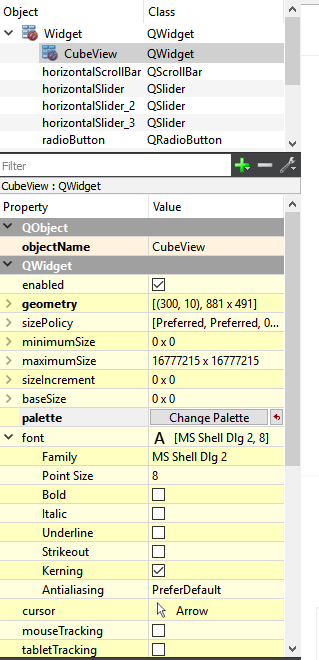
    So right now I have a container in my ui design name CubeView https://gyazo.com/8b565295a2c34c00280c769ca7e7c8c) and I'm currently trying to set it to a Qt3DExtras::Qt3DWindow that should have a background of gray. I'm trying to do this by
    w.findChild<QWidget*>("CubeView")->QWidget::createWindowContainer(view);
    but it doesn't seem to be working, If anyone could thing of the proper way of doing this it would be an immense help. Thanks

    K 1 Reply Last reply
    0
    • T Tendy

      So right now I have a container in my ui design name CubeView https://gyazo.com/8b565295a2c34c00280c769ca7e7c8c) and I'm currently trying to set it to a Qt3DExtras::Qt3DWindow that should have a background of gray. I'm trying to do this by
      w.findChild<QWidget*>("CubeView")->QWidget::createWindowContainer(view);
      but it doesn't seem to be working, If anyone could thing of the proper way of doing this it would be an immense help. Thanks

      K Offline
      K Offline
      kenchan
      wrote on last edited by
      #2

      @Tendy Your image is not visible?
      Which version of Qt?
      Which OS?
      Which toolchain are you using?
      Can you post a MWC sample to show how you are currently doing it?

      1 Reply Last reply
      0
      • T Offline
        T Offline
        Tendy
        wrote on last edited by
        #3

        Im using 5.10 on windows 10, with MSVC2017_64bit Here the link for the image @kenchan https://i.gyazo.com/8b565295a2c34c00280c769ca7e7c8ca.png

        1 Reply Last reply
        0
        • T Offline
          T Offline
          Tendy
          wrote on last edited by
          #4

          Here what I have so far. https://pastebin.com/i7nXKA0b. I'm just getting into Qt this week but i have prior c++ experience. From what I'm reading is that inside that CubeView container I might have to create a widget inside that but it seem redundant.

          K 2 Replies Last reply
          0
          • T Tendy

            Here what I have so far. https://pastebin.com/i7nXKA0b. I'm just getting into Qt this week but i have prior c++ experience. From what I'm reading is that inside that CubeView container I might have to create a widget inside that but it seem redundant.

            K Offline
            K Offline
            kenchan
            wrote on last edited by
            #5

            @Tendy said in Setting Qwidget to view:

            https://pastebin.com/i7nXKA0b

            OK thanks, can you please show your .pro file and the headers section of the cpp file?

            1 Reply Last reply
            0
            • T Tendy

              Here what I have so far. https://pastebin.com/i7nXKA0b. I'm just getting into Qt this week but i have prior c++ experience. From what I'm reading is that inside that CubeView container I might have to create a widget inside that but it seem redundant.

              K Offline
              K Offline
              kenchan
              wrote on last edited by kenchan
              #6

              @Tendy A question, where are you setting the name "CubeView" on the QWidget w in the first place?

              1 Reply Last reply
              0
              • T Offline
                T Offline
                Tendy
                wrote on last edited by
                #7

                Cube view is being set in the .ui file. Here the top of the main.cpp file
                https://pastebin.com/12nGgSDx
                and here's widget.cpp
                https://pastebin.com/D6rZE1ch And widget.h
                https://pastebin.com/Tma9vHvt

                K 1 Reply Last reply
                0
                • T Tendy

                  Cube view is being set in the .ui file. Here the top of the main.cpp file
                  https://pastebin.com/12nGgSDx
                  and here's widget.cpp
                  https://pastebin.com/D6rZE1ch And widget.h
                  https://pastebin.com/Tma9vHvt

                  K Offline
                  K Offline
                  kenchan
                  wrote on last edited by
                  #8

                  @Tendy
                  and is that widget just a simple widget?
                  BTW can I assume you have read all the docs for the 3dExtras? http://doc.qt.io/qt-5/qt3dextras-module.html

                  1 Reply Last reply
                  0
                  • T Offline
                    T Offline
                    Tendy
                    wrote on last edited by
                    #9

                    Along with my ui file https://pastebin.com/82ndTT0t

                    1 Reply Last reply
                    0
                    • T Offline
                      T Offline
                      Tendy
                      wrote on last edited by
                      #10

                      Just a widget I believe @kenchan and yes I've read the doc on it and the update on the createwindowcontainer

                      K 1 Reply Last reply
                      0
                      • T Tendy

                        Just a widget I believe @kenchan and yes I've read the doc on it and the update on the createwindowcontainer

                        K Offline
                        K Offline
                        kenchan
                        wrote on last edited by kenchan
                        #11

                        @Tendy
                        You are right about it not working the way you are doing it but it seems to work if you do something like this...

                            Qt3DExtras::Qt3DWindow *view = new Qt3DExtras::Qt3DWindow();
                            view->defaultFrameGraph()->setClearColor(QColor(255,0,0));
                            QWidget * viewcontainer = QWidget::createWindowContainer(view);
                            viewcontainer->setGeometry(container->geometry());
                            container->deleteLater();
                            viewcontainer->setParent(&w);
                        

                        and this works

                            QWidget *container = (QWidget*)w.findChild<QWidget*>("CubeView");
                            QSize csize = container->size();
                            QPoint cpos = container->pos();
                            container = QWidget::createWindowContainer(view);
                            container->setParent(0);
                            container->setParent(&w);
                            container->move(cpos);
                            container->resize(csize);


                        Basically you must reparent the widget or give it a new widget after you do the creatWindowContainer thing. Also it is better to use a layout for you widgets then you can resize them all easier.
                        It is a bit of a hack and I don't know why it does not work the way you want to do it. Maybe someone else can tell us the answer to that :-)
                        1 Reply Last reply
                        1

                        • Login

                        • Login or register to search.
                        • First post
                          Last post
                        0
                        • Categories
                        • Recent
                        • Tags
                        • Popular
                        • Users
                        • Groups
                        • Search
                        • Get Qt Extensions
                        • Unsolved