Skip to content
  • Categories
  • Recent
  • Tags
  • Popular
  • Users
  • Groups
  • Search
  • Get Qt Extensions
  • Unsolved
Collapse
Brand Logo
  1. Home
  2. Qt Development
  3. QML and Qt Quick
  4. Entity or other in ApllicationWindow

Entity or other in ApllicationWindow

Scheduled Pinned Locked Moved Unsolved QML and Qt Quick
3 Posts 2 Posters 732 Views 1 Watching
  • Oldest to Newest
  • Newest to Oldest
  • Most Votes
Reply
  • Reply as topic
Log in to reply
This topic has been deleted. Only users with topic management privileges can see it.
  • Nio74N Offline
    Nio74N Offline
    Nio74
    wrote on last edited by
    #1

    Hello I'm trying to figure out how to show in the applicationwindow an entity with a mesh, first I do not know if you can do I find nothing on the documentation, could you help me or show me the right path? Thank you

    import QtQuick.Controls 1.4
    import QtQuick 2.2 as QQ2
    import Qt3D.Core 2.0
    import Qt3D.Render 2.0
    import Qt3D.Input 2.0
    import Qt3D.Extras 2.0
    
    ApplicationWindow {
        id: window
        visible: true
    
        menuBar: MenuBar {
                Menu {
                    title: "File"
                    MenuItem { text: "OpenFile" }
                    MenuItem { text: "Close" }
                }
    
                Menu {
                    title: "Edit"
                    MenuItem { text: "Cut" }
                    MenuItem { text: "Copy" }
                    MenuItem { text: "Paste" }
                }
    
    
    }
        Entity{
            id: entityMesh
            ancor://?????
    
    
        }
    }
    
    
    1 Reply Last reply
    0
    • H Offline
      H Offline
      HappyFeet
      wrote on last edited by
      #2

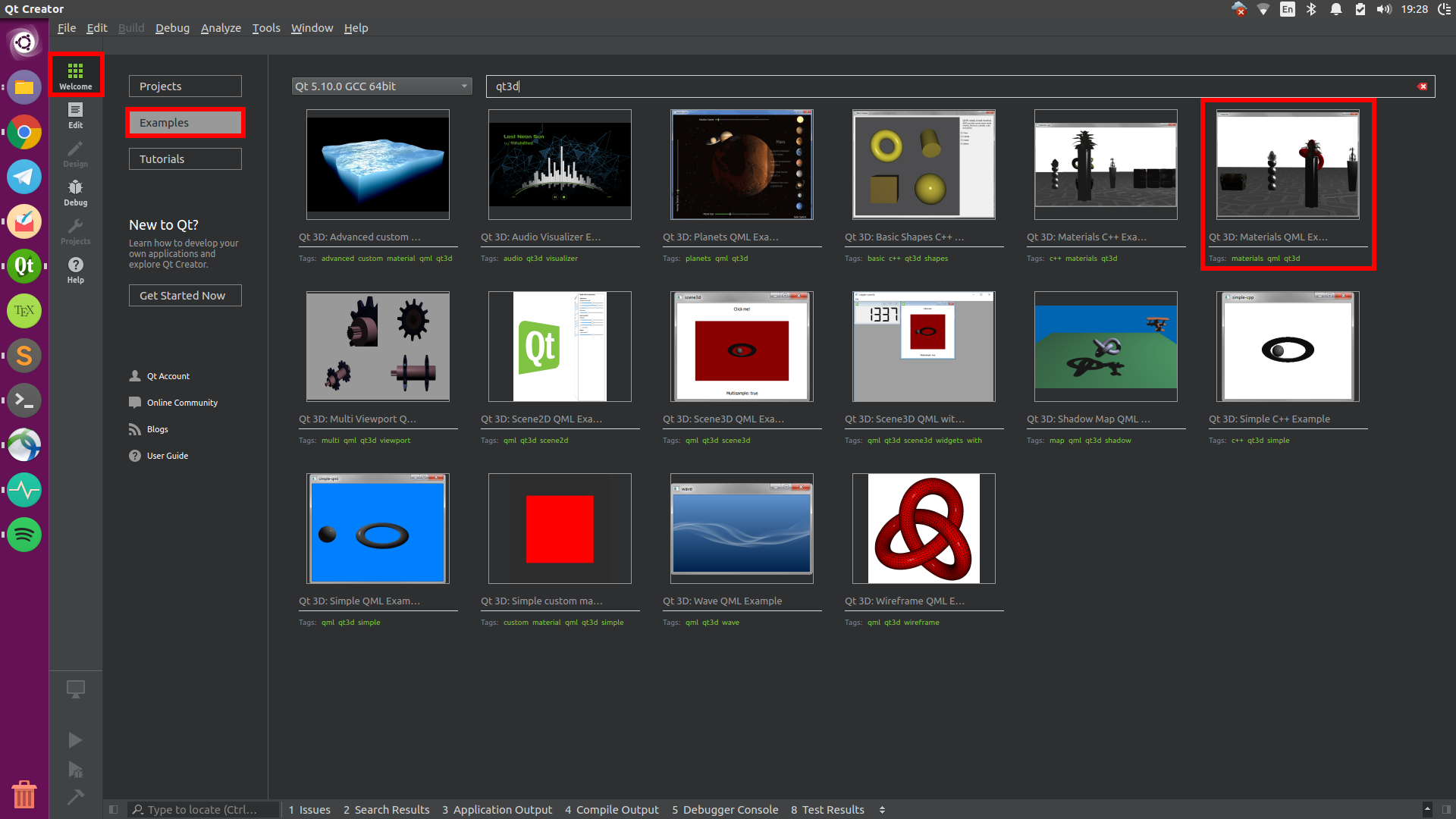
      There are examples on how to use Qt3D included in QtCreator. When you start QtCreator the topmost entry in the left views list (where Edit, Debug, etc. is) says Welcome. In there click on examples and search for 3D. There is for example the Qt3D Materials QML example. This should get you started.0_1517596292694_Screenshot from 2018-02-02 19-28-10.png

      1 Reply Last reply
      0
      • Nio74N Offline
        Nio74N Offline
        Nio74
        wrote on last edited by
        #3

        Good morning I understand where to start, but I wanted to put the classic menu File-> OpenFile but I can not figure out how to integrate it in the window.

        I would like to put the menuBar in this project as you would do?

        alt text

        1 Reply Last reply
        0

        • Login

        • Login or register to search.
        • First post
          Last post
        0
        • Categories
        • Recent
        • Tags
        • Popular
        • Users
        • Groups
        • Search
        • Get Qt Extensions
        • Unsolved