Skip to content
  • Categories
  • Recent
  • Tags
  • Popular
  • Users
  • Groups
  • Search
  • Get Qt Extensions
  • Unsolved
Collapse
Brand Logo
  1. Home
  2. Qt Development
  3. General and Desktop
  4. White screen not responding with GeForce 940 MX + Intel HD Graphics 620 (Integrated)
Forum Updated to NodeBB v4.3 + New Features

White screen not responding with GeForce 940 MX + Intel HD Graphics 620 (Integrated)

Scheduled Pinned Locked Moved Unsolved General and Desktop
8 Posts 4 Posters 2.1k Views 4 Watching
  • Oldest to Newest
  • Newest to Oldest
  • Most Votes
Reply
  • Reply as topic
Log in to reply
This topic has been deleted. Only users with topic management privileges can see it.
  • G Offline
    G Offline
    Geucimar
    wrote on last edited by
    #1

    Hi guys,

    I have a Dell Inspiron 14 7000 (7460) Series Laptop with Intel HD Graphics 620 (Integrated) + GeForce 940 MX, and I'm developing a QT GPU/OpenGL application, but I cannot run my software in GeForce 940 MX because it is freezing. I receive a white screen and not responding message. The freezing occurs with Automatic Driver Selection and Forced mode. I'm lost and don't know where to find a solution.

    What can I do? What is happening? Could someone help me?

    1 Reply Last reply
    0
    • SGaistS Offline
      SGaistS Offline
      SGaist
      Lifetime Qt Champion
      wrote on last edited by
      #2

      Hi and welcome to devnet,

      You should check the driver version for your NVIDIA card and either update it if too old or downgrade it if latest.

      Interested in AI ? www.idiap.ch
      Please read the Qt Code of Conduct - https://forum.qt.io/topic/113070/qt-code-of-conduct

      1 Reply Last reply
      1
      • G Offline
        G Offline
        Geucimar
        wrote on last edited by
        #3

        I've tried a lot of driver combination, but all are unsuccessful. I used original Dell's drive, NVidia's driver but no one work. Today, I tried run OpenGL Window Example and the not responding message came.

        1 Reply Last reply
        0
        • 6thC6 Offline
          6thC6 Offline
          6thC
          wrote on last edited by
          #4

          RE: Intel drivers, I've had to drop back to driver version, I'm using a HD Graphics 530:
          21.20.16.4590 WHQL / Win1064

          I started to tell Intel: https://communities.intel.com/message/504343#504343 - just haven't had the time to spend a day messing with drivers.

          1 Reply Last reply
          0
          • SGaistS Offline
            SGaistS Offline
            SGaist
            Lifetime Qt Champion
            wrote on last edited by
            #5

            By the way, which version of Qt are you using ?

            Interested in AI ? www.idiap.ch
            Please read the Qt Code of Conduct - https://forum.qt.io/topic/113070/qt-code-of-conduct

            1 Reply Last reply
            0
            • G Offline
              G Offline
              Geucimar
              wrote on last edited by Geucimar
              #6

              @6thC I've tried downgrade to the minimum version of Intel's video driver to Windows 10 but until now the freezing continues. Thank you.

              @SGaist I'm using Qt 5.9.2 and using this example to test my cards: https://github.com/TReed0803/QtOpenGL/tree/tutorial-series/6_GPUProfiler
              When I run in Intel card the code compile and run perfectly, but not in Geforce.

              Bellow my GPUs data:
              0_1510147183193_c8ff4042-c224-493a-bc78-9a85b732e6f4-image.png

              1 Reply Last reply
              0
              • G Offline
                G Offline
                Geucimar
                wrote on last edited by Geucimar
                #7

                This example is running in Intel HD Graphics 620:
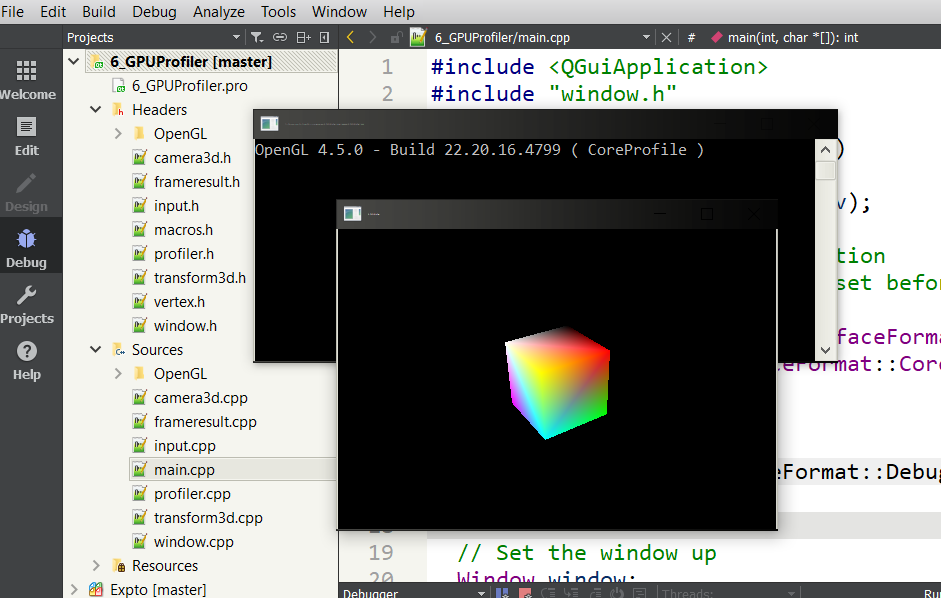
                0_1510147767288_d62ddf08-2d12-43bf-92d5-115b86630e1a-image.png

                The white screen occurs when I try to run on Geforce GPU:
                0_1510147996025_0c19050d-c34b-4f8a-8f6c-9b6dcffda4be-image.png

                How could I debug this Qt + OpenGL combination?

                1 Reply Last reply
                0
                • L Offline
                  L Offline
                  luvini
                  wrote on last edited by luvini
                  #8

                  i see this same issue with the game Second Life, however it will only happen in Window mode, the problem doesn't happen in Fullscreen

                  • on Geforce graphics card
                    -window mode: White screen
                    -Fullscreen mode: Functional window

                  • on Intel integrated graphics
                    -Window mode: Functional window
                    -Fullscreen mode: Functional window

                  the problem only happens if being rendered by the Geforce graphics card on window mode on some applications, as other games and applications are not affected

                  also, if the creen is not at the recomended resolution, it may randonly go fully blank

                  1 Reply Last reply
                  0

                  • Login

                  • Login or register to search.
                  • First post
                    Last post
                  0
                  • Categories
                  • Recent
                  • Tags
                  • Popular
                  • Users
                  • Groups
                  • Search
                  • Get Qt Extensions
                  • Unsolved