Skip to content
  • Categories
  • Recent
  • Tags
  • Popular
  • Users
  • Groups
  • Search
  • Get Qt Extensions
  • Unsolved
Collapse
Brand Logo
  1. Home
  2. Qt Development
  3. General and Desktop
  4. Centering Qlabel on screen
Forum Updated to NodeBB v4.3 + New Features

Centering Qlabel on screen

Scheduled Pinned Locked Moved Solved General and Desktop
31 Posts 7 Posters 14.6k Views 3 Watching
  • Oldest to Newest
  • Newest to Oldest
  • Most Votes
Reply
  • Reply as topic
Log in to reply
This topic has been deleted. Only users with topic management privileges can see it.
  • G Offline
    G Offline
    gabor53
    wrote on last edited by
    #1

    Hi,
    I have the following code:

      QMovie* movie = new QMovie(":/images/ajax-loader.gif");
    
      if(!movie->isValid ()) {
        qDebug() << "Movie doesn't work.";
      } else {
        QLabel* label = new QLabel(this);
        label->setGeometry (66, 66, 66, 66);
        label->setMovie (movie);
        movie->start ();
        label->show ();
      }


    How can I center the QLabel on the screen?
    Thank you.

    JKSHJ 2 Replies Last reply
    0
    • J Offline
      J Offline
      Johnson
      wrote on last edited by
      #2

      you can use QHBoxLayout

      G 1 Reply Last reply
      0
      • G gabor53

        Hi,
        I have the following code:

          QMovie* movie = new QMovie(":/images/ajax-loader.gif");
        
          if(!movie->isValid ()) {
            qDebug() << "Movie doesn't work.";
          } else {
            QLabel* label = new QLabel(this);
            label->setGeometry (66, 66, 66, 66);
            label->setMovie (movie);
            movie->start ();
            label->show ();
          }


        How can I center the QLabel on the screen?
        Thank you.

        JKSHJ Offline
        JKSHJ Offline
        JKSH
        Moderators
        wrote on last edited by
        #3

        @gabor53 said in Centering Qlabel on screen:

        How can I center the QLabel on the screen?

        1. Call QApplication::desktop()->screenGeometry() or QApplication::desktop()->availableGeometry() to find the screen dimensions.
        2. Use this information to calculate the center position for your QLabel.
        3. Call label->setGeometry() with your calculated position.

        See http://doc.qt.io/qt-5/qdesktopwidget.html for more details on QDesktopWidget.

        Qt Doc Search for browsers: forum.qt.io/topic/35616/web-browser-extension-for-improved-doc-searches

        G 1 Reply Last reply
        2
        • J Johnson

          you can use QHBoxLayout

          G Offline
          G Offline
          gabor53
          wrote on last edited by
          #4

          @Johnson
          Hi,
          Now I have this:

            QLabel* label = new QLabel(this);
            QHBoxLayout* layout = new QHBoxLayout(this);
            layout->setSpacing (0);
            layout->setContentsMargins (0, 0, 0, 0);
            layout->addWidget (label);
            QMovie* movie = new QMovie(":/images/ajax-loader.gif");
          
            if(!movie->isValid ()) {
              qDebug() << "Movie doesn't work.";
            } else {
          
              label->setGeometry (66, 66, 66, 66);
              label->setMovie (movie);
              movie->start ();
              label->show ();
            }
          

          No error message, but the image is not centered. Any suggestions what's wrong? Thank you.

          1 Reply Last reply
          0
          • JKSHJ JKSH

            @gabor53 said in Centering Qlabel on screen:

            How can I center the QLabel on the screen?

            1. Call QApplication::desktop()->screenGeometry() or QApplication::desktop()->availableGeometry() to find the screen dimensions.
            2. Use this information to calculate the center position for your QLabel.
            3. Call label->setGeometry() with your calculated position.

            See http://doc.qt.io/qt-5/qdesktopwidget.html for more details on QDesktopWidget.

            G Offline
            G Offline
            gabor53
            wrote on last edited by gabor53
            #5

            @JKSH
            Thank you.
            I tried this:

              QRect screenGeometry = QApplication::desktop ()->screenGeometry ();
              int x = (screenGeometry.width () - label->width ()) / 2;
              int y = (screenGeometry.height () - label->height ()) / 2;
            
              qDebug() << "Screen width: " << screenGeometry.width ();
              qDebug() << "Screen height: " << screenGeometry.height ();
              qDebug() << "x: " << x;
              qDebug() << "y: " << y;
            
             label->setGeometry (x, y, 66, 66);
            

            The label is not centered. what did I do incorrectly?
            Thank you.

            JKSHJ 1 Reply Last reply
            0
            • G gabor53

              @JKSH
              Thank you.
              I tried this:

                QRect screenGeometry = QApplication::desktop ()->screenGeometry ();
                int x = (screenGeometry.width () - label->width ()) / 2;
                int y = (screenGeometry.height () - label->height ()) / 2;
              
                qDebug() << "Screen width: " << screenGeometry.width ();
                qDebug() << "Screen height: " << screenGeometry.height ();
                qDebug() << "x: " << x;
                qDebug() << "y: " << y;
              
               label->setGeometry (x, y, 66, 66);
              

              The label is not centered. what did I do incorrectly?
              Thank you.

              JKSHJ Offline
              JKSHJ Offline
              JKSH
              Moderators
              wrote on last edited by
              #6

              @gabor53 said in Centering Qlabel on screen:

              what did I do incorrectly?

              You printed several qDebug lines, which is good. What does your debug output tell you? Are x and y what you expect?

              Qt Doc Search for browsers: forum.qt.io/topic/35616/web-browser-extension-for-improved-doc-searches

              1 Reply Last reply
              1
              • mrjjM Offline
                mrjjM Offline
                mrjj
                Lifetime Qt Champion
                wrote on last edited by
                #7

                Hi
                Just a small note.
                QLabel is left aligned pr default.
                So make sure change its set to center

                alt text

                1 Reply Last reply
                2
                • G gabor53

                  Hi,
                  I have the following code:

                    QMovie* movie = new QMovie(":/images/ajax-loader.gif");
                  
                    if(!movie->isValid ()) {
                      qDebug() << "Movie doesn't work.";
                    } else {
                      QLabel* label = new QLabel(this);
                      label->setGeometry (66, 66, 66, 66);
                      label->setMovie (movie);
                      movie->start ();
                      label->show ();
                    }


                  How can I center the QLabel on the screen?
                  Thank you.

                  JKSHJ Offline
                  JKSHJ Offline
                  JKSH
                  Moderators
                  wrote on last edited by
                  #8

                  @gabor53 said in Centering Qlabel on screen:

                  QLabel* label = new QLabel(this);

                  I just noticed that your QLabel has a parent. That means your QLabel's geometry is relative to its parent.

                  @mrjj said in Centering Qlabel on screen:

                  QLabel is left aligned pr default.
                  So make sure change its set to center

                  alt text

                  This post made me wonder if I understood the original question correctly.

                  @gabor53, are you trying to make QLabel centered on your computer screen? Or are you trying to make the QMovie centered on the QLabel?

                  Qt Doc Search for browsers: forum.qt.io/topic/35616/web-browser-extension-for-improved-doc-searches

                  G 1 Reply Last reply
                  3
                  • JKSHJ JKSH

                    @gabor53 said in Centering Qlabel on screen:

                    QLabel* label = new QLabel(this);

                    I just noticed that your QLabel has a parent. That means your QLabel's geometry is relative to its parent.

                    @mrjj said in Centering Qlabel on screen:

                    QLabel is left aligned pr default.
                    So make sure change its set to center

                    alt text

                    This post made me wonder if I understood the original question correctly.

                    @gabor53, are you trying to make QLabel centered on your computer screen? Or are you trying to make the QMovie centered on the QLabel?

                    G Offline
                    G Offline
                    gabor53
                    wrote on last edited by
                    #9

                    @JKSH
                    I am trying to cener QLabel on the screen.

                    mrjjM 1 Reply Last reply
                    0
                    • G gabor53

                      @JKSH
                      I am trying to cener QLabel on the screen.

                      mrjjM Offline
                      mrjjM Offline
                      mrjj
                      Lifetime Qt Champion
                      wrote on last edited by
                      #10

                      @gabor53
                      and it NOT about centering the QMovie ? so it plays in the middle?

                      G 1 Reply Last reply
                      0
                      • mrjjM mrjj

                        @gabor53
                        and it NOT about centering the QMovie ? so it plays in the middle?

                        G Offline
                        G Offline
                        gabor53
                        wrote on last edited by gabor53
                        #11

                        @mrjj
                        Yes, you are right. It is about centering the QMovie. The qDebug gives the expected values.

                        mrjjM JKSHJ 2 Replies Last reply
                        0
                        • G gabor53

                          @mrjj
                          Yes, you are right. It is about centering the QMovie. The qDebug gives the expected values.

                          mrjjM Offline
                          mrjjM Offline
                          mrjj
                          Lifetime Qt Champion
                          wrote on last edited by
                          #12

                          @gabor53
                          Ok, then the Horizontal Alignment should be set to center as else the actual movie
                          will always be shown at left side, regardless of how u place the QLabel.

                          G 1 Reply Last reply
                          0
                          • G gabor53

                            @mrjj
                            Yes, you are right. It is about centering the QMovie. The qDebug gives the expected values.

                            JKSHJ Offline
                            JKSHJ Offline
                            JKSH
                            Moderators
                            wrote on last edited by
                            #13

                            @gabor53 said in Centering Qlabel on screen:

                            The qDebug gives the expected values.

                            Please post your qDebug output here.

                            Qt Doc Search for browsers: forum.qt.io/topic/35616/web-browser-extension-for-improved-doc-searches

                            G 1 Reply Last reply
                            0
                            • JKSHJ JKSH

                              @gabor53 said in Centering Qlabel on screen:

                              The qDebug gives the expected values.

                              Please post your qDebug output here.

                              G Offline
                              G Offline
                              gabor53
                              wrote on last edited by
                              #14

                              @JKSH
                              Screen width: 1280
                              Screen height: 768
                              x: 320
                              y: 144

                              JKSHJ 1 Reply Last reply
                              0
                              • mrjjM mrjj

                                @gabor53
                                Ok, then the Horizontal Alignment should be set to center as else the actual movie
                                will always be shown at left side, regardless of how u place the QLabel.

                                G Offline
                                G Offline
                                gabor53
                                wrote on last edited by
                                #15

                                @mrjj
                                Please show me an example how to do it in this case. Thank you.

                                jsulmJ 1 Reply Last reply
                                0
                                • G gabor53

                                  @JKSH
                                  Screen width: 1280
                                  Screen height: 768
                                  x: 320
                                  y: 144

                                  JKSHJ Offline
                                  JKSHJ Offline
                                  JKSH
                                  Moderators
                                  wrote on last edited by
                                  #16

                                  @gabor53 said in Centering Qlabel on screen:

                                  @JKSH
                                  Screen width: 1280
                                  Screen height: 768
                                  x: 320
                                  y: 144

                                  (320, 144) is very far from the center of 1280 x 768.

                                  Can you explain why you got x=320 and y=144?

                                  If your QLabel is 66x66, then you want

                                  • Global X = (1280-66)/2 = 607
                                  • Global Y = (768-66)/2 = 351

                                  Make sure your code calculates the correct x and y values first.

                                  Qt Doc Search for browsers: forum.qt.io/topic/35616/web-browser-extension-for-improved-doc-searches

                                  G 1 Reply Last reply
                                  2
                                  • G gabor53

                                    @mrjj
                                    Please show me an example how to do it in this case. Thank you.

                                    jsulmJ Offline
                                    jsulmJ Offline
                                    jsulm
                                    Lifetime Qt Champion
                                    wrote on last edited by
                                    #17

                                    @gabor53 said in Centering Qlabel on screen:

                                    Please show me an example how to do it in this case. Thank you.

                                    It's all in the documentation: http://doc.qt.io/qt-5/qlabel.html#alignment-prop

                                    https://forum.qt.io/topic/113070/qt-code-of-conduct

                                    1 Reply Last reply
                                    3
                                    • Vinod KuntojiV Offline
                                      Vinod KuntojiV Offline
                                      Vinod Kuntoji
                                      wrote on last edited by Vinod Kuntoji
                                      #18

                                      @gabor53 ,

                                      Put the label in a layout, and set the alignment.

                                      QMovie* movie = new QMovie(":/images/ajax-loader.gif");
                                      QVBoxLayout *layout = new QVBoxLayout;
                                      if(!movie->isValid ()) {
                                          qDebug() << "Movie doesn't work.";
                                      } else {
                                          QLabel* label = new QLabel(this);
                                          label->setMovie (movie);
                                          movie->start ();
                                          label->show ();
                                          layout->addWidget(label);
                                          layout->setAlignment(Qt::AlignCenter);
                                      }
                                      

                                      this->setLayout(layout);

                                      C++, Qt, Qt Quick Developer,
                                      PthinkS, Bangalore

                                      G 1 Reply Last reply
                                      1
                                      • Vinod KuntojiV Vinod Kuntoji

                                        @gabor53 ,

                                        Put the label in a layout, and set the alignment.

                                        QMovie* movie = new QMovie(":/images/ajax-loader.gif");
                                        QVBoxLayout *layout = new QVBoxLayout;
                                        if(!movie->isValid ()) {
                                            qDebug() << "Movie doesn't work.";
                                        } else {
                                            QLabel* label = new QLabel(this);
                                            label->setMovie (movie);
                                            movie->start ();
                                            label->show ();
                                            layout->addWidget(label);
                                            layout->setAlignment(Qt::AlignCenter);
                                        }
                                        

                                        this->setLayout(layout);

                                        G Offline
                                        G Offline
                                        gabor53
                                        wrote on last edited by
                                        #19

                                        @Vinod-Kuntoji
                                        Thank you. This puts the movie in the top left corner:
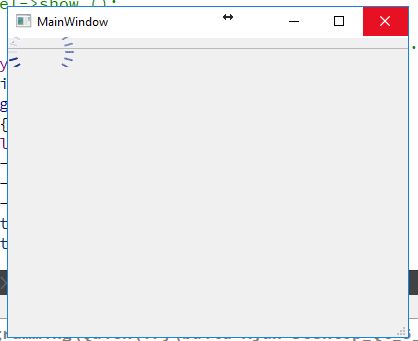
                                        0_1509977217031_Capture.JPG

                                        1 Reply Last reply
                                        0
                                        • JKSHJ JKSH

                                          @gabor53 said in Centering Qlabel on screen:

                                          @JKSH
                                          Screen width: 1280
                                          Screen height: 768
                                          x: 320
                                          y: 144

                                          (320, 144) is very far from the center of 1280 x 768.

                                          Can you explain why you got x=320 and y=144?

                                          If your QLabel is 66x66, then you want

                                          • Global X = (1280-66)/2 = 607
                                          • Global Y = (768-66)/2 = 351

                                          Make sure your code calculates the correct x and y values first.

                                          G Offline
                                          G Offline
                                          gabor53
                                          wrote on last edited by
                                          #20

                                          @JKSH
                                          You were right, the calculation was incorrect. The following code puts the movie in the center:

                                           QLabel* label = new QLabel();
                                            label->setGeometry (0, 0, 66, 66);
                                            QRect screenGeometry = QApplication::desktop ()->screenGeometry ();
                                            int x = (screenGeometry.width () - label->width ()) / 2;
                                            int y = (screenGeometry.height () - label->height ()) / 2;
                                          
                                            QMovie* movie = new QMovie(":/images/ajax-loader.gif");
                                          
                                            if(!movie->isValid ()) {
                                              qDebug() << "Movie doesn't work.";
                                            } else {
                                              qDebug() << "Screen width: " << screenGeometry.width ();
                                              qDebug() << "Screen height: " << screenGeometry.height ();
                                              qDebug() << "x: " << x;
                                              qDebug() << "y: " << y;
                                          
                                              label->setGeometry (x, y, 66, 66);
                                              label->setMovie (movie);
                                          
                                              movie->start ();
                                              label->show ();
                                           }
                                          

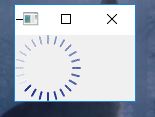
                                          Now it look like this:
                                          0_1509977961950_Capture.JPG
                                          Any way to delete the window controls from the movie?
                                          Thank you.

                                          J.HilkJ 1 Reply Last reply
                                          1

                                          • Login

                                          • Login or register to search.
                                          • First post
                                            Last post
                                          0
                                          • Categories
                                          • Recent
                                          • Tags
                                          • Popular
                                          • Users
                                          • Groups
                                          • Search
                                          • Get Qt Extensions
                                          • Unsolved