Skip to content
  • Categories
  • Recent
  • Tags
  • Popular
  • Users
  • Groups
  • Search
  • Get Qt Extensions
  • Unsolved
Collapse
Brand Logo
  1. Home
  2. Qt Development
  3. General and Desktop
  4. Freeing file handles created by Qt
Forum Updated to NodeBB v4.3 + New Features

Freeing file handles created by Qt

Scheduled Pinned Locked Moved Solved General and Desktop
20 Posts 6 Posters 5.8k Views 4 Watching
  • Oldest to Newest
  • Newest to Oldest
  • Most Votes
Reply
  • Reply as topic
Log in to reply
This topic has been deleted. Only users with topic management privileges can see it.
  • S Offline
    S Offline
    Sebi1729
    wrote on last edited by Sebi1729
    #1

    I've been successfully using Qt in Linux (Debian) for a few years but now I have to work on Windows (10, x64) and can't seem to get passed the issue of removing (deleting and closing the handle) builds. I get the following output:

    D:/InstallDir/Qt/Tools/mingw530_32/bin/../lib/gcc/i686-w64-mingw32/5.3.0/../../../../i686-w64-mingw32/bin/ld.exe: cannot open output file stockfish.exe: Permission denied
    collect2.exe: error: ld returned 1 exit status
    CMakeFiles\stockfish.dir\build.make:589: recipe for target 'stockfish.exe' failed
    mingw32-make.exe[2]: *** [stockfish.exe] Error 1
    CMakeFiles\Makefile2:66: recipe for target 'CMakeFiles/stockfish.dir/all' failed
    mingw32-make.exe[1]: *** [CMakeFiles/stockfish.dir/all] Error 2
    Makefile:82: recipe for target 'all' failed
    mingw32-make.exe: *** [all] Error 2
    13:06:39: The process "D:\InstallDir\CMake\bin\cmake.exe" exited with code 2.
    Error while building/deploying project Stockfish (kit: Desktop Qt 5.9.2 MinGW 32bit)
    When executing step "CMake Build"
    

    upon build. The build succeeds; I debug the code but after a few runs rebuilding fails. Up to now, I tried the following battery of solutions:

    • Close all related processes and check status with process explorer (ran with administrative privileges) :
      These handles cannot be closed ("Error opening process. The handle is invalid")

    • Disabling "Application Experience" is no longer an option in Win 10

    • Disabling McAfee didn't work either

    • Neither did disabling application indexing

    I can think of:

    • rebooting whenever this occurs (definitely not an option)

    • using a virtual machine with a Linux image and do the work there (might work up to a certain point
      since the project will rely on GPU usage which is not transparent through a VM)

    • writing a driver that closes open handles every now and then and forcefully close them, but this is not recommended

    • renaming the target binary (ugly; in my case doesn't work since handles seem to be kept open indefinitely)

    Can this be done in a more practical way?

    K 1 Reply Last reply
    0
    • S Sebi1729

      I've been successfully using Qt in Linux (Debian) for a few years but now I have to work on Windows (10, x64) and can't seem to get passed the issue of removing (deleting and closing the handle) builds. I get the following output:

      D:/InstallDir/Qt/Tools/mingw530_32/bin/../lib/gcc/i686-w64-mingw32/5.3.0/../../../../i686-w64-mingw32/bin/ld.exe: cannot open output file stockfish.exe: Permission denied
      collect2.exe: error: ld returned 1 exit status
      CMakeFiles\stockfish.dir\build.make:589: recipe for target 'stockfish.exe' failed
      mingw32-make.exe[2]: *** [stockfish.exe] Error 1
      CMakeFiles\Makefile2:66: recipe for target 'CMakeFiles/stockfish.dir/all' failed
      mingw32-make.exe[1]: *** [CMakeFiles/stockfish.dir/all] Error 2
      Makefile:82: recipe for target 'all' failed
      mingw32-make.exe: *** [all] Error 2
      13:06:39: The process "D:\InstallDir\CMake\bin\cmake.exe" exited with code 2.
      Error while building/deploying project Stockfish (kit: Desktop Qt 5.9.2 MinGW 32bit)
      When executing step "CMake Build"
      

      upon build. The build succeeds; I debug the code but after a few runs rebuilding fails. Up to now, I tried the following battery of solutions:

      • Close all related processes and check status with process explorer (ran with administrative privileges) :
        These handles cannot be closed ("Error opening process. The handle is invalid")

      • Disabling "Application Experience" is no longer an option in Win 10

      • Disabling McAfee didn't work either

      • Neither did disabling application indexing

      I can think of:

      • rebooting whenever this occurs (definitely not an option)

      • using a virtual machine with a Linux image and do the work there (might work up to a certain point
        since the project will rely on GPU usage which is not transparent through a VM)

      • writing a driver that closes open handles every now and then and forcefully close them, but this is not recommended

      • renaming the target binary (ugly; in my case doesn't work since handles seem to be kept open indefinitely)

      Can this be done in a more practical way?

      K Offline
      K Offline
      koahnig
      wrote on last edited by
      #2

      @Sebi1729

      Hi and welcome to devnet forum

      I have to admit I am a bit lost what you are trying to do. Probably that comes from the fact that you switched from linux to windows but suddenly you are talking about a VM with linux again. Therefore, I am not sure if you try to cross-compile on windows for linux.

      Anyway the error you see there is on windows 10. stockfish.exe is still open and has not been stopped, before you recompiled. I run typically into this issue when I start to run the application externally from command line or link. Well, simply stop the application before you do a recompile.
      Another case is when I start applications using QProcess and my application starting the processes is crashing. All application started then are in my system and continue to run. In such cases I have to stop the running applications in task manager. This method should work and seems to be what you describe as "Close all related ...".
      I had in the past cases with interfering AV app, but that typically deleted the executable and I had strange error messages when trying to start with debugger. However, stopping McAfee should take case of this. Probably you can there also exclude a folder from being checked by McAfee.

      My development account does have admin privileges. Therefore, I wondering why you are mentioning that explicitely. AFAIK you need admin rights for your dev account.

      Do you do something very special with your application?

      Vote the answer(s) that helped you to solve your issue(s)

      S 1 Reply Last reply
      1
      • K koahnig

        @Sebi1729

        Hi and welcome to devnet forum

        I have to admit I am a bit lost what you are trying to do. Probably that comes from the fact that you switched from linux to windows but suddenly you are talking about a VM with linux again. Therefore, I am not sure if you try to cross-compile on windows for linux.

        Anyway the error you see there is on windows 10. stockfish.exe is still open and has not been stopped, before you recompiled. I run typically into this issue when I start to run the application externally from command line or link. Well, simply stop the application before you do a recompile.
        Another case is when I start applications using QProcess and my application starting the processes is crashing. All application started then are in my system and continue to run. In such cases I have to stop the running applications in task manager. This method should work and seems to be what you describe as "Close all related ...".
        I had in the past cases with interfering AV app, but that typically deleted the executable and I had strange error messages when trying to start with debugger. However, stopping McAfee should take case of this. Probably you can there also exclude a folder from being checked by McAfee.

        My development account does have admin privileges. Therefore, I wondering why you are mentioning that explicitely. AFAIK you need admin rights for your dev account.

        Do you do something very special with your application?

        S Offline
        S Offline
        Sebi1729
        wrote on last edited by
        #3

        @koahnig

        Moving everything into a VM should be a last resort. The kernel (SYSTEM PID 4) has an open handle to stockfish.exe (I cannot find any process accessing stockfish.exe, at least not with process explorer). I did launch stockfish both from the cmd line and arena (that launched stockfish) but closed them afterwards (none of these processes are open).

        Local debugging in Qt worked fine but execution coverage was poor, so I tried running stockfish from arena and attaching gdb using Qt. None of the breakpoints were reached, instead code execution got into ntdll.dll at which it became unresponsive (F10 and F11 did no longer work). From that point I could no longer do interact with stockfish.exe.

        K 1 Reply Last reply
        0
        • S Sebi1729

          @koahnig

          Moving everything into a VM should be a last resort. The kernel (SYSTEM PID 4) has an open handle to stockfish.exe (I cannot find any process accessing stockfish.exe, at least not with process explorer). I did launch stockfish both from the cmd line and arena (that launched stockfish) but closed them afterwards (none of these processes are open).

          Local debugging in Qt worked fine but execution coverage was poor, so I tried running stockfish from arena and attaching gdb using Qt. None of the breakpoints were reached, instead code execution got into ntdll.dll at which it became unresponsive (F10 and F11 did no longer work). From that point I could no longer do interact with stockfish.exe.

          K Offline
          K Offline
          koahnig
          wrote on last edited by
          #4

          @Sebi1729

          I would expect that you can find stockfish.exe or arena in your task list then. I just tried process explorer and I could kill a process launched by another application. However, typically I am using task manager, because I am used to it.

          Since I do not know arena nor stockfish I cannot really help here. However, I think that the problem most likely stems from arena and that it does not handle things correctly. Also gdb may still not release everything.

          Vote the answer(s) that helped you to solve your issue(s)

          1 Reply Last reply
          3
          • mrjjM Offline
            mrjjM Offline
            mrjj
            Lifetime Qt Champion
            wrote on last edited by
            #5

            Hi
            Im not really sure what handles you refer to ?
            If you mean being able to override the running exe with a new one, then it normally works fine.
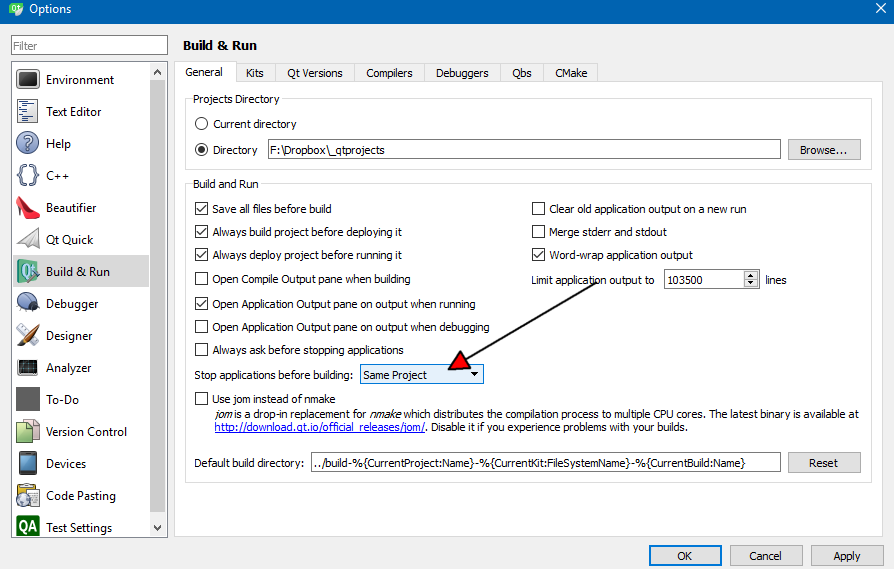
            There is also this option, you can check if on
            alt text

            You can try setting it to all.

            S 1 Reply Last reply
            2
            • mrjjM mrjj

              Hi
              Im not really sure what handles you refer to ?
              If you mean being able to override the running exe with a new one, then it normally works fine.
              There is also this option, you can check if on
              alt text

              You can try setting it to all.

              S Offline
              S Offline
              Sebi1729
              wrote on last edited by Sebi1729
              #6

              @mrjj @koahnig
              I checked my config and it seems correct (stop applications for the same project is a default setting (at least in my case)). I did attach gdb in Qt to stockfish.exe and never got to any breakpoints (that were reachable when running stockfish from Qt) but instead got into ntdll.dll after which Qt became unresponsive to step commands. Is there a better way of attaching gdb to a process? (without losing the handle to it (process explorer shows that the kernel still has an open but invalid handle to the binary)).

              This is a known issue in 64-bit versions of windows but there does not seem to be any workarounds or fixes for win 10.

              I guess this case is most similar with this answer.

              mrjjM 1 Reply Last reply
              0
              • S Sebi1729

                @mrjj @koahnig
                I checked my config and it seems correct (stop applications for the same project is a default setting (at least in my case)). I did attach gdb in Qt to stockfish.exe and never got to any breakpoints (that were reachable when running stockfish from Qt) but instead got into ntdll.dll after which Qt became unresponsive to step commands. Is there a better way of attaching gdb to a process? (without losing the handle to it (process explorer shows that the kernel still has an open but invalid handle to the binary)).

                This is a known issue in 64-bit versions of windows but there does not seem to be any workarounds or fixes for win 10.

                I guess this case is most similar with this answer.

                mrjjM Offline
                mrjjM Offline
                mrjj
                Lifetime Qt Champion
                wrote on last edited by
                #7

                @Sebi1729
                I never seen this issue on the forum so I have zero idea what is causing this.
                Does stockfish do anything a normal desktop app would not do ?
                Deep systems calls?
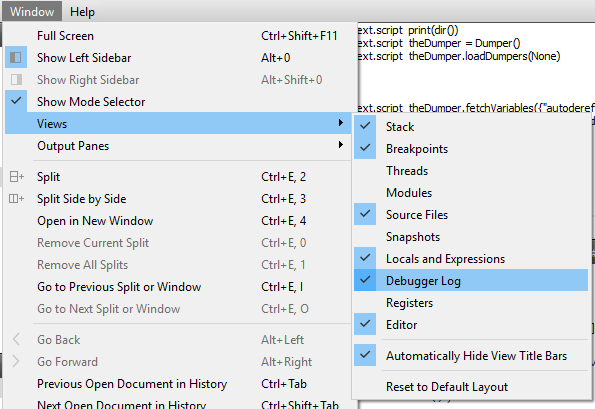
                You could try the debugger log if not tried that already
                alt text

                With Visual studio, Q seems to kill debugging but not sure if that applies to your case.
                (since its the mingw version)

                S 1 Reply Last reply
                2
                • mrjjM mrjj

                  @Sebi1729
                  I never seen this issue on the forum so I have zero idea what is causing this.
                  Does stockfish do anything a normal desktop app would not do ?
                  Deep systems calls?
                  You could try the debugger log if not tried that already
                  alt text

                  With Visual studio, Q seems to kill debugging but not sure if that applies to your case.
                  (since its the mingw version)

                  S Offline
                  S Offline
                  Sebi1729
                  wrote on last edited by Sebi1729
                  #8

                  @mrjj
                  I noticed that my Views tab us greyed out. Where does the Qt store logs by default? Stockfish at most writes to files in a local directory; it doesn't have any fancy logic.

                  mrjjM jsulmJ JonBJ 3 Replies Last reply
                  0
                  • S Sebi1729

                    @mrjj
                    I noticed that my Views tab us greyed out. Where does the Qt store logs by default? Stockfish at most writes to files in a local directory; it doesn't have any fancy logic.

                    mrjjM Offline
                    mrjjM Offline
                    mrjj
                    Lifetime Qt Champion
                    wrote on last edited by
                    #9

                    @Sebi1729
                    Well its not a log as such. more like a live window.
                    You have to be in debug mode to open it. ( as in - being debugging )

                    1 Reply Last reply
                    1
                    • S Sebi1729

                      @mrjj
                      I noticed that my Views tab us greyed out. Where does the Qt store logs by default? Stockfish at most writes to files in a local directory; it doesn't have any fancy logic.

                      jsulmJ Offline
                      jsulmJ Offline
                      jsulm
                      Lifetime Qt Champion
                      wrote on last edited by
                      #10

                      @Sebi1729 Did you try to disable your anti-virus application?

                      https://forum.qt.io/topic/113070/qt-code-of-conduct

                      mrjjM 1 Reply Last reply
                      2
                      • jsulmJ jsulm

                        @Sebi1729 Did you try to disable your anti-virus application?

                        mrjjM Offline
                        mrjjM Offline
                        mrjj
                        Lifetime Qt Champion
                        wrote on last edited by mrjj
                        #11

                        @jsulm
                        hi
                        yes he wrote

                        • Disabling McAfee didn't work either

                        But i was wondering about windows defender.

                        1 Reply Last reply
                        1
                        • S Sebi1729

                          @mrjj
                          I noticed that my Views tab us greyed out. Where does the Qt store logs by default? Stockfish at most writes to files in a local directory; it doesn't have any fancy logic.

                          JonBJ Offline
                          JonBJ Offline
                          JonB
                          wrote on last edited by JonB
                          #12

                          @Sebi1729
                          Windoze is notorious for having file handles left open/locked preventing overwrite, and it often does boil down to some AV. Make sure any & all AV is disabled and test.

                          You really ought to be able to use something like procexp to see what executables/handles are open by whom etc. If you have run stockfish.exe it only takes one thread inside it to still be running to prevent deletion. Try a little kill program to see if that terminates it correctly if it's still running.

                          The other possibility (hack) to get you going is that often Windoze allows open file rename where it does not allow delete/overwrite. You might try renaming to a temp file prior to re-link.

                          kshegunovK 1 Reply Last reply
                          3
                          • JonBJ JonB

                            @Sebi1729
                            Windoze is notorious for having file handles left open/locked preventing overwrite, and it often does boil down to some AV. Make sure any & all AV is disabled and test.

                            You really ought to be able to use something like procexp to see what executables/handles are open by whom etc. If you have run stockfish.exe it only takes one thread inside it to still be running to prevent deletion. Try a little kill program to see if that terminates it correctly if it's still running.

                            The other possibility (hack) to get you going is that often Windoze allows open file rename where it does not allow delete/overwrite. You might try renaming to a temp file prior to re-link.

                            kshegunovK Offline
                            kshegunovK Offline
                            kshegunov
                            Moderators
                            wrote on last edited by
                            #13

                            @JNBarchan said in Freeing file handles created by Qt:

                            Windoze is notorious for having file handles left open/locked preventing overwrite, and it often does boil down to some AV.

                            Actually it really boils down to "programmers" that don't take care to run a graceful shutdown sequence. Those people, from my observations, are often one and the same as the ones that believe leaking memory from global scope variables on program exit is just fine "because the OS will clean it up".

                            @Sebi1729 said in Freeing file handles created by Qt:

                            Is there a better way of attaching gdb to a process?

                            You can attach QtCreator, from the menu Debug > Start Debugging > Attach to Running Application ... select the process from the list. Make sure you're using a debug build so you get the debug information.

                            Read and abide by the Qt Code of Conduct

                            S 1 Reply Last reply
                            2
                            • S Offline
                              S Offline
                              Sebi1729
                              wrote on last edited by
                              #14

                              @jsulm

                              Yes, I disabled all antiviruses I was aware of.

                              @JNBarchan

                              I managed to close the handle using process hacker (it comes with a driver which can close any open handle). However, this is not a long term solution since handles are recycled on windows (which likely ends up in file corruption).

                              @kshegunov

                              I tried this in two cases; attaching gdb to stockfish before starting it and while running. The end result was the same: I got into ntdll.dll and started stepping through machine level code (F10/F11) and at some point gdb started to hang. Upon exit I could no longer reattach nor rebuild stockfish. Source code was not available during step by step debugging. Right now I am thinking of recording a few games and replaying the UCI transcript to stockfish from Qt (in the first case I was launching stockfish with an external application (chess) Arena).

                              kshegunovK JonBJ 2 Replies Last reply
                              0
                              • S Sebi1729

                                @jsulm

                                Yes, I disabled all antiviruses I was aware of.

                                @JNBarchan

                                I managed to close the handle using process hacker (it comes with a driver which can close any open handle). However, this is not a long term solution since handles are recycled on windows (which likely ends up in file corruption).

                                @kshegunov

                                I tried this in two cases; attaching gdb to stockfish before starting it and while running. The end result was the same: I got into ntdll.dll and started stepping through machine level code (F10/F11) and at some point gdb started to hang. Upon exit I could no longer reattach nor rebuild stockfish. Source code was not available during step by step debugging. Right now I am thinking of recording a few games and replaying the UCI transcript to stockfish from Qt (in the first case I was launching stockfish with an external application (chess) Arena).

                                kshegunovK Offline
                                kshegunovK Offline
                                kshegunov
                                Moderators
                                wrote on last edited by kshegunov
                                #15

                                @Sebi1729 said in Freeing file handles created by Qt:

                                I got into ntdll.dll and started stepping through machine level code (F10/F11) and at some point gdb started to hang.

                                You should get access to the call stack when you attach to a debug build, you can then inspect what called what.

                                Upon exit I could no longer reattach nor rebuild stockfish.

                                Who's exit? After you've attached the debugger you can close the instance by Shift+F5, but if the program has acquired a global mutex/semaphore or any other global resource this may be left uncleaned (although the debugger/OS should do it in principle).

                                Right now I am thinking of recording a few games and replaying the UCI transcript to stockfish from Qt (in the first case I was launching stockfish with an external application (chess) Arena).

                                What exactly are you trying to do?

                                Read and abide by the Qt Code of Conduct

                                1 Reply Last reply
                                2
                                • S Sebi1729

                                  @jsulm

                                  Yes, I disabled all antiviruses I was aware of.

                                  @JNBarchan

                                  I managed to close the handle using process hacker (it comes with a driver which can close any open handle). However, this is not a long term solution since handles are recycled on windows (which likely ends up in file corruption).

                                  @kshegunov

                                  I tried this in two cases; attaching gdb to stockfish before starting it and while running. The end result was the same: I got into ntdll.dll and started stepping through machine level code (F10/F11) and at some point gdb started to hang. Upon exit I could no longer reattach nor rebuild stockfish. Source code was not available during step by step debugging. Right now I am thinking of recording a few games and replaying the UCI transcript to stockfish from Qt (in the first case I was launching stockfish with an external application (chess) Arena).

                                  JonBJ Offline
                                  JonBJ Offline
                                  JonB
                                  wrote on last edited by
                                  #16

                                  @Sebi1729 said in Freeing file handles created by Qt:

                                  @JNBarchan

                                  I managed to close the handle using process hacker (it comes with a driver which can close any open handle). However, this is not a long term solution since handles are recycled on windows (which likely ends up in file corruption).

                                  The intention was not necessarily to repeatedly use an external close-handle-program, it was to identify which process has the handle open to diagnose the issue.

                                  1 Reply Last reply
                                  1
                                  • kshegunovK kshegunov

                                    @JNBarchan said in Freeing file handles created by Qt:

                                    Windoze is notorious for having file handles left open/locked preventing overwrite, and it often does boil down to some AV.

                                    Actually it really boils down to "programmers" that don't take care to run a graceful shutdown sequence. Those people, from my observations, are often one and the same as the ones that believe leaking memory from global scope variables on program exit is just fine "because the OS will clean it up".

                                    @Sebi1729 said in Freeing file handles created by Qt:

                                    Is there a better way of attaching gdb to a process?

                                    You can attach QtCreator, from the menu Debug > Start Debugging > Attach to Running Application ... select the process from the list. Make sure you're using a debug build so you get the debug information.

                                    S Offline
                                    S Offline
                                    Sebi1729
                                    wrote on last edited by
                                    #17

                                    @kshegunov

                                    What exactly are you trying to do?
                                    

                                    Arena is a UCI client that interacts with stockfish by sending/receiving messages with the next move of each player. I want to save the transcript to a log file, modify stockfish as to read it and infer its behavior through debugging.

                                    kshegunovK 1 Reply Last reply
                                    0
                                    • S Sebi1729

                                      @kshegunov

                                      What exactly are you trying to do?
                                      

                                      Arena is a UCI client that interacts with stockfish by sending/receiving messages with the next move of each player. I want to save the transcript to a log file, modify stockfish as to read it and infer its behavior through debugging.

                                      kshegunovK Offline
                                      kshegunovK Offline
                                      kshegunov
                                      Moderators
                                      wrote on last edited by
                                      #18

                                      Stockfish is open source, so you can build and modify it yourself. I really don't get why you're trying to reverse engineer the engine ...

                                      Read and abide by the Qt Code of Conduct

                                      S 1 Reply Last reply
                                      0
                                      • kshegunovK kshegunov

                                        Stockfish is open source, so you can build and modify it yourself. I really don't get why you're trying to reverse engineer the engine ...

                                        S Offline
                                        S Offline
                                        Sebi1729
                                        wrote on last edited by
                                        #19

                                        @kshegunov
                                        I'm not trying to reverse engineer per-se but rather have a deeper understanding on how moves are computed given a game state; I'm planning on improving the engine with some machine learning algorithms.

                                        1 Reply Last reply
                                        0
                                        • S Offline
                                          S Offline
                                          Sebi1729
                                          wrote on last edited by
                                          #20

                                          Merge double posts later. Apparently, McAfee can't exclude directories from scanning. It even blocks the linker from visual studio thus making any windows box useless for (binary application) development.

                                          I fixed it by:

                                          • uninstalling McAfee

                                          • flaming the cretins who thought this was a good idea

                                          1 Reply Last reply
                                          3

                                          • Login

                                          • Login or register to search.
                                          • First post
                                            Last post
                                          0
                                          • Categories
                                          • Recent
                                          • Tags
                                          • Popular
                                          • Users
                                          • Groups
                                          • Search
                                          • Get Qt Extensions
                                          • Unsolved