Skip to content
  • Categories
  • Recent
  • Tags
  • Popular
  • Users
  • Groups
  • Search
  • Get Qt
  • Unsolved
Collapse
qtws26_logo

The Qt Event of the Year: Qt World Summit 2026

Save Your Spot >
Brand Logo
  1. Home
  2. Qt Development
  3. General and Desktop
  4. QCalendarWidget doesn't show month and year on top
Qt 6.12 LTS is out! See what's new in the release blog

QCalendarWidget doesn't show month and year on top

Scheduled Pinned Locked Moved Solved General and Desktop
9 Posts 4 Posters 2.4k Views 2 Watching
  • Oldest to Newest
  • Newest to Oldest
  • Most Votes
Reply
  • Reply as topic
Log in to reply
This topic has been deleted. Only users with topic management privileges can see it.
  • G Offline
    G Offline
    gabor53
    wrote on last edited by
    #1

    Hi,
    My QCalendarWidget doesn't show the month and year when the program runs (it is visible in design mode). How can I turn it on?

    Thank you.

    jsulmJ JonBJ 2 Replies Last reply
    0
    • G gabor53

      Hi,
      My QCalendarWidget doesn't show the month and year when the program runs (it is visible in design mode). How can I turn it on?

      Thank you.

      jsulmJ Offline
      jsulmJ Offline
      jsulm
      Lifetime Qt Champion
      wrote on last edited by
      #2

      @gabor53 For me it does (Windows 7, Qt 5.9). Did you change any properties of QCalendarWidget? Is it in a layout?

      https://forum.qt.io/topic/113070/qt-code-of-conduct

      1 Reply Last reply
      0
      • G gabor53

        Hi,
        My QCalendarWidget doesn't show the month and year when the program runs (it is visible in design mode). How can I turn it on?

        Thank you.

        JonBJ Offline
        JonBJ Offline
        JonB
        wrote on last edited by JonB
        #3

        @gabor53
        Ensure navigationBarVisible == true (at runtime) if that's what you mean?

        G 1 Reply Last reply
        0
        • JonBJ JonB

          @gabor53
          Ensure navigationBarVisible == true (at runtime) if that's what you mean?

          G Offline
          G Offline
          gabor53
          wrote on last edited by
          #4

          @JNBarchan
          Hi,
          It is visible. It showes the 2 little arrows, but not the minth and date combo boxes.

          1 Reply Last reply
          0
          • mrjjM Offline
            mrjjM Offline
            mrjj
            Lifetime Qt Champion
            wrote on last edited by mrjj
            #5

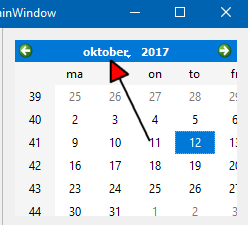
            The middle is missing ?
            alt text

            Make a clean project and just place a Calendar on form. If still missing, you got font issue or something like that.

            G 1 Reply Last reply
            3
            • mrjjM mrjj

              The middle is missing ?
              alt text

              Make a clean project and just place a Calendar on form. If still missing, you got font issue or something like that.

              G Offline
              G Offline
              gabor53
              wrote on last edited by
              #6

              @mrjj
              Thank you. Cleen project worked.

              mrjjM 1 Reply Last reply
              0
              • G gabor53

                @mrjj
                Thank you. Cleen project worked.

                mrjjM Offline
                mrjjM Offline
                mrjj
                Lifetime Qt Champion
                wrote on last edited by
                #7

                @gabor53

                Ok so maybe in other project, you used a styelsheet or something that could disturb it ?

                G 1 Reply Last reply
                0
                • mrjjM mrjj

                  @gabor53

                  Ok so maybe in other project, you used a styelsheet or something that could disturb it ?

                  G Offline
                  G Offline
                  gabor53
                  wrote on last edited by
                  #8

                  @mrjj
                  Yes, it was a style shedt it didn't like.

                  mrjjM 1 Reply Last reply
                  0
                  • G gabor53

                    @mrjj
                    Yes, it was a style shedt it didn't like.

                    mrjjM Offline
                    mrjjM Offline
                    mrjj
                    Lifetime Qt Champion
                    wrote on last edited by
                    #9

                    @gabor53
                    Ok, you can fix that using names in stylesheet if needed.

                    1 Reply Last reply
                    0

                    • Login

                    • Login or register to search.
                    • First post
                      Last post
                    0
                    • Categories
                    • Recent
                    • Tags
                    • Popular
                    • Users
                    • Groups
                    • Search
                    • Get Qt
                    • Unsolved