Skip to content
  • Categories
  • Recent
  • Tags
  • Popular
  • Users
  • Groups
  • Search
  • Get Qt Extensions
  • Unsolved
Collapse
Brand Logo
  1. Home
  2. Qt Development
  3. General and Desktop
  4. Floating QCalendarWidget over QTableView cell in delegate
Qt 6.11 is out! See what's new in the release blog

Floating QCalendarWidget over QTableView cell in delegate

Scheduled Pinned Locked Moved Solved General and Desktop
3 Posts 2 Posters 1.1k Views 2 Watching
  • Oldest to Newest
  • Newest to Oldest
  • Most Votes
Reply
  • Reply as topic
Log in to reply
This topic has been deleted. Only users with topic management privileges can see it.
  • G Offline
    G Offline
    gabor53
    wrote on last edited by
    #1

    Hi,

    I have a QStyledItemDelegate which is supposed to display a QCalendarWidget in table cell. Currently it looks like this:
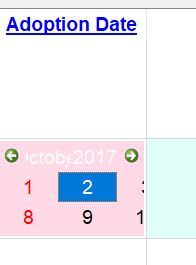
    0_1507581183096_Capture.JPG
    It is working, but it is impossible to use it as it is too small. Is it possible to "float" the QCalendarWidget over several cells creating a usable size?
    This is the code I currently have:

    #include "adoptdatefixdelegate.h"
    
    adoptDateFixDelegate::adoptDateFixDelegate(QObject* parent) : QStyledItemDelegate(parent) {
    
    }
    
    QWidget* adoptDateFixDelegate::createEditor(QWidget* parent, const QStyleOptionViewItem& option, const QModelIndex& index) const {
    
      Q_UNUSED(option);
      Q_UNUSED(index);
    
      QWidget* ca = new QWidget( parent );
    
      QCalendarWidget* adoptDateWidget = new QCalendarWidget(ca);
      adoptDateWidget->setStyleSheet ("background-color:rgb(255,217,229);" );
    //  adoptDateWidget->setMaximumWidth (100);
    //  adoptDateWidget->setMinimumWidth (100);
    //  adoptDateWidget->setMaximumHeight (30);
    //  adoptDateWidget->setMinimumHeight (30);
    
      QDate date;
      date = adoptDateWidget->selectedDate ();
    
    //  adoptDateWidget->setDateTextFormat (date, "MM/DD/YYYY");
    
      QFont calFont("Arial", 14);
      adoptDateWidget->setFont (calFont);
    
      adoptDateWidget->setSizePolicy (QSizePolicy::Expanding, QSizePolicy::Expanding);
    
      QVBoxLayout* adoptLayout = new QVBoxLayout;
    
      adoptLayout->addWidget (adoptDateWidget, 0, Qt::AlignCenter);
      adoptLayout->setMargin (2);
    
      ca->setLayout (adoptLayout);
    
      return ca;
    }


    Thank you for your help.

    1 Reply Last reply
    0
    • mrjjM Offline
      mrjjM Offline
      mrjj
      Lifetime Qt Champion
      wrote on last edited by
      #2

      Hi
      What about using a dialog ?
      When user click in cell - you pop a dialog and let him choose
      a date. On ok, you close the dialog.
      Creating a floating QCalendarWidget would require some
      clever coding to close at the right times. like when scrolling etc.

      G 1 Reply Last reply
      1
      • mrjjM mrjj

        Hi
        What about using a dialog ?
        When user click in cell - you pop a dialog and let him choose
        a date. On ok, you close the dialog.
        Creating a floating QCalendarWidget would require some
        clever coding to close at the right times. like when scrolling etc.

        G Offline
        G Offline
        gabor53
        wrote on last edited by
        #3

        @mrjj
        Thank you. It works.

        1 Reply Last reply
        0

        • Login

        • Login or register to search.
        • First post
          Last post
        0
        • Categories
        • Recent
        • Tags
        • Popular
        • Users
        • Groups
        • Search
        • Get Qt Extensions
        • Unsolved