Skip to content
  • Categories
  • Recent
  • Tags
  • Popular
  • Users
  • Groups
  • Search
  • Get Qt Extensions
  • Unsolved
Collapse
Brand Logo
  1. Home
  2. Qt Development
  3. General and Desktop
  4. QPushButton smooth vertices
Qt 6.11 is out! See what's new in the release blog

QPushButton smooth vertices

Scheduled Pinned Locked Moved Unsolved General and Desktop
4 Posts 2 Posters 1.6k Views 1 Watching
  • Oldest to Newest
  • Newest to Oldest
  • Most Votes
Reply
  • Reply as topic
Log in to reply
This topic has been deleted. Only users with topic management privileges can see it.
  • T Offline
    T Offline
    Tikani
    wrote on last edited by Tikani
    #1

    Hi!
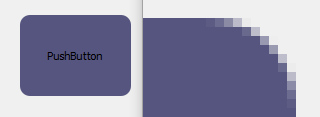
    I have QPushButtons in my application and I applied a stylesheet to make a custom appearance. But on my monitor (15 inches, 1366x768 resolution) the result looks poorly on the vertices.
    radius-dirt
    Because of border-radius: 10px;, artifacts, which look like blured stair-step "dirt" on vertices, appeared. So, I need to make it smooth. Any ideas how to achieve this?
    Thanks in advance.
    P.S. Sorry, if you can't see these artifacts clearly on the attached image - I took the screenshot with standard PrintScreen and saved in PNG in Paint. Maybe it compressed the image by itself, maybe postimage.org compresses images on upload.

    1 Reply Last reply
    0
    • mrjjM Offline
      mrjjM Offline
      mrjj
      Lifetime Qt Champion
      wrote on last edited by
      #2

      Hi
      Do you mean the round edges ?`
      alt text

      Unless they are not antialiased for some reason, i doubt there is much you can do to make them look smoother.

      how does this look on same monitor ?

      alt text

      T 1 Reply Last reply
      0
      • mrjjM mrjj

        Hi
        Do you mean the round edges ?`
        alt text

        Unless they are not antialiased for some reason, i doubt there is much you can do to make them look smoother.

        how does this look on same monitor ?
        alt text

        T Offline
        T Offline
        Tikani
        wrote on last edited by
        #3

        @mrjj
        your image is displayed without any artifacts and yes, English isn't my native language, so I meant "edges" :D

        1 Reply Last reply
        0
        • mrjjM Offline
          mrjjM Offline
          mrjj
          Lifetime Qt Champion
          wrote on last edited by
          #4

          ok, its antialiased. (the circle)
          Does the "pushbutton" also look ok?

          Could try to look at your buttons borders with
          "C:\Qt\5.9.1\msvc2015_64\bin\pixeltool.exe"
          (if mingw compiler, its other folder)

          My best guess its either not antialiased or the effect is not good due
          to transparency or other reasons.

          1 Reply Last reply
          0

          • Login

          • Login or register to search.
          • First post
            Last post
          0
          • Categories
          • Recent
          • Tags
          • Popular
          • Users
          • Groups
          • Search
          • Get Qt Extensions
          • Unsolved