Skip to content
  • Categories
  • Recent
  • Tags
  • Popular
  • Users
  • Groups
  • Search
  • Get Qt Extensions
  • Unsolved
Collapse
Brand Logo
  1. Home
  2. Qt Development
  3. Qt Creator and other tools
  4. using %{CurrentProject:Path} in Build Step doesn't resolve to correct project

using %{CurrentProject:Path} in Build Step doesn't resolve to correct project

Scheduled Pinned Locked Moved Unsolved Qt Creator and other tools
1 Posts 1 Posters 752 Views 1 Watching
  • Oldest to Newest
  • Newest to Oldest
  • Most Votes
Reply
  • Reply as topic
Log in to reply
This topic has been deleted. Only users with topic management privileges can see it.
  • D Offline
    D Offline
    davecotter
    wrote on last edited by davecotter
    #1

    here are my two projects, later depends on earlier:
    0_1502747790546_Screen Shot 2017-08-14 at 2.52.31 PM.png
    I select the LATER one as the active project, but in the build step, using %{CurrentProject:Path} (or name, or filepath, or any of them) picks the WRONG project! (see the mouse pointer showing "Current Value:" ?)
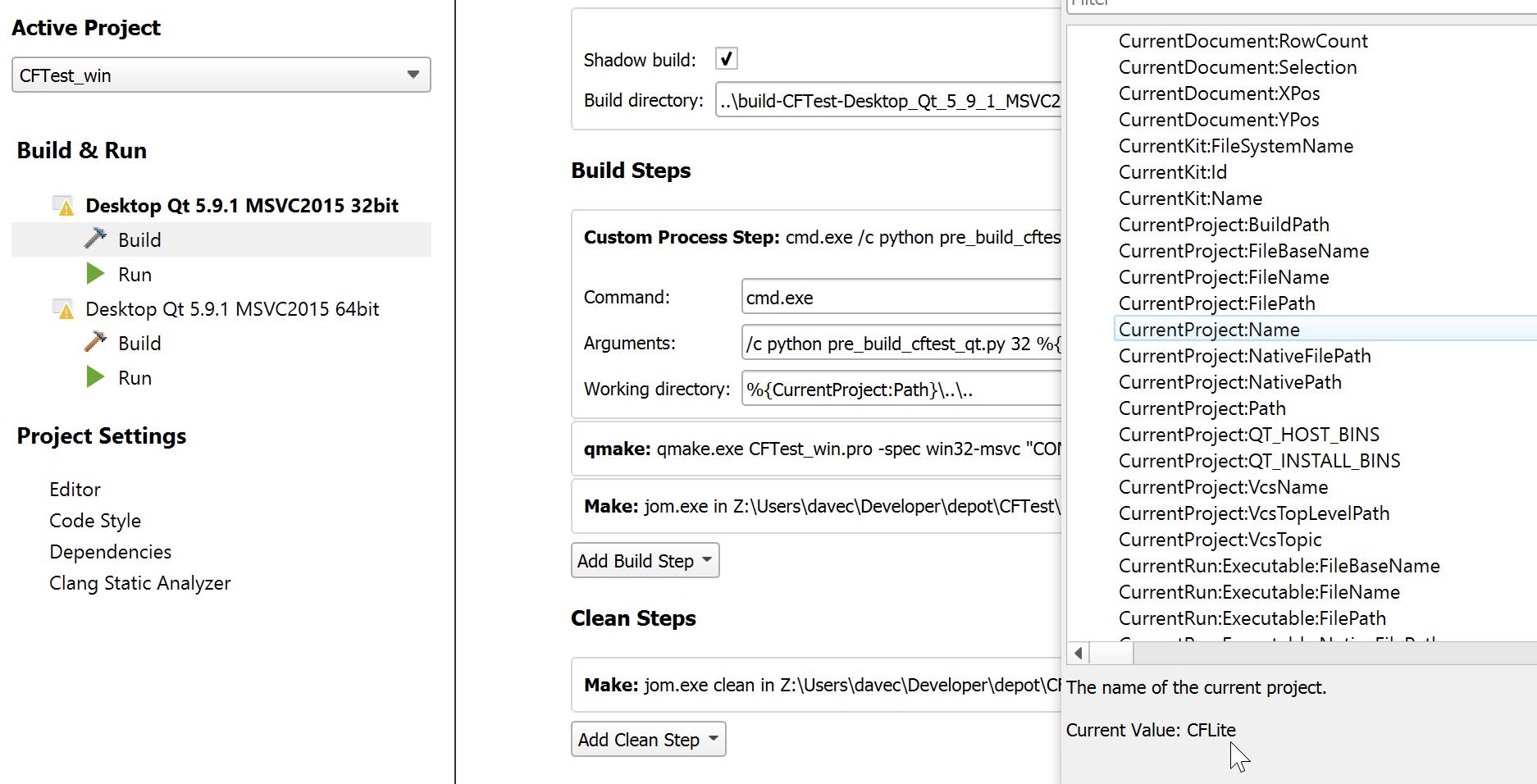
    0_1502747812636_Parallels DesktopScreenSnapz001.png
    this breaks my build :(
    is this.. a bug? am i doing something wrong? can i not depend on this variable?

    1 Reply Last reply
    0

    • Login

    • Login or register to search.
    • First post
      Last post
    0
    • Categories
    • Recent
    • Tags
    • Popular
    • Users
    • Groups
    • Search
    • Get Qt Extensions
    • Unsolved