Skip to content
  • Categories
  • Recent
  • Tags
  • Popular
  • Users
  • Groups
  • Search
  • Get Qt Extensions
  • Unsolved
Collapse
Brand Logo
  1. Home
  2. Qt Development
  3. General and Desktop
  4. Stacked dock widgets tab bars not consistent
Qt 6.11 is out! See what's new in the release blog

Stacked dock widgets tab bars not consistent

Scheduled Pinned Locked Moved Solved General and Desktop
17 Posts 3 Posters 5.0k Views 3 Watching
  • Oldest to Newest
  • Newest to Oldest
  • Most Votes
Reply
  • Reply as topic
Log in to reply
This topic has been deleted. Only users with topic management privileges can see it.
  • F Offline
    F Offline
    Fenrir
    wrote on last edited by
    #1

    Hello! I am relatively new to Qt, and have been pulling my hair out trying to solve this issue. I am working on a theme for the open source project OBS, which just updated to allow dock widgets for many of the main UI elements.

    However, when stacking two dock widgets together, the QTabBar is near impossible to style correctly with a QSS file, and the overall behavior is extremely inconsistent. For example, the biggest issue I'm having is that the separator line (I'm not even really sure what to call this specific element) is present when two widgets are newly stacked, as shown here:

    New stack

    But when the program is restarted, this line is now gone, and the entire object looks different (presumably because this line is adding 1px of height to the QTabBar itsel:

    Old stack

    So, the question I have is, in the context of a stacked dock widget, what is that line element called and how can I select it/remove/change it with QSS or otherwise? QSS would be preferred as that will be the minimum amount of changes needed. I have searched around and found quite a few people having this same issue with the dock widget tab bar and how it does not behave like a normal QTabBar. Thanks in advance for any advice or help you can provide.

    For reference, here is the QSS I'm working with as it relates to the QTabBar: https://gist.github.com/Fenrirthviti/2006b0d555408a82c64485571a131ccb

    1 Reply Last reply
    0
    • F Fenrir

      5.9.1 is what I have been testing against. I've installed 5.10 and the same issue occurs.

      5.7.0 is what the application is currently shipping with, as mentioned due to compatibility concerns. We are looking to update Qt to a newer version in the near future that includes VS2017 support, but we have many different (and older) versions of macOS and Linux that must remain supported.

      mrjjM Offline
      mrjjM Offline
      mrjj
      Lifetime Qt Champion
      wrote on last edited by mrjj
      #15

      @Fenrir

      Hi
      you stylesheet looked so nice ( even without right icons)
      I tested it and could reproduce it on Linux and Windows.
      (after restore state/ running second time, it would loose a pixel)

      If i float and redocked/tabbed them again, it would draw as expected.

      Using trial and error and found out that if i remove
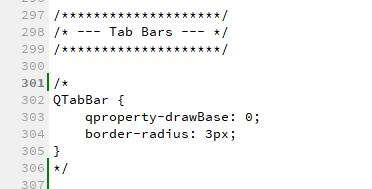
      alt text

      I could no longer reproduce it.

      Also
      https://github.com/ColinDuquesnoy/QDarkStyleSheet
      had same issue
      and also contained

      QTabBar
      {
          qproperty-drawBase: 0;
          border-radius: 3px;
      }
      

      So my conclusion is that the line
      qproperty-drawBase: 0;
      Is not working 100% and start searching for that and found
      https://forum.qt.io/topic/59450/set-qtabbar-stylesheet-as-qproperty-drawbase-0-not-work-sometime

      I tried

      QList<QDockWidget *> dockWidgets = findChildren<QDockWidget *>();
          for (int var = 0; var < dockWidgets.size(); var++) {
              dockWidgets[var]->adjustSize();
          }
      

      But as far as I can test.
      Using qproperty-drawBase: 0; is a no go with Docks and tabs.

      If i do ( with qproperty-drawBase: 1; in stylesheet)
      (using the menu New Letter)

        for (int var = 0; var < dockWidgets.size(); var++) {
          if (dockWidgets[var]->drawBase())
            dockWidgets[var]->setDrawBase(false);
          else
            dockWidgets[var]->setDrawBase(true);
        }
      

      after restorestate
      i get the the missing line syndrom instantly.
      alt text

      I assume it has something to do with its a property and not a stylesheet tag but
      i have no future info but other qproperty- uses have issues too.
      https://bugreports.qt.io/browse/QTBUG-2982

      Cheers

      F 1 Reply Last reply
      1
      • SGaistS Offline
        SGaistS Offline
        SGaist
        Lifetime Qt Champion
        wrote on last edited by
        #2

        Hi and welcome to devnet,

        Can you also provide a minimal sample code that shows the problem once the style sheet is applied ?

        Interested in AI ? www.idiap.ch
        Please read the Qt Code of Conduct - https://forum.qt.io/topic/113070/qt-code-of-conduct

        F 1 Reply Last reply
        0
        • SGaistS SGaist

          Hi and welcome to devnet,

          Can you also provide a minimal sample code that shows the problem once the style sheet is applied ?

          F Offline
          F Offline
          Fenrir
          wrote on last edited by
          #3

          @SGaist Unfortunately, I don't think I will be able to. As I mentioned, I'm very new to Qt and I don't know how to generate a sample application (I know next to nothing about C/C++, I'm more of a web guy).

          I will see if I can find some simple sample applications, however, and try to replicate it there.

          1 Reply Last reply
          0
          • F Offline
            F Offline
            Fenrir
            wrote on last edited by
            #4

            Ok, I've managed to create a reduced test case (using the Dock Widgets example app that ships with Qt) to replicate this issue.

            What constitutes "minimal sample code" that you need to see here? Here's what happens in the example:

            Before restart:
            before

            After restart:
            after

            You can see that the line is 1px smaller after relaunching the test app.

            1 Reply Last reply
            0
            • SGaistS Offline
              SGaistS Offline
              SGaist
              Lifetime Qt Champion
              wrote on last edited by
              #5

              If the code is small you can post it here.

              Interested in AI ? www.idiap.ch
              Please read the Qt Code of Conduct - https://forum.qt.io/topic/113070/qt-code-of-conduct

              1 Reply Last reply
              0
              • F Offline
                F Offline
                Fenrir
                wrote on last edited by
                #6

                @SGaist I still don't understand what specifically you're asking for, so here's the entire application: https://gist.github.com/Fenrirthviti/f9c801031adfa2604dbea03d98854585

                1 Reply Last reply
                0
                • F Offline
                  F Offline
                  Fenrir
                  wrote on last edited by
                  #7

                  Any updates? Do I need to provide anything further for this to be looked at?

                  1 Reply Last reply
                  0
                  • SGaistS Offline
                    SGaistS Offline
                    SGaist
                    Lifetime Qt Champion
                    wrote on last edited by
                    #8

                    That might be specific to Windows, It doesn't seem to happen on macOS.

                    On a side note, your gist is missing a .pro and .qrc file and the Q_INIT_RESOURCE is not needed and done too late.

                    Interested in AI ? www.idiap.ch
                    Please read the Qt Code of Conduct - https://forum.qt.io/topic/113070/qt-code-of-conduct

                    1 Reply Last reply
                    0
                    • F Offline
                      F Offline
                      Fenrir
                      wrote on last edited by
                      #9

                      So no other suggestions or ideas? I really just need to understand if this is a Qt problem, or a problem with my .qss file.

                      I can provide the missing files when I get time, but I don't think they're relevant to this issue and if I remember correctly, they were pretty much blank anyway.

                      As for the code itself, this is the example code that ships with Qt, the only modification I did was to apply my theme, so I'm not sure what you mean by "not needed and done too late" there. I can try removing it and see if it makes a difference, however.

                      1 Reply Last reply
                      0
                      • F Offline
                        F Offline
                        Fenrir
                        wrote on last edited by
                        #10

                        Bump, still looking for an answer on this. Thanks!

                        1 Reply Last reply
                        0
                        • SGaistS Offline
                          SGaistS Offline
                          SGaist
                          Lifetime Qt Champion
                          wrote on last edited by
                          #11

                          In between did you update Qt ? 5.10 is just around the corner with the Beta 4 that was just released.

                          Interested in AI ? www.idiap.ch
                          Please read the Qt Code of Conduct - https://forum.qt.io/topic/113070/qt-code-of-conduct

                          1 Reply Last reply
                          0
                          • F Offline
                            F Offline
                            Fenrir
                            wrote on last edited by
                            #12

                            I am currently building against 5.9.1, and the issue is still present. I was building against 5.7.0 before.

                            I am very reluctant to update to the latest for compatibility reasons.

                            1 Reply Last reply
                            0
                            • SGaistS Offline
                              SGaistS Offline
                              SGaist
                              Lifetime Qt Champion
                              wrote on last edited by
                              #13

                              Why 5.9.1 ? 5.9.3 got released and 5.10 is in RC.

                              Interested in AI ? www.idiap.ch
                              Please read the Qt Code of Conduct - https://forum.qt.io/topic/113070/qt-code-of-conduct

                              1 Reply Last reply
                              0
                              • F Offline
                                F Offline
                                Fenrir
                                wrote on last edited by
                                #14

                                5.9.1 is what I have been testing against. I've installed 5.10 and the same issue occurs.

                                5.7.0 is what the application is currently shipping with, as mentioned due to compatibility concerns. We are looking to update Qt to a newer version in the near future that includes VS2017 support, but we have many different (and older) versions of macOS and Linux that must remain supported.

                                mrjjM 1 Reply Last reply
                                0
                                • F Fenrir

                                  5.9.1 is what I have been testing against. I've installed 5.10 and the same issue occurs.

                                  5.7.0 is what the application is currently shipping with, as mentioned due to compatibility concerns. We are looking to update Qt to a newer version in the near future that includes VS2017 support, but we have many different (and older) versions of macOS and Linux that must remain supported.

                                  mrjjM Offline
                                  mrjjM Offline
                                  mrjj
                                  Lifetime Qt Champion
                                  wrote on last edited by mrjj
                                  #15

                                  @Fenrir

                                  Hi
                                  you stylesheet looked so nice ( even without right icons)
                                  I tested it and could reproduce it on Linux and Windows.
                                  (after restore state/ running second time, it would loose a pixel)

                                  If i float and redocked/tabbed them again, it would draw as expected.

                                  Using trial and error and found out that if i remove
                                  alt text

                                  I could no longer reproduce it.

                                  Also
                                  https://github.com/ColinDuquesnoy/QDarkStyleSheet
                                  had same issue
                                  and also contained

                                  QTabBar
                                  {
                                      qproperty-drawBase: 0;
                                      border-radius: 3px;
                                  }
                                  

                                  So my conclusion is that the line
                                  qproperty-drawBase: 0;
                                  Is not working 100% and start searching for that and found
                                  https://forum.qt.io/topic/59450/set-qtabbar-stylesheet-as-qproperty-drawbase-0-not-work-sometime

                                  I tried

                                  QList<QDockWidget *> dockWidgets = findChildren<QDockWidget *>();
                                      for (int var = 0; var < dockWidgets.size(); var++) {
                                          dockWidgets[var]->adjustSize();
                                      }
                                  

                                  But as far as I can test.
                                  Using qproperty-drawBase: 0; is a no go with Docks and tabs.

                                  If i do ( with qproperty-drawBase: 1; in stylesheet)
                                  (using the menu New Letter)

                                    for (int var = 0; var < dockWidgets.size(); var++) {
                                      if (dockWidgets[var]->drawBase())
                                        dockWidgets[var]->setDrawBase(false);
                                      else
                                        dockWidgets[var]->setDrawBase(true);
                                    }
                                  

                                  after restorestate
                                  i get the the missing line syndrom instantly.
                                  alt text

                                  I assume it has something to do with its a property and not a stylesheet tag but
                                  i have no future info but other qproperty- uses have issues too.
                                  https://bugreports.qt.io/browse/QTBUG-2982

                                  Cheers

                                  F 1 Reply Last reply
                                  1
                                  • SGaistS Offline
                                    SGaistS Offline
                                    SGaist
                                    Lifetime Qt Champion
                                    wrote on last edited by
                                    #16

                                    Nice catch !

                                    Interested in AI ? www.idiap.ch
                                    Please read the Qt Code of Conduct - https://forum.qt.io/topic/113070/qt-code-of-conduct

                                    1 Reply Last reply
                                    0
                                    • mrjjM mrjj

                                      @Fenrir

                                      Hi
                                      you stylesheet looked so nice ( even without right icons)
                                      I tested it and could reproduce it on Linux and Windows.
                                      (after restore state/ running second time, it would loose a pixel)

                                      If i float and redocked/tabbed them again, it would draw as expected.

                                      Using trial and error and found out that if i remove
                                      alt text

                                      I could no longer reproduce it.

                                      Also
                                      https://github.com/ColinDuquesnoy/QDarkStyleSheet
                                      had same issue
                                      and also contained

                                      QTabBar
                                      {
                                          qproperty-drawBase: 0;
                                          border-radius: 3px;
                                      }
                                      

                                      So my conclusion is that the line
                                      qproperty-drawBase: 0;
                                      Is not working 100% and start searching for that and found
                                      https://forum.qt.io/topic/59450/set-qtabbar-stylesheet-as-qproperty-drawbase-0-not-work-sometime

                                      I tried

                                      QList<QDockWidget *> dockWidgets = findChildren<QDockWidget *>();
                                          for (int var = 0; var < dockWidgets.size(); var++) {
                                              dockWidgets[var]->adjustSize();
                                          }
                                      

                                      But as far as I can test.
                                      Using qproperty-drawBase: 0; is a no go with Docks and tabs.

                                      If i do ( with qproperty-drawBase: 1; in stylesheet)
                                      (using the menu New Letter)

                                        for (int var = 0; var < dockWidgets.size(); var++) {
                                          if (dockWidgets[var]->drawBase())
                                            dockWidgets[var]->setDrawBase(false);
                                          else
                                            dockWidgets[var]->setDrawBase(true);
                                        }
                                      

                                      after restorestate
                                      i get the the missing line syndrom instantly.
                                      alt text

                                      I assume it has something to do with its a property and not a stylesheet tag but
                                      i have no future info but other qproperty- uses have issues too.
                                      https://bugreports.qt.io/browse/QTBUG-2982

                                      Cheers

                                      F Offline
                                      F Offline
                                      Fenrir
                                      wrote on last edited by
                                      #17

                                      @mrjj said in Stacked dock widgets tab bars not consistent:

                                      @Fenrir

                                      ...snip...

                                      Cheers

                                      Thank you so much for this. That was definitely it. I found the same conflicting reports that using a property in QSS like that should work (and it does seem to sometimes work), but that was definitely the issue. Tested removing the property line and now everything is working consistently.

                                      I can't figure out another way of styling that divider line in QSS, but I can at least work around it now that there's some level of consistency. Thank you, again, for pointing me in the right direction!

                                      1 Reply Last reply
                                      0

                                      • Login

                                      • Login or register to search.
                                      • First post
                                        Last post
                                      0
                                      • Categories
                                      • Recent
                                      • Tags
                                      • Popular
                                      • Users
                                      • Groups
                                      • Search
                                      • Get Qt Extensions
                                      • Unsolved