Skip to content
  • Categories
  • Recent
  • Tags
  • Popular
  • Users
  • Groups
  • Search
  • Get Qt Extensions
  • Unsolved
Collapse
Brand Logo
  1. Home
  2. International
  3. German
  4. QtCanBus auf Raspberry Pi
Qt 6.11 is out! See what's new in the release blog

QtCanBus auf Raspberry Pi

Scheduled Pinned Locked Moved Solved German
3 Posts 2 Posters 1.4k Views 1 Watching
  • Oldest to Newest
  • Newest to Oldest
  • Most Votes
Reply
  • Reply as topic
Log in to reply
This topic has been deleted. Only users with topic management privileges can see it.
  • H Offline
    H Offline
    haxxe
    wrote on last edited by haxxe
    #1

    Hi,
    ich versuche QtCanBus auf dem Pi zum laufen zu bekommen.
    Aber selbst der erste Befehl, schlägt fehl.
    Ich hab Qt 5.9.1 auf Ubuntu und mit den Sourcen hab ich mir Qt für den Pi kompiliert.
    Ein "normales" Programm läuft auch, aber ich bekomme schon das connecten des Canbusses nicht mehr hin, da streikt Qt.
    hier mein Code:

    #include "mainwindow.h"
    #include "ui_mainwindow.h"
    #include <QDebug>
    #include <QCanBus>
    #include <QCanBusDevice>
    #include <QCanBusFactory>
    #include <QCanBusFrame>
    
    MainWindow::MainWindow(QWidget *parent) :
        QMainWindow(parent),
        ui(new Ui::MainWindow)
    {
        ui->setupUi(this);
        QCanBusDevice *device = QCanBus::instance()->createDevice(
              QStringLiteral("socketcan"), QStringLiteral("vcan0"));
          device->connectDevice();
    }
    
    MainWindow::~MainWindow()
    {
        delete ui;
    }
    

    Als Fehler gibt es sofort:
    alt text
    Warum? Ich versuche jetzt seit 2 Tagen endlich auf den CanBus zuzugreifen, bzw auf mein can0 Element aufm Pi und rein garnichts funktioniert.
    Auch funktioniert das CanBusExample nicht, da fehlt angeblich QCanBusDeviceInfo, warum auch immer.
    Lieben Gruß

    EDIT: Wenn ich manuell, das erste argument, statt mit QString wie im Beispiel angegeben, mit QByteArray übergebe, startet es. Aber stürzt sofort wieder hiermit ab:
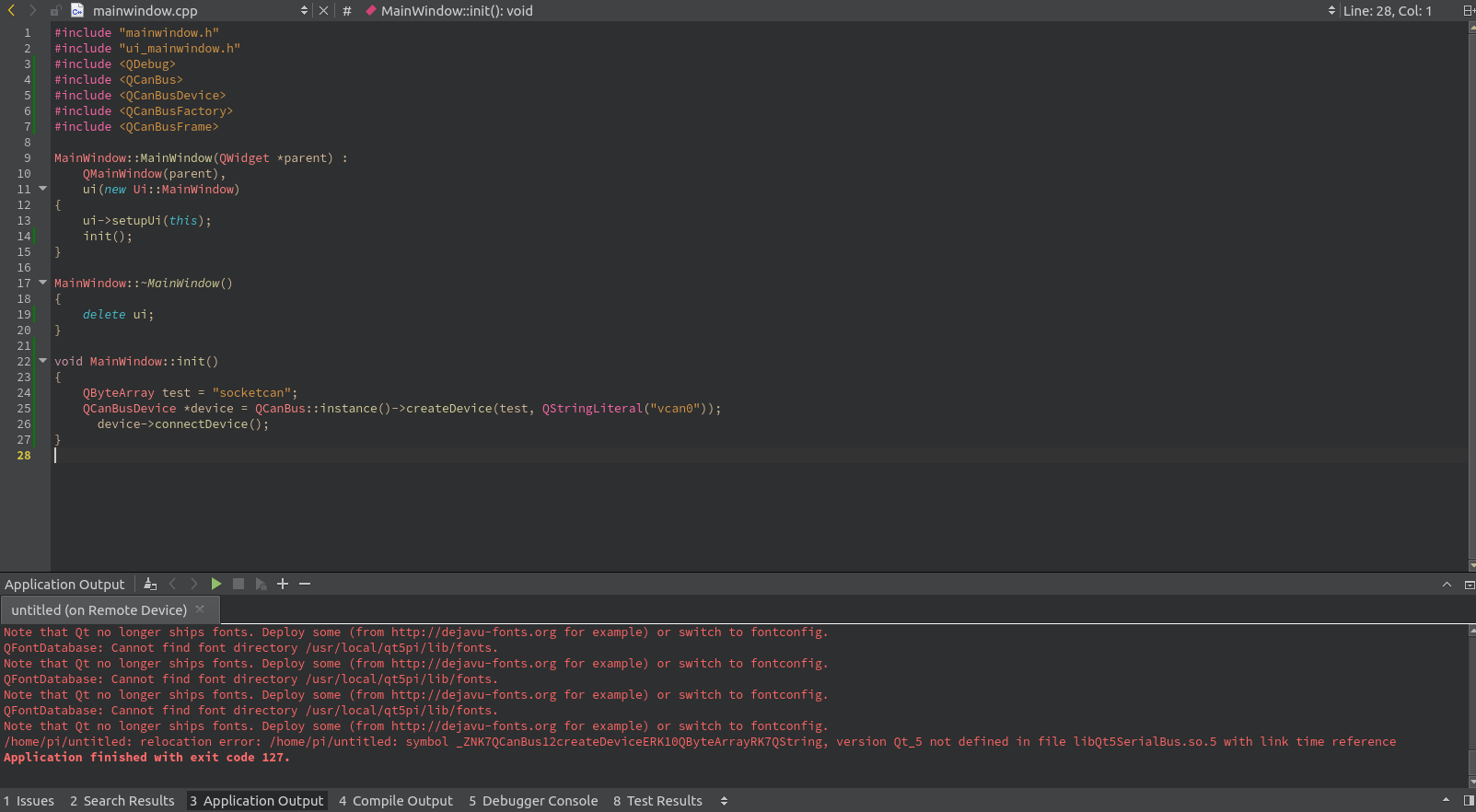
    alt text

    raven-worxR 1 Reply Last reply
    0
    • H haxxe

      Hi,
      ich versuche QtCanBus auf dem Pi zum laufen zu bekommen.
      Aber selbst der erste Befehl, schlägt fehl.
      Ich hab Qt 5.9.1 auf Ubuntu und mit den Sourcen hab ich mir Qt für den Pi kompiliert.
      Ein "normales" Programm läuft auch, aber ich bekomme schon das connecten des Canbusses nicht mehr hin, da streikt Qt.
      hier mein Code:

      #include "mainwindow.h"
      #include "ui_mainwindow.h"
      #include <QDebug>
      #include <QCanBus>
      #include <QCanBusDevice>
      #include <QCanBusFactory>
      #include <QCanBusFrame>
      
      MainWindow::MainWindow(QWidget *parent) :
          QMainWindow(parent),
          ui(new Ui::MainWindow)
      {
          ui->setupUi(this);
          QCanBusDevice *device = QCanBus::instance()->createDevice(
                QStringLiteral("socketcan"), QStringLiteral("vcan0"));
            device->connectDevice();
      }
      
      MainWindow::~MainWindow()
      {
          delete ui;
      }
      

      Als Fehler gibt es sofort:
      alt text
      Warum? Ich versuche jetzt seit 2 Tagen endlich auf den CanBus zuzugreifen, bzw auf mein can0 Element aufm Pi und rein garnichts funktioniert.
      Auch funktioniert das CanBusExample nicht, da fehlt angeblich QCanBusDeviceInfo, warum auch immer.
      Lieben Gruß

      EDIT: Wenn ich manuell, das erste argument, statt mit QString wie im Beispiel angegeben, mit QByteArray übergebe, startet es. Aber stürzt sofort wieder hiermit ab:
      alt text

      raven-worxR Offline
      raven-worxR Offline
      raven-worx
      Moderators
      wrote on last edited by
      #2

      @haxxe
      Der Fehlermeldung nach verwendest du verschiedene Qt Versionen zum Ausführen und Bauen deiner Applikation?!

      --- SUPPORT REQUESTS VIA CHAT WILL BE IGNORED ---
      If you have a question please use the forum so others can benefit from the solution in the future

      1 Reply Last reply
      1
      • H Offline
        H Offline
        haxxe
        wrote on last edited by haxxe
        #3

        Gelöst: falsches/veraltetet qmake im Pi Kit

        EDIT: Ja, das war das Problem. Ich hab damals erstmal qtrpi genutzt, welche mit QT5.7 arbeiten, und ich wollte jetzt Funktionen aus Qt5.9.1 nutzen, allerdings war das Kit, und dessen qmake noch 5.7.
        Hab natürlich alles ausgetauscht, außer das Kit.
        Jetzt läufts endlich! :)

        1 Reply Last reply
        1

        • Login

        • Login or register to search.
        • First post
          Last post
        0
        • Categories
        • Recent
        • Tags
        • Popular
        • Users
        • Groups
        • Search
        • Get Qt Extensions
        • Unsolved
