Skip to content
  • Categories
  • Recent
  • Tags
  • Popular
  • Users
  • Groups
  • Search
  • Get Qt Extensions
  • Unsolved
Collapse
Brand Logo
  1. Home
  2. Qt Development
  3. General and Desktop
  4. How do I properly deal with the QHeaderView of a QTreeWidget (it always displays "1" )
Qt 6.11 is out! See what's new in the release blog

How do I properly deal with the QHeaderView of a QTreeWidget (it always displays "1" )

Scheduled Pinned Locked Moved Unsolved General and Desktop
3 Posts 2 Posters 800 Views
  • Oldest to Newest
  • Newest to Oldest
  • Most Votes
Reply
  • Reply as topic
Log in to reply
This topic has been deleted. Only users with topic management privileges can see it.
  • enjoysmathE Offline
    enjoysmathE Offline
    enjoysmath
    wrote on last edited by
    #1

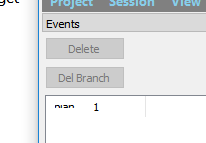
    Here's a screenshot:
    0_1501550413133_Untitled.png

    In which I tried to change its label:

    class HeaderView(QHeaderView):
        def __init__(self):
            super().__init__(Qt.Horizontal)
            #self.setContentsMargins(0, 0, 0, 0)
            self.setLayout(QGridLayout())
            self.layout().addWidget(QLabel("blah"), 0, 0)
    
    class EventsWidget(QDockWidget, Ui_EventsWidget):
        def __init__(self):
            super().__init__()
            super().__init__()
            self.setupUi(self)
        
            self.tree.setHeader(HeaderView())
    

    to no avail. How do you work with QTreeWidgets? How do I "get rid" of the "1"? Ideally I want a vertical list of ">"s (the default) but already expanded, without the "1" there. I also don't want a header of column labels.

    https://github.com/enjoysmath
    https://math.stackexchange.com/users/26327/exercisingmathematician

    1 Reply Last reply
    0
    • enjoysmathE Offline
      enjoysmathE Offline
      enjoysmath
      wrote on last edited by
      #2

      This seems to work and I am still able to add items (they show up):

      self.tree.header().setHidden(True)
      

      https://github.com/enjoysmath
      https://math.stackexchange.com/users/26327/exercisingmathematician

      1 Reply Last reply
      0
      • VRoninV Offline
        VRoninV Offline
        VRonin
        wrote on last edited by
        #3

        The contents of the QHeaderView are controlled by the model treeWidget.model().setHeaderData(/**/);

        "La mort n'est rien, mais vivre vaincu et sans gloire, c'est mourir tous les jours"
        ~Napoleon Bonaparte

        On a crusade to banish setIndexWidget() from the holy land of Qt

        1 Reply Last reply
        1

        • Login

        • Login or register to search.
        • First post
          Last post
        0
        • Categories
        • Recent
        • Tags
        • Popular
        • Users
        • Groups
        • Search
        • Get Qt Extensions
        • Unsolved