Skip to content
  • Categories
  • Recent
  • Tags
  • Popular
  • Users
  • Groups
  • Search
  • Get Qt Extensions
  • Unsolved
Collapse
Brand Logo
  1. Home
  2. Qt Development
  3. General and Desktop
  4. Menu items greyed out

Menu items greyed out

Scheduled Pinned Locked Moved Unsolved General and Desktop
6 Posts 3 Posters 2.5k Views 3 Watching
  • Oldest to Newest
  • Newest to Oldest
  • Most Votes
Reply
  • Reply as topic
Log in to reply
This topic has been deleted. Only users with topic management privileges can see it.
  • K Offline
    K Offline
    krec-dev
    wrote on last edited by
    #1

    Hi all: I am a newbie in Qt, even though have worked in C++.

    Developing a basic GUI. In that, have plugged in a simple media player using QMediaPlayer. But some of the menu items in Edit - like Cut / Copy / Paste - is greyed out while playing the video. But at other times it is active. I have checked designer UI file, and it is enabled as well. Other menu items in Edit menu are active.
    Any solutions for this trivial & strange issue?
    Thanks a ton, folks.

    raven-worxR 1 Reply Last reply
    0
    • K krec-dev

      Hi all: I am a newbie in Qt, even though have worked in C++.

      Developing a basic GUI. In that, have plugged in a simple media player using QMediaPlayer. But some of the menu items in Edit - like Cut / Copy / Paste - is greyed out while playing the video. But at other times it is active. I have checked designer UI file, and it is enabled as well. Other menu items in Edit menu are active.
      Any solutions for this trivial & strange issue?
      Thanks a ton, folks.

      raven-worxR Offline
      raven-worxR Offline
      raven-worx
      Moderators
      wrote on last edited by
      #2

      @krec-dev said in Menu items greyed out:

      But some of the menu items in Edit - like Cut / Copy / Paste - is greyed out while playing the video. But at other times it is active.

      about what menu are you talking?
      Where do the menu actions come from?

      --- SUPPORT REQUESTS VIA CHAT WILL BE IGNORED ---
      If you have a question please use the forum so others can benefit from the solution in the future

      1 Reply Last reply
      0
      • K Offline
        K Offline
        krec-dev
        wrote on last edited by
        #3

        Thanks @raven-worx for the note. My developed demo GUI for a video player has a EDIT menu, which has simple menu items called copy, paste etc.

        While the video is playing in the media player, the menu items of copy & paste in Edit menu in the top menu bar is greyed out. At other items, these menu items - copy & paste - in Edit menu are active.

        I have also attached a screenshot for your kind reference.

        Added to this, there is this un-needed "Emoji Symbols " menu in the Edit menu drop down on Mac. Any work arounds for that?
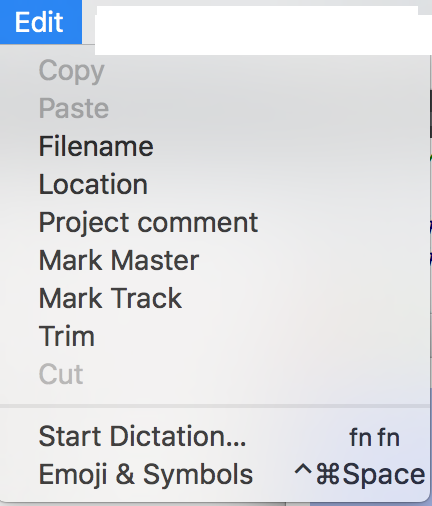
        0_1500982521521_Edit-Issue.png

        raven-worxR 1 Reply Last reply
        0
        • K krec-dev

          Thanks @raven-worx for the note. My developed demo GUI for a video player has a EDIT menu, which has simple menu items called copy, paste etc.

          While the video is playing in the media player, the menu items of copy & paste in Edit menu in the top menu bar is greyed out. At other items, these menu items - copy & paste - in Edit menu are active.

          I have also attached a screenshot for your kind reference.

          Added to this, there is this un-needed "Emoji Symbols " menu in the Edit menu drop down on Mac. Any work arounds for that?

          0_1500982521521_Edit-Issue.png

          raven-worxR Offline
          raven-worxR Offline
          raven-worx
          Moderators
          wrote on last edited by
          #4

          @krec-dev
          you haven't answered my question, but nevermind i figured it out by myself.
          try the following:

          #ifdef Q_OS_MAC
          #include <Foundation/NSUserDefaults.h>
          #endif
          
          int main(int argc, char **argv)
          {
          #ifdef Q_OS_MAC
              [[NSUserDefaults standardUserDefaults]
                  setBool:YES forKey:@"NSDisabledCharacterPaletteMenuItem"];
              [[NSUserDefaults standardUserDefaults]
                  setBool:YES forKey:@"NSDisabledDictationMenuItem"];
          #endif
          
              QApplication app(argc, argv);
              ....
              return app.exec();
          }
          

          --- SUPPORT REQUESTS VIA CHAT WILL BE IGNORED ---
          If you have a question please use the forum so others can benefit from the solution in the future

          1 Reply Last reply
          1
          • C Offline
            C Offline
            Charlie_Hdz
            wrote on last edited by
            #5

            Seems that you're disabling these action.

            I don't know your implementation, but would you think that may be a good idea to set up the actions in the ctor or any function that changes the actions?

            Thank you

            Kind Regards,
            Enrique Hernandez
            gearstech.com.mx
            chernandez@gearstech.com.mx

            1 Reply Last reply
            0
            • K Offline
              K Offline
              krec-dev
              wrote on last edited by
              #6

              To add further to this and clarify , please note the menu items will be disabled ONLY after calling QFileDialog to open and load a video file to play. Does this have any issue as mentioned here (https://forum.qt.io/topic/51950/qt-mac-osx-few-menu-items-are-disabled-after-qfiledialog). Need to check.

              Thanks for the replies, @raven-worx. But seems, the solutions is for the "emoji symbols and start dictation " menu items. But it appears it does not work out. I will explore that again.

              @Charlie_Hdz. I have not setup any actions, in fact tried adding simple statements after setting up actions too, but still it does not work. The moment , Copy/ Paste /Cut changes to say demo or Copies, Pastes, Cuts - the menu items are active!
              I observe on stack overflow, that giving space while defining the titles in creator will solve that, but it has not worked out for me so far.

              1 Reply Last reply
              0

              • Login

              • Login or register to search.
              • First post
                Last post
              0
              • Categories
              • Recent
              • Tags
              • Popular
              • Users
              • Groups
              • Search
              • Get Qt Extensions
              • Unsolved