Skip to content
  • Categories
  • Recent
  • Tags
  • Popular
  • Users
  • Groups
  • Search
  • Get Qt Extensions
  • Unsolved
Collapse
Brand Logo
  1. Home
  2. Qt Development
  3. Qt Creator and other tools
  4. QPainter howto draw Table
Qt 6.11 is out! See what's new in the release blog

QPainter howto draw Table

Scheduled Pinned Locked Moved Solved Qt Creator and other tools
16 Posts 4 Posters 12.1k Views 1 Watching
  • Oldest to Newest
  • Newest to Oldest
  • Most Votes
Reply
  • Reply as topic
Log in to reply
This topic has been deleted. Only users with topic management privileges can see it.
  • M Offline
    M Offline
    MrLibya
    wrote on last edited by
    #1

    Hello

    How i can draw a table in QPainter ?
    for e.g : alt text

    m.sueM jsulmJ 2 Replies Last reply
    0
    • M Offline
      M Offline
      MrLibya
      wrote on last edited by
      #15

      http://www.qtrpt.tk/?page=doc_qtrpt.php#usinginproject
      that's is what i was looking for :)
      thx all for help

      1 Reply Last reply
      1
      • M MrLibya

        Hello

        How i can draw a table in QPainter ?
        for e.g : alt text

        m.sueM Offline
        m.sueM Offline
        m.sue
        wrote on last edited by m.sue
        #2

        @MrLibya

        You don't. You create a table which displays data of some model and let the table draw itself.

        E.g. you can use the QTableWidget class.

        -Michael.

        M 1 Reply Last reply
        2
        • M MrLibya

          Hello

          How i can draw a table in QPainter ?
          for e.g : alt text

          jsulmJ Offline
          jsulmJ Offline
          jsulm
          Lifetime Qt Champion
          wrote on last edited by
          #3

          @MrLibya Why do you want to draw it manually? There are http://doc.qt.io/qt-5/qtablewidget.html and http://doc.qt.io/qt-5/qtableview.html

          https://forum.qt.io/topic/113070/qt-code-of-conduct

          1 Reply Last reply
          2
          • m.sueM m.sue

            @MrLibya

            You don't. You create a table which displays data of some model and let the table draw itself.

            E.g. you can use the QTableWidget class.

            -Michael.

            M Offline
            M Offline
            MrLibya
            wrote on last edited by
            #4

            @m.sue @jsulm cuz i don't show the table i only want print the table , i've make a QTableWidget ( without showing it ) and insert the data then i used render function , but the output is small part of the Table , and i didn't found any example for using the render function

            m.sueM jsulmJ 2 Replies Last reply
            0
            • M MrLibya

              @m.sue @jsulm cuz i don't show the table i only want print the table , i've make a QTableWidget ( without showing it ) and insert the data then i used render function , but the output is small part of the Table , and i didn't found any example for using the render function

              m.sueM Offline
              m.sueM Offline
              m.sue
              wrote on last edited by
              #5

              @MrLibya

              I would guess that you need to scale the rendering to the printer geometry i.e get the printer's size in pixel and give this to the render function.

              -Michael.

              1 Reply Last reply
              4
              • M MrLibya

                @m.sue @jsulm cuz i don't show the table i only want print the table , i've make a QTableWidget ( without showing it ) and insert the data then i used render function , but the output is small part of the Table , and i didn't found any example for using the render function

                jsulmJ Offline
                jsulmJ Offline
                jsulm
                Lifetime Qt Champion
                wrote on last edited by
                #6

                @MrLibya You should fix your printing as @m-sue suggested instead of drawing manually.

                https://forum.qt.io/topic/113070/qt-code-of-conduct

                1 Reply Last reply
                0
                • mrjjM Offline
                  mrjjM Offline
                  mrjj
                  Lifetime Qt Champion
                  wrote on last edited by mrjj
                  #7

                  Hi
                  You can do it like this ( among many ways)
                  Credits to @Ni.Sumi Sumi for base function

                  void MainWindow::on_pushButton_released() {
                    PrintWidget(ui->tableWidget);
                  }
                  
                  void MainWindow::PrintWidget(QWidget* widget) {
                  
                    QPixmap pix(widget->size());
                    QPainter painter(&pix);
                    widget->render(&painter);
                    painter.end();
                    QPrinter printer(QPrinter::HighResolution);
                    printer.setOrientation(QPrinter::Landscape);
                    printer.setOutputFormat(QPrinter::PdfFormat);
                    printer.setPaperSize(QPrinter::A4);
                    printer.setOutputFileName("test.pdf"); // will be in build folder
                  
                    painter.begin(&printer);
                    double xscale = printer.pageRect().width() / double(pix.width());
                    double yscale = printer.pageRect().height() / double(pix.height());
                    double scale = qMin(xscale, yscale);
                    painter.translate(printer.paperRect().x() + printer.pageRect().width() / 2,
                                      printer.paperRect().y() + printer.pageRect().height() / 2);
                    painter.scale(scale, scale);
                    painter.translate(-widget->width() / 2, -widget->height() / 2);
                    painter.drawPixmap(0, 0, pix);
                    painter.end();
                  }


                  Just disable the pdf part to have it on paper.

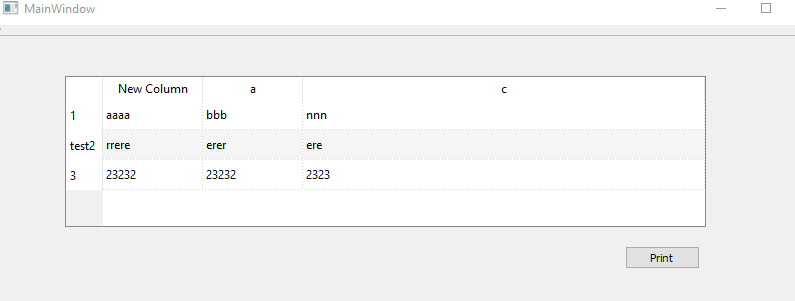
                  Screen:alt text

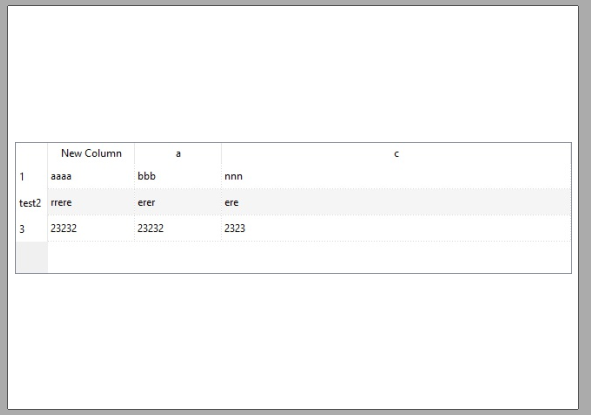
                  output:
                  alt text

                  Test project
                  https://www.dropbox.com/s/kvgo5fissc9i9t0/printtable.zip?dl=0

                  M 1 Reply Last reply
                  4
                  • mrjjM mrjj

                    Hi
                    You can do it like this ( among many ways)
                    Credits to @Ni.Sumi Sumi for base function

                    void MainWindow::on_pushButton_released() {
                      PrintWidget(ui->tableWidget);
                    }
                    
                    void MainWindow::PrintWidget(QWidget* widget) {
                    
                      QPixmap pix(widget->size());
                      QPainter painter(&pix);
                      widget->render(&painter);
                      painter.end();
                      QPrinter printer(QPrinter::HighResolution);
                      printer.setOrientation(QPrinter::Landscape);
                      printer.setOutputFormat(QPrinter::PdfFormat);
                      printer.setPaperSize(QPrinter::A4);
                      printer.setOutputFileName("test.pdf"); // will be in build folder
                    
                      painter.begin(&printer);
                      double xscale = printer.pageRect().width() / double(pix.width());
                      double yscale = printer.pageRect().height() / double(pix.height());
                      double scale = qMin(xscale, yscale);
                      painter.translate(printer.paperRect().x() + printer.pageRect().width() / 2,
                                        printer.paperRect().y() + printer.pageRect().height() / 2);
                      painter.scale(scale, scale);
                      painter.translate(-widget->width() / 2, -widget->height() / 2);
                      painter.drawPixmap(0, 0, pix);
                      painter.end();
                    }


                    Just disable the pdf part to have it on paper.

                    Screen:alt text

                    output:
                    alt text

                    Test project
                    https://www.dropbox.com/s/kvgo5fissc9i9t0/printtable.zip?dl=0

                    M Offline
                    M Offline
                    MrLibya
                    wrote on last edited by
                    #8

                    @mrjj said in QPainter howto draw Table:

                    painter.begin(&printer);
                    double xscale = printer.pageRect().width() / double(pix.width());
                    double yscale = printer.pageRect().height() / double(pix.height());
                    double scale = qMin(xscale, yscale);
                    painter.translate(printer.paperRect().x() + printer.pageRect().width() / 2,
                    printer.paperRect().y() + printer.pageRect().height() / 2);
                    painter.scale(scale, scale);
                    painter.translate(-widget->width() / 2, -widget->height() / 2);
                    painter.drawPixmap(0, 0, pix);
                    painter.end();

                    i got : alt text

                    code :

                    QTableWidget * test = new QTableWidget(this);
                        int row = 0;
                        for(MAPEmployeesTable::const_iterator it = mEmployeesTable->begin(); it != mEmployeesTable->end(); ++it){
                            test->setRowCount(row+1);
                            test->setItem(row,0,new QTableWidgetItem(it->second.getName()));
                            test->setItem(row,1,new QTableWidgetItem(it->second.getBsalary()));
                            test->setItem(row,2,new QTableWidgetItem(it->second.getAccommBonus()));
                            test->setItem(row,3,new QTableWidgetItem(it->second.getDiscriminBonus()));
                            test->setItem(row,4,new QTableWidgetItem(it->second.getDelegatBonus()));
                            test->setItem(row,5,new QTableWidgetItem(it->second.getTeachingBonus()));
                            test->setItem(row,6,new QTableWidgetItem(it->second.getReward()));
                            test->setItem(row,7,new QTableWidgetItem(it->second.getNOWBonus()));
                            row++;
                        }
                    
                        QPrinter printer(QPrinter::HighResolution);
                        printer.setOutputFileName("print.pdf");
                        printer.setOrientation(QPrinter::Landscape);
                        printer.setOutputFormat(QPrinter::PdfFormat);
                        printer.setPageSize(QPrinter::A4);
                    
                        QPixmap pix(test->size());
                        QPainter painter(&pix);
                        test->render(&painter);
                        painter.end();
                    
                        painter.begin(&printer);
                        double xscale = printer.pageRect().width() / double(pix.width());
                        double yscale = printer.pageRect().height() / double(pix.height());
                        double scale = qMin(xscale, yscale);
                        painter.translate(printer.paperRect().x() + printer.pageRect().width() / 2,
                                              printer.paperRect().y() + printer.pageRect().height() / 2);
                        painter.scale(scale, scale);
                        painter.translate(-test->width() / 2, -test->height() / 2);
                        painter.drawPixmap(0, 0, pix);
                        painter.end();
                    
                        delete test;
                    
                    1 Reply Last reply
                    0
                    • M Offline
                      M Offline
                      MrLibya
                      wrote on last edited by
                      #9
                      This post is deleted!
                      1 Reply Last reply
                      0
                      • M Offline
                        M Offline
                        MrLibya
                        wrote on last edited by
                        #10

                        the problem above is cuz i'm working on new QTableWidget without giveing it any size , so i try this on another table wodget and the result :

                        alt text

                        1 Reply Last reply
                        0
                        • mrjjM Offline
                          mrjjM Offline
                          mrjj
                          Lifetime Qt Champion
                          wrote on last edited by
                          #11

                          well it will have a default size then.
                          And it seems it has scrollbars too.
                          try to resize it to have the needed width.

                          M 1 Reply Last reply
                          0
                          • mrjjM mrjj

                            well it will have a default size then.
                            And it seems it has scrollbars too.
                            try to resize it to have the needed width.

                            M Offline
                            M Offline
                            MrLibya
                            wrote on last edited by
                            #12

                            @mrjj there will be another problem , so as u can see the render fucntion it's not take the table items..etc it just take a screenshot for the table
                            i don't want the header & scroolbar , also when i've more then 10 rows ( then i will have a scroolbar ) the render is only take screenshot for what is visible ( maybe only first 5 rows ) , i will have table with over 1k rows so it should be in every page maybe there 20 or 30 based on paper height , it's there any another class can do same this ?

                            also if i make it by HTML code is't ok ? ( while i think this is very stupid method)

                            1 Reply Last reply
                            0
                            • M Offline
                              M Offline
                              MrLibya
                              wrote on last edited by
                              #13
                              This post is deleted!
                              1 Reply Last reply
                              0
                              • M Offline
                                M Offline
                                MrLibya
                                wrote on last edited by
                                #14
                                This post is deleted!
                                1 Reply Last reply
                                0
                                • M Offline
                                  M Offline
                                  MrLibya
                                  wrote on last edited by
                                  #15

                                  http://www.qtrpt.tk/?page=doc_qtrpt.php#usinginproject
                                  that's is what i was looking for :)
                                  thx all for help

                                  1 Reply Last reply
                                  1
                                  • mrjjM Offline
                                    mrjjM Offline
                                    mrjj
                                    Lifetime Qt Champion
                                    wrote on last edited by
                                    #16

                                    Oh you have 1000 rows. Yes then report generator is surely the way to go as it would have been a huge image to show all them at once :)

                                    1 Reply Last reply
                                    1

                                    • Login

                                    • Login or register to search.
                                    • First post
                                      Last post
                                    0
                                    • Categories
                                    • Recent
                                    • Tags
                                    • Popular
                                    • Users
                                    • Groups
                                    • Search
                                    • Get Qt Extensions
                                    • Unsolved