Skip to content
  • Categories
  • Recent
  • Tags
  • Popular
  • Users
  • Groups
  • Search
  • Get Qt Extensions
  • Unsolved
Collapse
Brand Logo
  1. Home
  2. Qt Development
  3. General and Desktop
  4. Program failing at Run time
Qt 6.11 is out! See what's new in the release blog

Program failing at Run time

Scheduled Pinned Locked Moved Unsolved General and Desktop
4 Posts 2 Posters 907 Views 1 Watching
  • Oldest to Newest
  • Newest to Oldest
  • Most Votes
Reply
  • Reply as topic
Log in to reply
This topic has been deleted. Only users with topic management privileges can see it.
  • L Offline
    L Offline
    Luism
    wrote on last edited by
    #1

    Hi All,
    Just starting with Qt and really going through a few tutorials and reading a few books trying to get my skill levels up. Really enjoying it at the moment.
    I hit a problem on an example program that I am failing to resolve...
    This is an exercise from a book i am reading. Instead of just downloading the source code for the problem I'm actually writing the program as I go along. I already had to correct some issues on it to do with the windows api access, but now all seems good and builds fine but when I run it, it crashes immediately.
    I have now downloaded the source code from their website, corrected the same issues with the api and their program works fine. I then compared their files with mine and I can see any significant differences between them so I am at a loss here.
    This is my program files:

    link text

    The problem is with QLayout as far as I can see it, but I can't really see why. If I include QLayout on mainwindow.cpp, it will build fine but will crash on run time.

    I am re-writing the program from scratch but would really like to know what the problem is, as it is driving me up the wall! I would be grateful for some advice.

    Thank you.
    Best Regards
    Luis

    mrjjM 1 Reply Last reply
    0
    • L Luism

      Hi All,
      Just starting with Qt and really going through a few tutorials and reading a few books trying to get my skill levels up. Really enjoying it at the moment.
      I hit a problem on an example program that I am failing to resolve...
      This is an exercise from a book i am reading. Instead of just downloading the source code for the problem I'm actually writing the program as I go along. I already had to correct some issues on it to do with the windows api access, but now all seems good and builds fine but when I run it, it crashes immediately.
      I have now downloaded the source code from their website, corrected the same issues with the api and their program works fine. I then compared their files with mine and I can see any significant differences between them so I am at a loss here.
      This is my program files:

      link text

      The problem is with QLayout as far as I can see it, but I can't really see why. If I include QLayout on mainwindow.cpp, it will build fine but will crash on run time.

      I am re-writing the program from scratch but would really like to know what the problem is, as it is driving me up the wall! I would be grateful for some advice.

      Thank you.
      Best Regards
      Luis

      mrjjM Offline
      mrjjM Offline
      mrjj
      Lifetime Qt Champion
      wrote on last edited by mrjj
      #2

      @Luism
      Hi
      I dont have any QtCharts so could not run code.

      However, i saw u are using a standalone layout and your issues might come from that.
      Please read docs on how to use them
      http://doc.qt.io/qt-5/designer-layouts.html

      Adding layouts are done by right clicking. very rarely by dragging from widget collection.
      Its other type of use case.
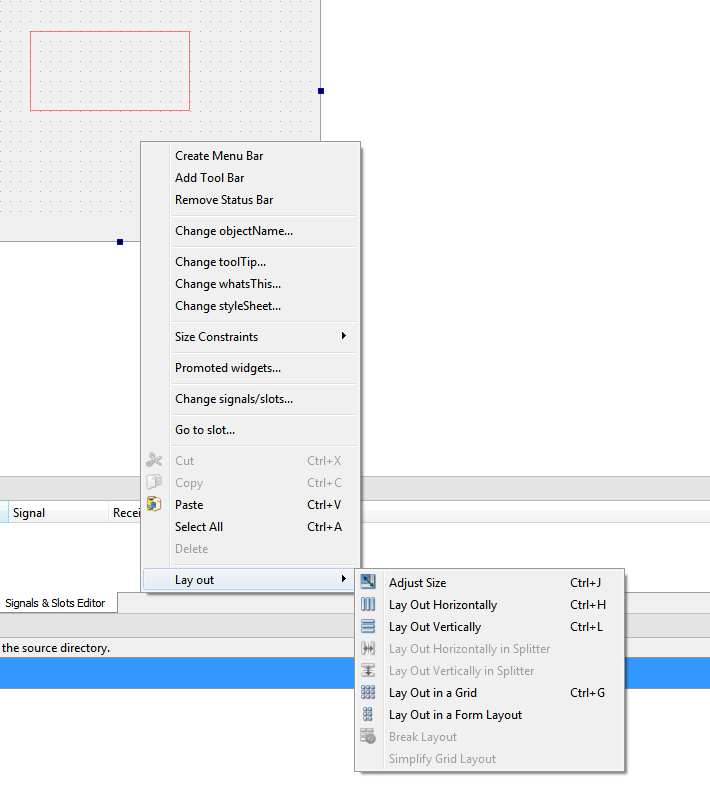
      alt text

      So i think you crash here ( mainwindow constructor)

      ui->centralWidget->layout()->

      As centralWidget DO NOT have a layout and it return NULL.

      Check that :)

      1 Reply Last reply
      2
      • L Offline
        L Offline
        Luism
        wrote on last edited by
        #3

        Hi,
        I am definitely missing something here... If I try to insert a layout by right clicking I don't get the same menu as you, the layouts are all greyed out.

        I did manage to make it work by dragging a Vertical Layout from the widget collection and then replace
        ui->centralWidget->layout()->addWidget(&mCpuWidget);
        with
        ui->verticalLayout->addWidget(&mCpuWidget);
        Is this a way it should be done?
        Thank you for your help.
        Best Regards
        Luis

        mrjjM 1 Reply Last reply
        0
        • L Luism

          Hi,
          I am definitely missing something here... If I try to insert a layout by right clicking I don't get the same menu as you, the layouts are all greyed out.

          I did manage to make it work by dragging a Vertical Layout from the widget collection and then replace
          ui->centralWidget->layout()->addWidget(&mCpuWidget);
          with
          ui->verticalLayout->addWidget(&mCpuWidget);
          Is this a way it should be done?
          Thank you for your help.
          Best Regards
          Luis

          mrjjM Offline
          mrjjM Offline
          mrjj
          Lifetime Qt Champion
          wrote on last edited by mrjj
          #4

          @Luism

          -i f I try to insert a layout by right clicking I don't get the same menu as you, the layouts are all greyed out.

          You must first place a widget (any) , then its not grey any more. :)

          Yes, its a bit tricky. :(

          ui->verticalLayout->addWidget(&mCpuWidget);

          Is not what you want., its a floating layout :)

          The right click is the way in most cases.

          1 Reply Last reply
          1

          • Login

          • Login or register to search.
          • First post
            Last post
          0
          • Categories
          • Recent
          • Tags
          • Popular
          • Users
          • Groups
          • Search
          • Get Qt Extensions
          • Unsolved