Skip to content
  • Categories
  • Recent
  • Tags
  • Popular
  • Users
  • Groups
  • Search
  • Get Qt Extensions
  • Unsolved
Collapse
Brand Logo
  1. Home
  2. Qt Development
  3. General and Desktop
  4. Is there some way to 'automatize' plugin creation?

Is there some way to 'automatize' plugin creation?

Scheduled Pinned Locked Moved Unsolved General and Desktop
2 Posts 2 Posters 785 Views 1 Watching
  • Oldest to Newest
  • Newest to Oldest
  • Most Votes
Reply
  • Reply as topic
Log in to reply
This topic has been deleted. Only users with topic management privileges can see it.
  • P Offline
    P Offline
    Panoss
    wrote on last edited by
    #1

    When I make a change in my plugin:

    1. I build it
    2. I close the Qt Creator (or else the existing plugin cannot be overwritten )
    3. I move the plugin from folder: C:\Documents\QtProjects\Tml\build-Tml-Desktop_Qt_5_0_2_MSVC2010_32bit-Release\release to the folder G:\Qt\Qt5.0.2\Tools\QtCreator\bin\designer, so the existing plugin is overwritten.
    4. I re - open Qt Creator.

    Is there some way to do all this automatically? (Qt Creator 2.7.0)

    1 Reply Last reply
    0
    • mrjjM Offline
      mrjjM Offline
      mrjj
      Lifetime Qt Champion
      wrote on last edited by mrjj
      #2

      Hi
      I use the "make install" feature

      http://doc.qt.io/qt-5/qmake-advanced-usage.html

      Look in "Installing Files"

      You can then make it copy it .

      Note for this to trigger. You must make a manual make step
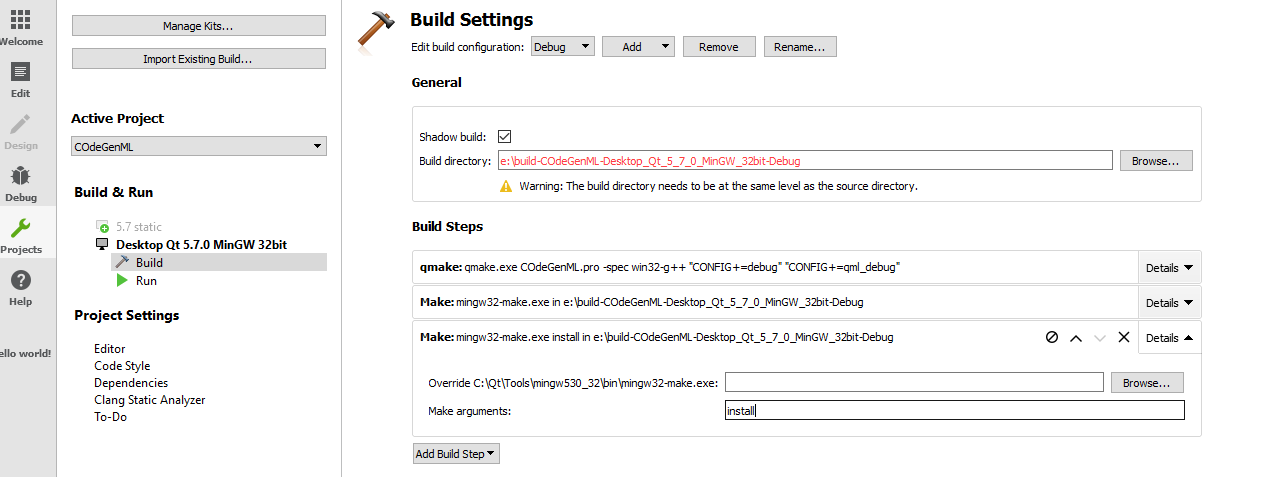
      alt text

      Example

      I have ( in pro)

      # if you are using Shadow build, you need to get the output folder
      CONFIG(release, debug|release): DESTDIR = $$OUT_PWD/release
      CONFIG(debug, debug|release): DESTDIR = $$OUT_PWD/debug
      
      install_it.path = $$DESTDIR/data
      install_it.files = $$PWD/copy_to_install_dir/*
      
      INSTALLS += \
          install_it


      This will copy the data folder in the project (copy_to_install_dir) to the build folder i folder called data . ( all files in copy_to_install_dir)

      You can then just copy to plugin folder.

      1 Reply Last reply
      3

      • Login

      • Login or register to search.
      • First post
        Last post
      0
      • Categories
      • Recent
      • Tags
      • Popular
      • Users
      • Groups
      • Search
      • Get Qt Extensions
      • Unsolved