Skip to content
  • Categories
  • Recent
  • Tags
  • Popular
  • Users
  • Groups
  • Search
  • Get Qt Extensions
  • Unsolved
Collapse
Brand Logo
  1. Home
  2. Qt Development
  3. General and Desktop
  4. Qt Creator 5.8 - (i) letter not writting
Forum Updated to NodeBB v4.3 + New Features

Qt Creator 5.8 - (i) letter not writting

Scheduled Pinned Locked Moved Unsolved General and Desktop
12 Posts 4 Posters 2.9k Views 2 Watching
  • Oldest to Newest
  • Newest to Oldest
  • Most Votes
Reply
  • Reply as topic
Log in to reply
This topic has been deleted. Only users with topic management privileges can see it.
  • I Offline
    I Offline
    Ibrahim
    wrote on last edited by Ibrahim
    #1

    Hi; I installed Qt 5.8 on Ubuntu 16.04. I cannot write (i or I) letter. Is this an issue? Thanks.

    jsulmJ 1 Reply Last reply
    0
    • I Ibrahim

      Hi; I installed Qt 5.8 on Ubuntu 16.04. I cannot write (i or I) letter. Is this an issue? Thanks.

      jsulmJ Offline
      jsulmJ Offline
      jsulm
      Lifetime Qt Champion
      wrote on last edited by
      #2

      @Ibrahim I guess you mean QtCreator 4.2.1? Qt != QtCreator.
      Works for me on Ubuntu 16.04.
      An issue with your computer I would say.

      https://forum.qt.io/topic/113070/qt-code-of-conduct

      I 1 Reply Last reply
      2
      • jsulmJ jsulm

        @Ibrahim I guess you mean QtCreator 4.2.1? Qt != QtCreator.
        Works for me on Ubuntu 16.04.
        An issue with your computer I would say.

        I Offline
        I Offline
        Ibrahim
        wrote on last edited by
        #3

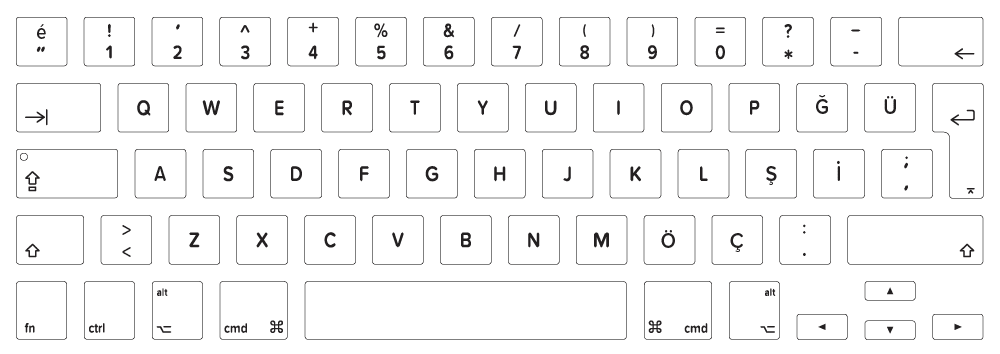
        @jsulm thanks. Yes, I'm talking about Qt Creator 4.2.1. I removed Qt 5.8 and I installed Qt 5.8 with Qt Creator 4.2.1 again. But result is same. Should I return Qt 5.7? I'm using Turkish Q Keyboard. Like this:
        alt text

        K jsulmJ 2 Replies Last reply
        0
        • I Ibrahim

          @jsulm thanks. Yes, I'm talking about Qt Creator 4.2.1. I removed Qt 5.8 and I installed Qt 5.8 with Qt Creator 4.2.1 again. But result is same. Should I return Qt 5.7? I'm using Turkish Q Keyboard. Like this:
          alt text

          K Offline
          K Offline
          koahnig
          wrote on last edited by
          #4

          @Ibrahim

          Just by looking at the keyboard and your initial question, where are the missing characters located?
          Is it the standard 'i' located between 'u' and 'o'?
          Or is it the special character second after 'L' and before the ';'?

          Vote the answer(s) that helped you to solve your issue(s)

          I 1 Reply Last reply
          1
          • I Ibrahim

            @jsulm thanks. Yes, I'm talking about Qt Creator 4.2.1. I removed Qt 5.8 and I installed Qt 5.8 with Qt Creator 4.2.1 again. But result is same. Should I return Qt 5.7? I'm using Turkish Q Keyboard. Like this:
            alt text

            jsulmJ Offline
            jsulmJ Offline
            jsulm
            Lifetime Qt Champion
            wrote on last edited by jsulm
            #5

            @Ibrahim One more question: are you unable to enter i character in QtCreator on in Qt apps you're writing?
            Because from your description it is not clear.
            If it is in your apps, can you tell us whether it is in some Qt Widgets or QML controls?

            https://forum.qt.io/topic/113070/qt-code-of-conduct

            I 1 Reply Last reply
            2
            • K koahnig

              @Ibrahim

              Just by looking at the keyboard and your initial question, where are the missing characters located?
              Is it the standard 'i' located between 'u' and 'o'?
              Or is it the special character second after 'L' and before the ';'?

              I Offline
              I Offline
              Ibrahim
              wrote on last edited by Ibrahim
              #6

              @koahnig thanks, Not writting both 'I' and 'i' (you can understand ----> i = Alt + 105 and I = Alt + 73).

              @jsulm thanks, I create a new project and I set name of project or I'm writting 'i' or 'I' letter on editor, but when I pressed 'I' or 'i' letter, it's not writting on Ubuntu 16.04. I installed Qt 5.8 with Qt Creator 4.2.1. Qt Creator 4.2.1 is running successfully. So, I can writting 'i' and 'I' letters on Windows 10 Home.
              I will try I reinstall Ubuntu 16.04.

              1 Reply Last reply
              0
              • jsulmJ jsulm

                @Ibrahim One more question: are you unable to enter i character in QtCreator on in Qt apps you're writing?
                Because from your description it is not clear.
                If it is in your apps, can you tell us whether it is in some Qt Widgets or QML controls?

                I Offline
                I Offline
                Ibrahim
                wrote on last edited by Ibrahim
                #7

                Updated. I installed Oracle VirtualBox on Windows 10 Home and I installed Ubuntu 16.04 x64. Then I installed Qt Creator 4.2.1 (Qt 5.8), but result is same. I cannot write 'i' or 'I' letters. I pressed 'i' and 'I' letters, but it's not writting. I think Qt Creator 4.2.1 has got a bug on Ubuntu 16.04 for Turkish Q Keyboard.

                jsulmJ 1 Reply Last reply
                0
                • I Ibrahim

                  Updated. I installed Oracle VirtualBox on Windows 10 Home and I installed Ubuntu 16.04 x64. Then I installed Qt Creator 4.2.1 (Qt 5.8), but result is same. I cannot write 'i' or 'I' letters. I pressed 'i' and 'I' letters, but it's not writting. I think Qt Creator 4.2.1 has got a bug on Ubuntu 16.04 for Turkish Q Keyboard.

                  jsulmJ Offline
                  jsulmJ Offline
                  jsulm
                  Lifetime Qt Champion
                  wrote on last edited by
                  #8

                  @Ibrahim Then you can create a bug report.

                  https://forum.qt.io/topic/113070/qt-code-of-conduct

                  I 1 Reply Last reply
                  1
                  • jsulmJ jsulm

                    @Ibrahim Then you can create a bug report.

                    I Offline
                    I Offline
                    Ibrahim
                    wrote on last edited by
                    #9

                    @jsulm thanks, I reported the bug.

                    1 Reply Last reply
                    0
                    • SGaistS Offline
                      SGaistS Offline
                      SGaist
                      Lifetime Qt Champion
                      wrote on last edited by
                      #10

                      Hi,

                      Can you share the report link ? That way it will make it easier for other people to find it.

                      Interested in AI ? www.idiap.ch
                      Please read the Qt Code of Conduct - https://forum.qt.io/topic/113070/qt-code-of-conduct

                      I 1 Reply Last reply
                      0
                      • SGaistS SGaist

                        Hi,

                        Can you share the report link ? That way it will make it easier for other people to find it.

                        I Offline
                        I Offline
                        Ibrahim
                        wrote on last edited by
                        #11

                        @SGaist, Of Course; The link: https://bugreports.qt.io/browse/QTBUG-58413

                        1 Reply Last reply
                        1
                        • SGaistS Offline
                          SGaistS Offline
                          SGaist
                          Lifetime Qt Champion
                          wrote on last edited by
                          #12

                          Thanks !

                          Interested in AI ? www.idiap.ch
                          Please read the Qt Code of Conduct - https://forum.qt.io/topic/113070/qt-code-of-conduct

                          1 Reply Last reply
                          0

                          • Login

                          • Login or register to search.
                          • First post
                            Last post
                          0
                          • Categories
                          • Recent
                          • Tags
                          • Popular
                          • Users
                          • Groups
                          • Search
                          • Get Qt Extensions
                          • Unsolved