Skip to content
  • Categories
  • Recent
  • Tags
  • Popular
  • Users
  • Groups
  • Search
  • Get Qt Extensions
  • Unsolved
Collapse
Brand Logo
  1. Home
  2. Qt Development
  3. General and Desktop
  4. Draws Rect not from pos of the cursor (code provided)

Draws Rect not from pos of the cursor (code provided)

Scheduled Pinned Locked Moved Solved General and Desktop
12 Posts 2 Posters 2.5k Views 1 Watching
  • Oldest to Newest
  • Newest to Oldest
  • Most Votes
Reply
  • Reply as topic
Log in to reply
This topic has been deleted. Only users with topic management privileges can see it.
  • mandruk1331M Offline
    mandruk1331M Offline
    mandruk1331
    wrote on last edited by mandruk1331
    #1
    This post is deleted!
    1 Reply Last reply
    0
    • mrjjM Offline
      mrjjM Offline
      mrjj
      Lifetime Qt Champion
      wrote on last edited by mrjj
      #2

      Hi
      You might need to use
      mapFromGlobal / maptoGLobal
      translate from inside x,y to global rubberband x,y

      You should check the docs if event->pos() is in global or local coordinates.
      And then translate .
      I guess its in local, so you want to translate to Global
      as setGeometry is in global.

      mandruk1331M 1 Reply Last reply
      1
      • mrjjM mrjj

        Hi
        You might need to use
        mapFromGlobal / maptoGLobal
        translate from inside x,y to global rubberband x,y

        You should check the docs if event->pos() is in global or local coordinates.
        And then translate .
        I guess its in local, so you want to translate to Global
        as setGeometry is in global.

        mandruk1331M Offline
        mandruk1331M Offline
        mandruk1331
        wrote on last edited by
        #3

        @mrjj
        The functions pos(), x(), and y() give the cursor position relative to the widget that receives the mouse event. - from docs
        so I need to translate the event-pos() coordinates to global?

        mrjjM 1 Reply Last reply
        1
        • mandruk1331M mandruk1331

          @mrjj
          The functions pos(), x(), and y() give the cursor position relative to the widget that receives the mouse event. - from docs
          so I need to translate the event-pos() coordinates to global?

          mrjjM Offline
          mrjjM Offline
          mrjj
          Lifetime Qt Champion
          wrote on last edited by
          #4

          @mandruk1331
          Yes , since you use it with setGeometry then
          you need to use mapToGlobal.
          The x,y in setGeometry is global.

          mandruk1331M 1 Reply Last reply
          1
          • mrjjM mrjj

            @mandruk1331
            Yes , since you use it with setGeometry then
            you need to use mapToGlobal.
            The x,y in setGeometry is global.

            mandruk1331M Offline
            mandruk1331M Offline
            mandruk1331
            wrote on last edited by
            #5

            @mrjj
            like this:
            origin = ui->label->mapFromGlobal(this->mapToGlobal(event->pos()));

            mrjjM 1 Reply Last reply
            0
            • mandruk1331M mandruk1331

              @mrjj
              like this:
              origin = ui->label->mapFromGlobal(this->mapToGlobal(event->pos()));

              mrjjM Offline
              mrjjM Offline
              mrjj
              Lifetime Qt Champion
              wrote on last edited by
              #6

              @mandruk1331

              Hi im not sure it must be double mapped
              More like
              QPoint origin = this->mapToGlobal(event->pos()));
              rubber->setGeometry(QRect(origin xxxx)

              mandruk1331M 1 Reply Last reply
              1
              • mrjjM mrjj

                @mandruk1331

                Hi im not sure it must be double mapped
                More like
                QPoint origin = this->mapToGlobal(event->pos()));
                rubber->setGeometry(QRect(origin xxxx)

                mandruk1331M Offline
                mandruk1331M Offline
                mandruk1331
                wrote on last edited by mandruk1331
                #7

                @mrjj it's not drawing then. Is it better to use QRubberBand to draw an area of interest on the image, or QPaint?

                mrjjM 1 Reply Last reply
                0
                • mandruk1331M mandruk1331

                  @mrjj it's not drawing then. Is it better to use QRubberBand to draw an area of interest on the image, or QPaint?

                  mrjjM Offline
                  mrjjM Offline
                  mrjj
                  Lifetime Qt Champion
                  wrote on last edited by
                  #8

                  @mandruk1331
                  Ok. Not sure why. Maybe Class is not what i think. ( the qlabel)

                  Well with QRubberBand you can move it again as its not part of image.
                  So if it works well, nothing bad in using it. You could also draw it directly which is more
                  light but it becomes part of the image so its harder to undo/move/delete etc.
                  So depending on your needs, QRubberBand might be a good solution.

                  mandruk1331M 1 Reply Last reply
                  0
                  • mrjjM mrjj

                    @mandruk1331
                    Ok. Not sure why. Maybe Class is not what i think. ( the qlabel)

                    Well with QRubberBand you can move it again as its not part of image.
                    So if it works well, nothing bad in using it. You could also draw it directly which is more
                    light but it becomes part of the image so its harder to undo/move/delete etc.
                    So depending on your needs, QRubberBand might be a good solution.

                    mandruk1331M Offline
                    mandruk1331M Offline
                    mandruk1331
                    wrote on last edited by mandruk1331
                    #9

                    @mrjj I DID IT!!! the problem was not in the code but in the UI. One more thing, in my UI i have a QLabel is there a way to draw the bounds of the label?

                    mrjjM 1 Reply Last reply
                    1
                    • mandruk1331M mandruk1331

                      @mrjj I DID IT!!! the problem was not in the code but in the UI. One more thing, in my UI i have a QLabel is there a way to draw the bounds of the label?

                      mrjjM Offline
                      mrjjM Offline
                      mrjj
                      Lifetime Qt Champion
                      wrote on last edited by
                      #10

                      @mandruk1331
                      good work!
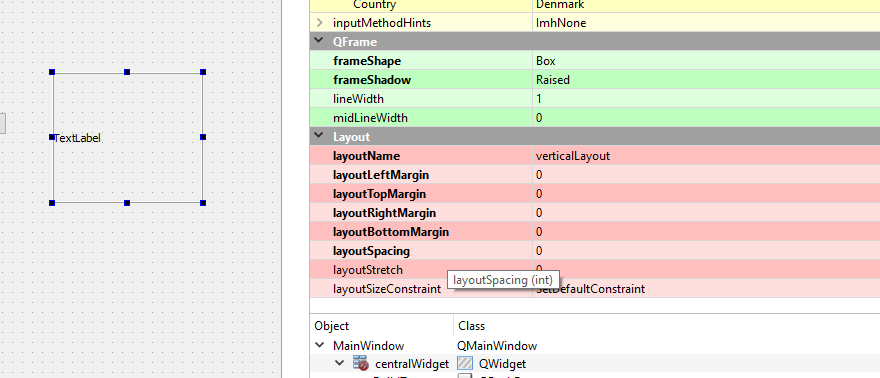
                      To draw borders on a QLabel, I think you need
                      to create new Widget (Qlabel as base class) and override PaintEvent.
                      Then first call base paint, and then draw the borders.

                      Alternativ, you can use a frame, set FrameShape to "box"
                      insert layout to frame, then put label in layout.
                      set Layout margins for layout to zero (from 9)
                      It would then fit so tight that the label would have borders.
                      mandruk1331M 1 Reply Last reply
                      2
                      • mrjjM mrjj

                        @mandruk1331
                        good work!
                        To draw borders on a QLabel, I think you need
                        to create new Widget (Qlabel as base class) and override PaintEvent.
                        Then first call base paint, and then draw the borders.

                        Alternativ, you can use a frame, set FrameShape to "box"
                        insert layout to frame, then put label in layout.
                        set Layout margins for layout to zero (from 9)
                        It would then fit so tight that the label would have borders.

                        mandruk1331M Offline
                        mandruk1331M Offline
                        mandruk1331
                        wrote on last edited by
                        #11

                        @mrjj Thanks. I overloaded the PaintEvent method and then I was able to draw a rect

                        mrjjM 1 Reply Last reply
                        0
                        • mandruk1331M mandruk1331

                          @mrjj Thanks. I overloaded the PaintEvent method and then I was able to draw a rect

                          mrjjM Offline
                          mrjjM Offline
                          mrjj
                          Lifetime Qt Champion
                          wrote on last edited by
                          #12

                          @mandruk1331
                          Super. I think its the best solution. Also if you need other features, you now have your own QLabel derived class and can work from there.

                          1 Reply Last reply
                          2

                          • Login

                          • Login or register to search.
                          • First post
                            Last post
                          0
                          • Categories
                          • Recent
                          • Tags
                          • Popular
                          • Users
                          • Groups
                          • Search
                          • Get Qt Extensions
                          • Unsolved