Skip to content
  • Categories
  • Recent
  • Tags
  • Popular
  • Users
  • Groups
  • Search
  • Get Qt Extensions
  • Unsolved
Collapse
Brand Logo
  1. Home
  2. Qt Development
  3. General and Desktop
  4. Qt5 WindowsVista widget style, broken QTreeWidget controls hover graphics
Qt 6.11 is out! See what's new in the release blog

Qt5 WindowsVista widget style, broken QTreeWidget controls hover graphics

Scheduled Pinned Locked Moved Solved General and Desktop
5 Posts 3 Posters 2.6k Views 1 Watching
  • Oldest to Newest
  • Newest to Oldest
  • Most Votes
Reply
  • Reply as topic
Log in to reply
This topic has been deleted. Only users with topic management privileges can see it.
  • P Offline
    P Offline
    Phil_W
    wrote on last edited by
    #1

    We just ported our large application from Qt 4.8.5 to Qt 5.5.1. We need to continue using the "WindowsVista" widget style. But we are seeing some graphical anomalies in QTreeWidget open/close controls.

    Sometimes some drawing artifacts are left over on items from the current or selected ornamentation.

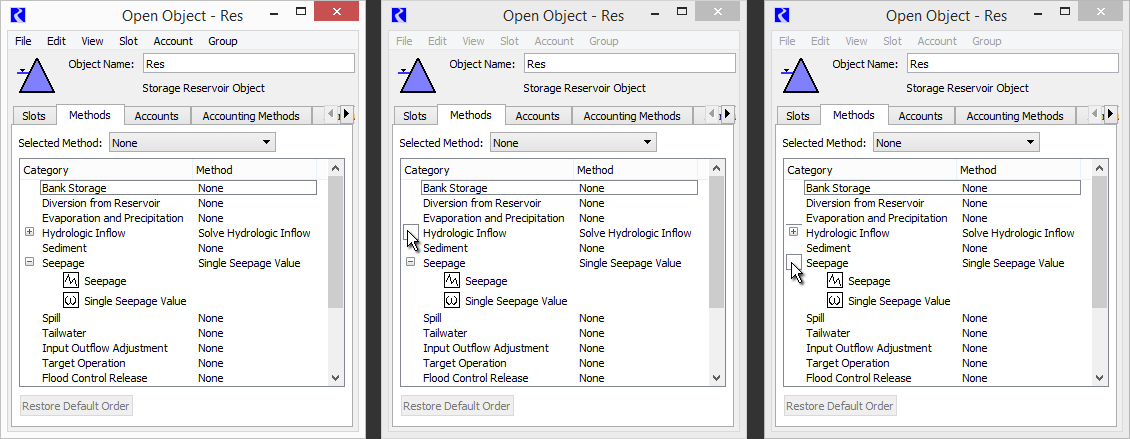
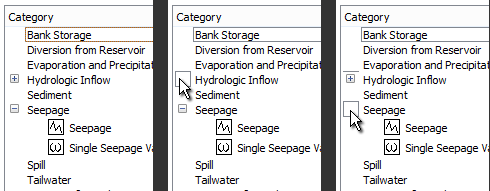
    But more prominently the MOUSE HOVER ornamentation on the tree item Open/Closed control is a SQUARE FRAME (which also sometimes leaves drawing artifacts behind).

    See these image sequences (with the mouse hovering in different places):
    alt text
    http://cadswes2.colorado.edu/~philw/pub/2016/RwQt5/TreeViews/TvDecoration2.png
    http://cadswes2.colorado.edu/~philw/pub/2016/RwQt5/TreeViews/TvDecoration2-Detail.png

    We're not seeing this problem with the new (Qt5) "Fusion" widget style.

    We're seeing this on both Windows 8.1 and Windows 7. (But it doesn't happen in Windows 7 if the "Windows Classic" Personalization Theme is selected).

    We're building with Visual Studio 2010 SP1.

    Any ideas about what might be causing this QTreeWidget problem in Qt 5.5.1 with the "WindowsVista" widget style?

    Thank you in advance.

    raven-worxR 1 Reply Last reply
    0
    • P Phil_W

      We just ported our large application from Qt 4.8.5 to Qt 5.5.1. We need to continue using the "WindowsVista" widget style. But we are seeing some graphical anomalies in QTreeWidget open/close controls.

      Sometimes some drawing artifacts are left over on items from the current or selected ornamentation.

      But more prominently the MOUSE HOVER ornamentation on the tree item Open/Closed control is a SQUARE FRAME (which also sometimes leaves drawing artifacts behind).

      See these image sequences (with the mouse hovering in different places):

      alt text
      http://cadswes2.colorado.edu/~philw/pub/2016/RwQt5/TreeViews/TvDecoration2.png
      http://cadswes2.colorado.edu/~philw/pub/2016/RwQt5/TreeViews/TvDecoration2-Detail.png

      We're not seeing this problem with the new (Qt5) "Fusion" widget style.

      We're seeing this on both Windows 8.1 and Windows 7. (But it doesn't happen in Windows 7 if the "Windows Classic" Personalization Theme is selected).

      We're building with Visual Studio 2010 SP1.

      Any ideas about what might be causing this QTreeWidget problem in Qt 5.5.1 with the "WindowsVista" widget style?

      Thank you in advance.

      raven-worxR Offline
      raven-worxR Offline
      raven-worx
      Moderators
      wrote on last edited by
      #2

      @Phil_W
      there were some known issues with the treeview expand/collapse icons.
      Try upgrading to Qt 5.6.1 at least and check again.
      See QTBUG-52230 and QTBUG-53310

      --- SUPPORT REQUESTS VIA CHAT WILL BE IGNORED ---
      If you have a question please use the forum so others can benefit from the solution in the future

      1 Reply Last reply
      1
      • P Offline
        P Offline
        Phil_W
        wrote on last edited by
        #3

        Qt commercial support was able to provide to us a patch for Qt 5.5.1 which incorporated the necessary fixes from Qt 5.6 and Qt 5.6.1. For those who can see this (having a commercial license), this was incident INC-1070436. I'm attaching the patch file. It is applied from the 'qtbase' directory, with this patch command:

        • patch -i 1070436.diff -p 1

        It modifies these files, with no changes to public Qt interfaces:
        src/widgets/styles/qwindowsvistastyle.cpp
        src/widgets/styles/qwindowsvistastyle_p_p.h
        src/widgets/styles/qwindowsxpstyle.cpp
        src/widgets/styles/qwindowsxpstyle_p_p.h

        Usual disclaimers apply. This is, of course, has not undergone the normal release testing regimen. We are building this with Visual Studio 2010 SP1 on Windows 8.1.

        See attachment: 1070436.diff
        How do I attach a file to a forum post? I'm not seeing it.

        mrjjM 1 Reply Last reply
        1
        • P Phil_W

          Qt commercial support was able to provide to us a patch for Qt 5.5.1 which incorporated the necessary fixes from Qt 5.6 and Qt 5.6.1. For those who can see this (having a commercial license), this was incident INC-1070436. I'm attaching the patch file. It is applied from the 'qtbase' directory, with this patch command:

          • patch -i 1070436.diff -p 1

          It modifies these files, with no changes to public Qt interfaces:
          src/widgets/styles/qwindowsvistastyle.cpp
          src/widgets/styles/qwindowsvistastyle_p_p.h
          src/widgets/styles/qwindowsxpstyle.cpp
          src/widgets/styles/qwindowsxpstyle_p_p.h

          Usual disclaimers apply. This is, of course, has not undergone the normal release testing regimen. We are building this with Visual Studio 2010 SP1 on Windows 8.1.

          See attachment: 1070436.diff
          How do I attach a file to a forum post? I'm not seeing it.

          mrjjM Offline
          mrjjM Offline
          mrjj
          Lifetime Qt Champion
          wrote on last edited by mrjj
          #4

          @Phil_W
          Hi please use external site and post link here.
          Thank you for reporting back.

          1 Reply Last reply
          0
          • P Offline
            P Offline
            Phil_W
            wrote on last edited by
            #5

            Here is the a link to 1070436.diff. Usual disclaimers apply. This, of course, has not undergone the normal release testing regimen. See my prior messages in this thread:

            • http://cadswes2.colorado.edu/~philw/pub/2016/1070436.diff
            1 Reply Last reply
            1

            • Login

            • Login or register to search.
            • First post
              Last post
            0
            • Categories
            • Recent
            • Tags
            • Popular
            • Users
            • Groups
            • Search
            • Get Qt Extensions
            • Unsolved