Skip to content
  • Categories
  • Recent
  • Tags
  • Popular
  • Users
  • Groups
  • Search
  • Get Qt Extensions
  • Unsolved
Collapse
Brand Logo
  1. Home
  2. Qt Development
  3. QML and Qt Quick
  4. why property x:width/2 is not same in Qt for android and desktop?
Qt 6.11 is out! See what's new in the release blog

why property x:width/2 is not same in Qt for android and desktop?

Scheduled Pinned Locked Moved Unsolved QML and Qt Quick
3 Posts 3 Posters 1.4k Views 2 Watching
  • Oldest to Newest
  • Newest to Oldest
  • Most Votes
Reply
  • Reply as topic
Log in to reply
This topic has been deleted. Only users with topic management privileges can see it.
  • stackprogramerS Offline
    stackprogramerS Offline
    stackprogramer
    wrote on last edited by stackprogramer
    #1

    hi,main is a id of window that my app is start with it..

    in my app i uses property x:main.width/2 for position of my type text in QML.
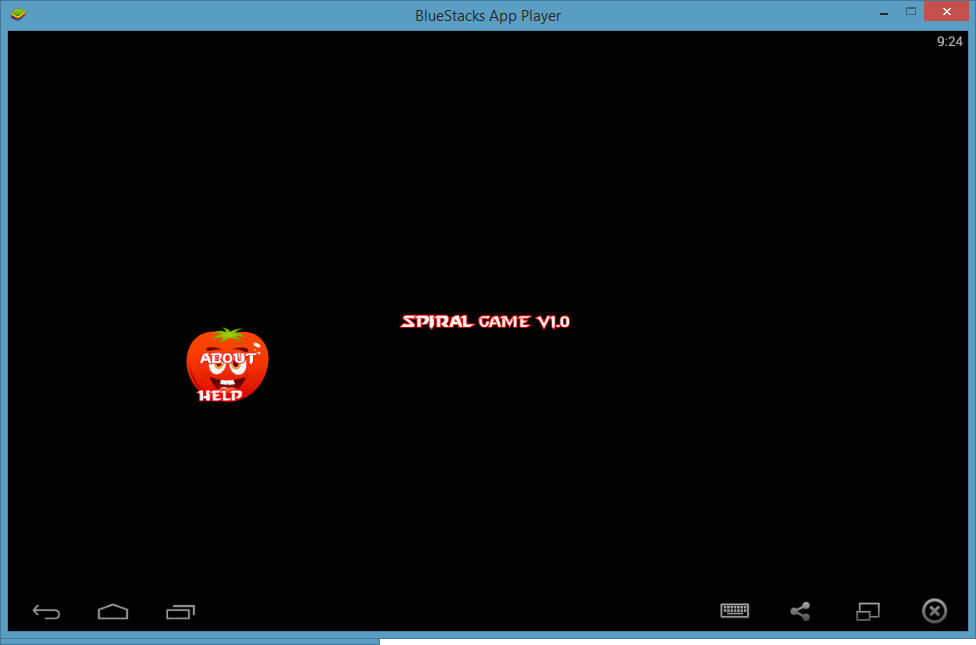
    in desktop mode texts are in middle of window...
    please see image

    qtdesktop
    now for android
    qtandroid

    how i can create same result in two platform...
    thanks for attention

    A kshegunovK 2 Replies Last reply
    0
    • stackprogramerS stackprogramer

      hi,main is a id of window that my app is start with it..

      in my app i uses property x:main.width/2 for position of my type text in QML.
      in desktop mode texts are in middle of window...
      please see image
      qtdesktop
      now for android
      qtandroid

      how i can create same result in two platform...
      thanks for attention

      A Offline
      A Offline
      archqt
      wrote on last edited by
      #2

      @stackprogramer
      Hi,
      can you send some code, else not easy to see what is wrong. Thanks
      Sincerely

      1 Reply Last reply
      0
      • stackprogramerS stackprogramer

        hi,main is a id of window that my app is start with it..

        in my app i uses property x:main.width/2 for position of my type text in QML.
        in desktop mode texts are in middle of window...
        please see image
        qtdesktop
        now for android
        qtandroid

        how i can create same result in two platform...
        thanks for attention

        kshegunovK Offline
        kshegunovK Offline
        kshegunov
        Moderators
        wrote on last edited by kshegunov
        #3

        @stackprogramer
        Just anchor your elements.

        anchors.centerIn: parent
        

        Read and abide by the Qt Code of Conduct

        1 Reply Last reply
        0

        • Login

        • Login or register to search.
        • First post
          Last post
        0
        • Categories
        • Recent
        • Tags
        • Popular
        • Users
        • Groups
        • Search
        • Get Qt Extensions
        • Unsolved