Skip to content
  • Categories
  • Recent
  • Tags
  • Popular
  • Users
  • Groups
  • Search
  • Get Qt Extensions
  • Unsolved
Collapse
Brand Logo
  1. Home
  2. Qt Development
  3. QML and Qt Quick
  4. QtAV: Qt Quick items display wrong textures
Qt 6.11 is out! See what's new in the release blog

QtAV: Qt Quick items display wrong textures

Scheduled Pinned Locked Moved QML and Qt Quick
1 Posts 1 Posters 1.3k Views 1 Watching
  • Oldest to Newest
  • Newest to Oldest
  • Most Votes
Reply
  • Reply as topic
Log in to reply
This topic has been deleted. Only users with topic management privileges can see it.
  • I Offline
    I Offline
    ibingow
    wrote on last edited by
    #1

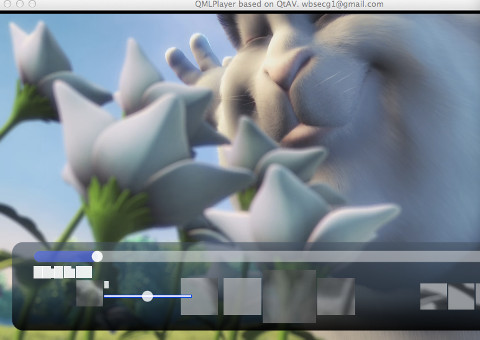
    Now i'm developing rendering yuv frames with opengl for qml. Video frames can display correctly. But other items display wrong contents. Text item becomes white rectangles. Image item displays a part of video frame, the color is gray. If I render rgb frames instead yuv frames, all works fine.

    Now i have no ideas. What could be the reason?

    code is here: https://github.com/wang-bin/QtAV

    you can try yourself. in "examples/QMLPlayer/qml/QMLPlayer/main.qml", add a line @opengl: true@ in "VideoOutput" item.

    this is the result if rendering yuv with opengl is used

    !http://wang-bin.github.io/qtav.org/images/qtav-qml-gl-wrong-items.jpg(wrong item contents)!

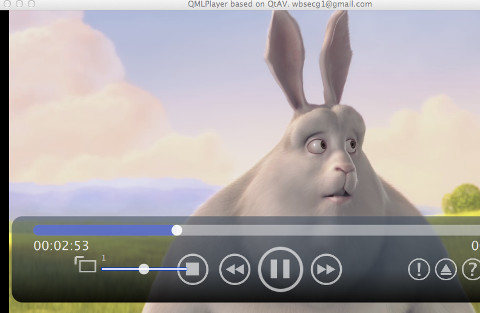
    the buttons should be

    !http://wang-bin.github.io/qtav.org/images/qtav-qml-no-gl.jpg(qtav no gl in qml)!
    1 Reply Last reply
    0

    • Login

    • Login or register to search.
    • First post
      Last post
    0
    • Categories
    • Recent
    • Tags
    • Popular
    • Users
    • Groups
    • Search
    • Get Qt Extensions
    • Unsolved