Very Beginner on QT
-
Hello everyone
I was searching for C++ GUI on Mac and I came across QT. I have many options
- Qt 4.8.4 for Mac OS X (Src and Binary)
- Qt Creator 2.7.1 for Mac OS X (Binary)
- Qt 4.8.4 Sources (Full framework)
- Qt Enterprise Charts 1.3.0
- Qt 4.8 SDK for Mac OS X
- Qt 5.0.2 Offline SDK for Mac OS X
- Qt 5.0.2 Sources
Let say I like to write a very basic Hello World and simple have button and a Lable. Clicking on the button will change the txt on the Lable.
The first question is which package I need.
Thanks
-
In order to build Qt applications, you only need the "Qt library" for your platform - this contains the libraries, the header files and the required tools (UIC, MOC, Designer, Linguist, etc). At the same time, the "Qt Creator" is a fully-fledged IDE, which you can use to create (Qt) applications, but you don't have to! I guess on the Mac platform you would normally use Xcode.
To my understanding, the old "Qt SDK" package has been discontinued, when Qt was moved from Nokia to Digia. But the current Qt 5.x downloads include both, the Qt libraries and the Qt Creator. That should be all you need ;-)
The Qt Source package is only needed if you want to compile Qt yourself, which should not be required normally. Also, whether you go with the current Qt 5.x or stick to the previous Qt 4.x is up to your own preferences...
--
To make a long story short:
http://download.qt-project.org/official_releases/qt/5.0/5.0.2/qt-mac-opensource-5.0.2-clang-offline.dmg -
Thank you. I downloaded QT creator 5.0.2 but all I see are:
Other project
Code Snippest
Non-Qt Projects
Plain C project(CMale Build)
Plain C++ project(CMale Build)
Import Project
Bazar Clone
and many othersThere is no GUI project and I also try the Plain C++ project(CMale Build) but it asks for CMake Executable Path for which I have no idea. I tried to follow a tutorial at http://www.youtube.com/watch?v=GxlB34Cn0zw
but as I said, I dont have those options available. !!! -
Not sure if its related, but check this: Tools menu->Options->Build and run. Check for Qt Versions and Kits. Sounds logical that if the Qt Framework is not detected or configured, the Qt projects creation options are disabled. Might not be the case though.
-
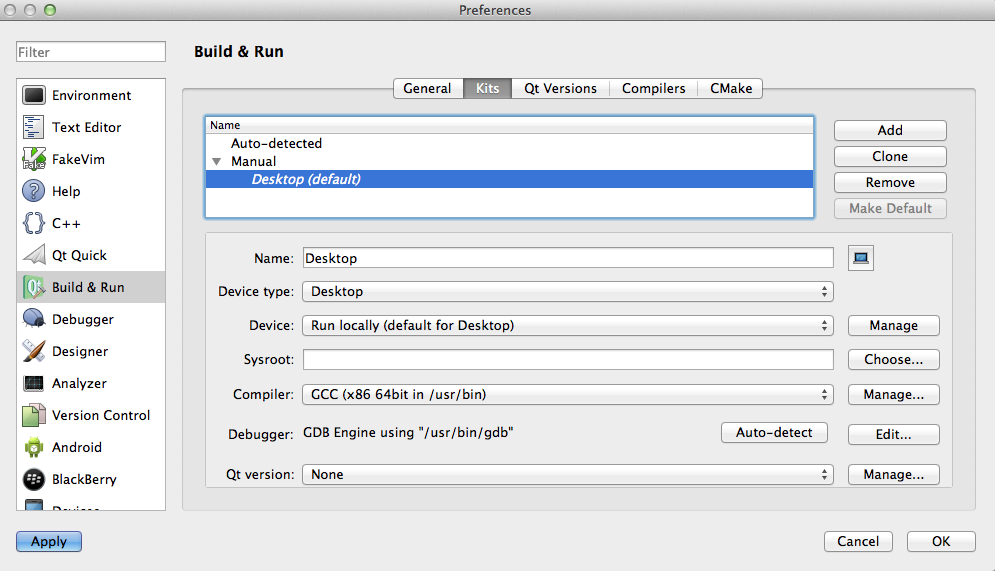
That's what I have. Does it make sense?
!https://web.cs.dal.ca/~ghazavi/QT.png(QT setting)! -
The Qt Version at the bottom is set to "None". This is not right. Next to the Kits tab, you can configure a Qt Version and then select it in the default kit's Qt Version.
-
It has Auto-detect and Manual but neither are selectable. When I try to add, it asks for qmake Executable path. How can I find it?
-
It's inside the "Qt installation dir"/bin folder.