QGLWidget issue?!
-
I get really strange artifacts with the following simple application when using QGLWidget and a dashed pen in MyRectItem::paint():
!http://www.bilderload.com/daten/screenshotSY80M.png(OK)!
!http://www.bilderload.com/daten/screenshot1KQZWZ.png(Artifacts)!Code:
dialog.ui
@<?xml version="1.0" encoding="UTF-8"?>
<ui version="4.0">
<class>Dialog</class>
<widget class="QDialog" name="Dialog">
<property name="geometry">
<rect>
<x>0</x>
<y>0</y>
<width>400</width>
<height>300</height>
</rect>
</property>
<property name="windowTitle">
<string>Dialog</string>
</property>
<layout class="QHBoxLayout" name="horizontalLayout">
<item>
<widget class="QGraphicsView" name="graphicsView"/>
</item>
</layout>
</widget>
<layoutdefault spacing="6" margin="11"/>
<resources/>
<connections/>
</ui>@dialog.h
@#ifndef DIALOG_H
#define DIALOG_H#include <QDialog>
namespace Ui {
class Dialog;
}class QGraphicsView;
class QGraphicsScene;
class VipuGuiCanvasItem;
class MyRectItem;class Dialog : public QDialog
{
Q_OBJECTpublic:
explicit Dialog(QWidget *parent = 0);
~Dialog();protected:
bool eventFilter(QObject *pObject, QEvent *pEvent);private:
Ui::Dialog *ui;public:
QGraphicsView *m_pView;
QGraphicsScene *m_pScene;
VipuGuiCanvasItem *m_pCanvasItem;
MyRectItem *m_pMyRectItem;
};#endif // DIALOG_H@
dialog.cpp
@#include "dialog.h"
#include "ui_dialog.h"
#include <QGLWidget>
#include <QGraphicsView>
#include <QGraphicsScene>
#include <QGraphicsRectItem>
#include <QGraphicsSceneWheelEvent>
#include <QGraphicsObject>class MyRectItem : public QGraphicsObject
{
public:
MyRectItem(QGraphicsItem *pParent = 0) : QGraphicsObject(pParent)
{}
QRectF boundingRect() const
{
return m_oBoundingRect;
}
void paint(QPainter *pPainter, const QStyleOptionGraphicsItem *, QWidget *)
{
QRectF oRect(QPointF(0,0), boundingRect().size());
oRect.moveCenter(boundingRect().center());
oRect.adjust(5, 5, -5, -5);
#if 1 // --> PROBLEM!
QPen oPen(Qt::DashLine);
#else
QPen oPen(Qt::SolidLine);
#endif
oPen.setColor(QColor(255,0,0,255)); // RED
pPainter->setPen(oPen);
pPainter->drawRect(oRect);oPen.setColor(QColor(0,255,0,255)); // GREEN pPainter->setPen(oPen); pPainter->drawEllipse(oRect); } void setRect(const QRectF& oRect) { m_oBoundingRect = oRect; update(); }private:
QRectF m_oBoundingRect;
};class VipuGuiCanvasItem : public QGraphicsRectItem
{
public:
VipuGuiCanvasItem(Dialog *pDialog) : m_pDialog(pDialog)
{}
protected:
void wheelEvent(QGraphicsSceneWheelEvent *pEvent)
{
{
double fScale = pEvent->delta();
QRectF oRect = m_pDialog->m_pMyRectItem->boundingRect();
m_pDialog->m_pMyRectItem->setRect(
oRect.adjusted(fScale >= 0. ? -1. : 1.,
fScale >= 0. ? -1. : 1.,
fScale >= 0. ? 1. : -1.,
fScale >= 0. ? 1. : -1.));
}
}
private:
Dialog *m_pDialog;
};Dialog::Dialog(QWidget *parent) :
QDialog(parent),
ui(new Ui::Dialog)
{
ui->setupUi(this);m_pView = ui->graphicsView;#if 1 // --> PROBLEM!
m_pView->setViewport(new QGLWidget(QGLFormat(QGL::SampleBuffers)));
#endif
m_pView->viewport()->installEventFilter(this);m_pScene = new QGraphicsScene(this); m_pView->setScene(m_pScene); m_pCanvasItem = new VipuGuiCanvasItem(this); m_pCanvasItem->setVisible(true); m_pCanvasItem->setPen(Qt::NoPen); m_pCanvasItem->setBrush(Qt::NoBrush); m_pCanvasItem->setFlag(QGraphicsItem::ItemHasNoContents); m_pScene->addItem(m_pCanvasItem); m_pMyRectItem = new MyRectItem(m_pCanvasItem);}
Dialog::~Dialog()
{
delete ui;
}bool Dialog::eventFilter(QObject *pObject, QEvent *pEvent)
{
if (pObject == m_pView->viewport())
{
if (pEvent->type() == QEvent::Resize)
{
m_pScene->setSceneRect(m_pView->viewport()->rect());
m_pCanvasItem->setRect(m_pView->viewport()->rect());
m_pMyRectItem->setRect(m_pCanvasItem->rect());
}
}
return QWidget::eventFilter(pObject, pEvent);
}@main.cpp
@#include <QtGui/QApplication>
#include "dialog.h"int main(int argc, char *argv[])
{
QApplication a(argc, argv);
Dialog w;
w.show();return a.exec();}@
-
I'm sorry, but I can't seem to notice any problem with that output... If you mean that the curved lines look a bit awkward, blame your monitor for having large pixels ;) or turn antialiasing on.
-
so what is the question?
-
When you use the mouse wheel to resize the MyRectItem (which paints a red rectangle and a green ellipse) and the red rectangle gets outside of the view it will change to a second red ellipse! But I DON'T draw any RED ellipse!
-
Ah, you could have mentioned that a bit earlier :)
-
Ah, you could have mentioned that a bit earlier :)
Sorry!
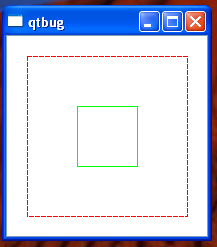
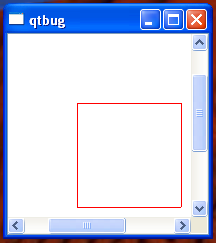
A similar problem occurs in the following simple application:
@
#include <QtGui/QApplication>
#include <QGLWidget>
#include <QGraphicsView>
#include <QGraphicsScene>
#include <QGraphicsRectItem>
#include <QWheelEvent>
#include <qmath.h>class View : public QGraphicsView
{
public:
View()
{
setViewport(new QGLWidget(QGLFormat(QGL::SampleBuffers)));QGraphicsScene *pScene = new QGraphicsScene(this); setScene(pScene); pScene->setSceneRect(0, 0, 200, 200); QGraphicsRectItem *pItemSolid = new QGraphicsRectItem; pItemSolid->setPen(QColor(Qt::green)); pItemSolid->setRect(70, 70, 60, 60); pScene->addItem(pItemSolid); QGraphicsRectItem *pItemDash = new QGraphicsRectItem; QPen oPen(Qt::DashLine); oPen.setColor(Qt::red); pItemDash->setPen(oPen); pItemDash->setRect(20, 20, 160, 160); pScene->addItem(pItemDash); }protected:
void wheelEvent(QWheelEvent *event)
{
qreal factor = qPow(1.2, event->delta() / 240.0);
scale(factor, factor);
event->accept();
}
};int main(int argc, char *argv[])
{
QApplication a(argc, argv);
View v;
v.show();
return a.exec();
}
@When zooming in with the mouse wheel so that the red dashed QGraphicsRectItem gets outside of the view the solid green QGraphicsRectItem will become red:
!http://www.bilderload.com/daten/1VNSJ1.png! !http://www.bilderload.com/daten/25ZCZ7.png!
This only occurs when using QGLWidget and a dashed pen!
-
hi,
I have the exact same problem at the moment...
In our application we also draw a dashed rectangle and when you zoom in in such a way that the viewport is inside the dashed rectangle, other objects start behaving very weird:- the color changes like in the previous post
- sometimes the solid-line objects inside the dashed rectangle are drawn on the same location if you pan the solid-lined object out of the viewport (so they don't disappear)
These problems are solved if we just don't use dashed lines but solid lines instead
We are using Qt 4.8.6Have you ever found a solution for this? Or do you know if this issue has been solved in newer releases of Qt?
Thanks in advance

)
)