
Is QGraphicsItemGroup a good design choice for editable diagram elements?
-
I'm working on an application to draw an Entity Relationship diagram, so I want to show a representation of a SQL table on a diagram that can be edited and moved. Something like this
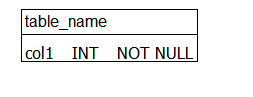
I've been using a QGraphicsItemGroup to represent this, and then add elements to the group as needed, borrowing the DiagramTextItem from the "Diagram Scene Example". (code below). I'm wondering if this is a good approach. I've already encountered an issue with editing the table name, where if the name gets larger than the original boundingRect(), there doesn't seem to be any way to update the highlight box drawn when selecting the table other than removing and re-adding the element (which seems like a hack).
Is there a better way to do this or is this a sound design, and I just need to live with a few minor hacks?
class DiagramTableItem : public QGraphicsItemGroup, public QObject
{
public:
	DiagramTableItem();
private:
	DiagramTextItem* tableNameText;
	QGraphicsLineItem* tableNameRule;
	QGraphicsPolygonItem* tableBorder;
	TableColumnGroup* columns;
	void layoutTable();
public slots:
	void handleTextChanged();
};

DiagramTableItem::DiagramTableItem()
{
	tableNameText = new DiagramTextItem("table_name");
	tableNameText->setFont(QFont("Arial"));

	addToGroup(tableNameText);

	connect(tableNameText, &DiagramTextItem::textChanged, this, &DiagramTableItem::handleTextChanged);

	columns = new TableColumnGroup();
	columns->setPos(QPointF(0, 30));
	addToGroup(columns);
	auto br = boundingRect();

	auto tableNameBottom = tableNameText->boundingRect().bottom();
	tableNameRule = new QGraphicsLineItem(0, 0, 0, 0);
	addToGroup(tableNameRule);

	tableBorder = new QGraphicsPolygonItem(br);
	addToGroup(tableBorder);

	layoutTable();

	setHandlesChildEvents(false);

	setFlag(QGraphicsItem::ItemIsMovable);
	setFlag(QGraphicsItem::ItemIsSelectable);

}

void DiagramTableItem::handleTextChanged()
{
	// hack: you have to force a recomputation of the bounding rect by removing and re-adding an element
	removeFromGroup(tableNameText);
	addToGroup(tableNameText);
	layoutTable();
}

void DiagramTableItem::layoutTable()
{
	auto computedWidth = std::max(columns->boundingRect().width(), tableNameText->boundingRect().width());
	tableNameRule->setLine(0, tableNameText->boundingRect().bottom(), computedWidth, tableNameText->boundingRect().bottom());
	auto bottomOfColumns = tableNameText->boundingRect().height() + columns->boundingRect().height();
	QRectF border(0, tableNameText->boundingRect().top(), computedWidth, bottomOfColumns);
	tableBorder->setPolygon(border);
}