
QTableView fit to size but keep last one fully stretched
-
I have a
QTableViewand custom model, that sets the background role. Colors are different for odd/even rows.Table configuration
    ui->table->horizontalHeader()->setDefaultAlignment(Qt::AlignmentFlag::AlignLeft);
    ui->table->horizontalHeader()->setStretchLastSection(true);
    ui->table->resizeColumnsToContents();
    ui->table->resizeRowsToContents();
    ui->table->setSelectionBehavior(QAbstractItemView::SelectRows);
    ui->table->verticalHeader()->setVisible(true);
    ui->table->verticalHeader()->setSectionResizeMode(QHeaderView::ResizeMode::Custom);
    ui->table->verticalHeader()->setDefaultSectionSize(16);
    ui->table->setShowGrid(false);
When table is popped with data, and I press a custom button to execute
clickedaction, code is executed:ui->table_can_logger->resizeColumnsToContents(); ui->table->resizeRowsToContents(); ui->table->horizontalHeader()->setStretchLastSection(true);Table fits to size, but last column does not show background anymore:
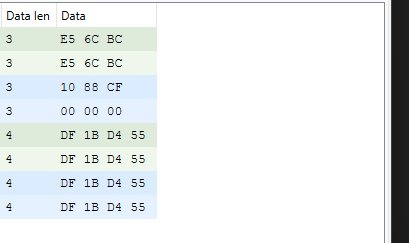
Unless I go above spacer on the right of text Data and try to drag it. Then I immediately get:
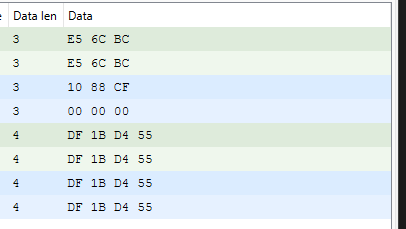
How can I programmatically keep the last column to stretch as on above picture?
-
I have a
QTableViewand custom model, that sets the background role. Colors are different for odd/even rows.Table configuration
    ui->table->horizontalHeader()->setDefaultAlignment(Qt::AlignmentFlag::AlignLeft);
    ui->table->horizontalHeader()->setStretchLastSection(true);
    ui->table->resizeColumnsToContents();
    ui->table->resizeRowsToContents();
    ui->table->setSelectionBehavior(QAbstractItemView::SelectRows);
    ui->table->verticalHeader()->setVisible(true);
    ui->table->verticalHeader()->setSectionResizeMode(QHeaderView::ResizeMode::Custom);
    ui->table->verticalHeader()->setDefaultSectionSize(16);
    ui->table->setShowGrid(false);
When table is popped with data, and I press a custom button to execute
clickedaction, code is executed:ui->table_can_logger->resizeColumnsToContents(); ui->table->resizeRowsToContents(); ui->table->horizontalHeader()->setStretchLastSection(true);Table fits to size, but last column does not show background anymore:
Unless I go above spacer on the right of text Data and try to drag it. Then I immediately get:
How can I programmatically keep the last column to stretch as on above picture?
@tilz0R said in QTableView fit to size but keep last one fully stretched:
How can I programmatically keep the last column to stretch as on above picture?
Don't call resizeColumnsToContents() for the last column
-
@tilz0R said in QTableView fit to size but keep last one fully stretched:
How can I programmatically keep the last column to stretch as on above picture?
Don't call resizeColumnsToContents() for the last column
@Christian-Ehrlicher Thanks - that worked:
    QAbstractItemModel* tableModel = ui->table->model();

    /* Fit to size all but last item */
    ui->table->horizontalHeader()->setStretchLastSection(true);
    for (int i = 0; i < tableModel->columnCount() - 1; ++i) {
        ui->table->resizeColumnToContents(i);
    }
    ui->table->resizeRowsToContents();
