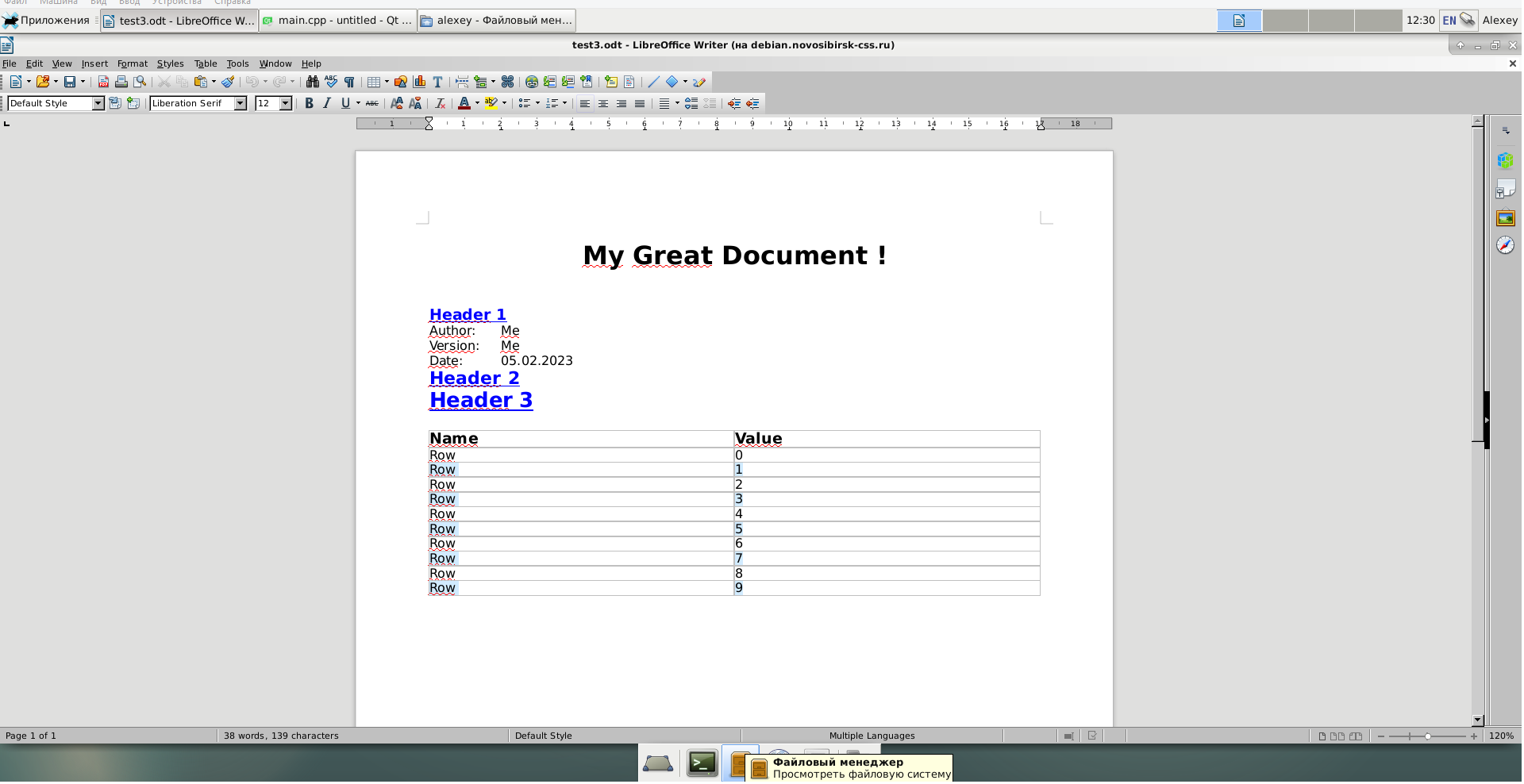
QTextDocumentWriter does not work transferring to table cells when saving
-
When I create a document using QTextDocumentWriter in the "odf" format, line wrapping in the table does not work.
#include <QString> #include <QTextStream> #include <QTextDocument> #include <QTextDocumentWriter> #include <QTextCursor> #include <QTextBlock> #include <QDate> #include <QTextTableCell> void createsOdfWithTable(){ QTextDocument *doc = new QTextDocument; doc->setDocumentMargin(10); QTextCursor cursor(doc); cursor.movePosition(QTextCursor::Start); QTextCharFormat textFormat; textFormat.setFontPointSize(10); QTextCharFormat boldFormat; boldFormat.setFontWeight(QFont::Bold); //HEADERS QTextCharFormat header1Format = boldFormat; header1Format.setFontPointSize(12); header1Format.setFontUnderline(true); header1Format.setForeground(QBrush(QColor("#0000FF"))); QTextCharFormat header2Format = header1Format; header2Format.setFontPointSize(14); QTextCharFormat header3Format = header1Format; header3Format.setFontPointSize(16); QTextCharFormat titleFormat = boldFormat; titleFormat.setFontPointSize(20); header1Format.setForeground(QBrush(QColor("#0000FF"))); QTextBlockFormat blockFormat = cursor.block().blockFormat(); QTextBlockFormat titleBlockFormat = cursor.block().blockFormat(); titleBlockFormat.setAlignment(Qt::AlignHCenter); QTextCharFormat alternateCellFormat = textFormat; alternateCellFormat.setBackground(QBrush(QColor("#D1EBFF"))); QTextTableFormat tableFormat; tableFormat.setBorder(1); tableFormat.setBorderStyle(QTextFrameFormat::BorderStyle_Solid); tableFormat.setCellPadding(2); tableFormat.setCellSpacing(0); tableFormat.setWidth(QTextLength(QTextLength::PercentageLength, 80)); tableFormat.setAlignment(Qt::AlignLeft); //Title of the document cursor.insertBlock(); cursor.setBlockCharFormat(titleFormat); cursor.setBlockFormat(titleBlockFormat); cursor.insertText(QObject::tr("My Great Document !")); cursor.insertBlock(); //new line cursor.insertBlock(); cursor.insertBlock(); cursor.setBlockFormat(blockFormat); cursor.insertText(QObject::tr("Header 1"), header1Format); cursor.insertBlock(); cursor.setCharFormat(textFormat); cursor.insertText("Author:\tMe"); cursor.insertBlock(); cursor.insertText("Version:\tMe"); cursor.insertBlock(); cursor.insertText("Date:\t" + QDate::currentDate().toString("dd.MM.yyyy")); cursor.insertBlock(); cursor.insertText(QObject::tr("Header 2"), header2Format); cursor.insertBlock(); cursor.insertText(QObject::tr("Header 3"), header3Format); cursor.insertBlock(); //Insert table with nb row = 10, column = 2 QTextTable *table = cursor.insertTable(10+1, 2, tableFormat); QTextTableCell headerCell = table->cellAt(0, 0); QTextCursor headerCellCursor = headerCell.firstCursorPosition(); headerCellCursor.insertText(QObject::tr("Name"), boldFormat); headerCell = table->cellAt(0, 1); headerCellCursor = headerCell.firstCursorPosition(); headerCellCursor.insertText(QObject::tr("Value"), boldFormat); for(int i = 0; i < 10; i++){ QTextCharFormat cellFormat = i % 2 == 0 ? textFormat : alternateCellFormat; QTextTableCell cell = table->cellAt(i + 1, 0); cell.setFormat(cellFormat); QTextCursor cellCursor = cell.firstCursorPosition(); cellCursor.insertText("Row \n" + QString::number(i)); cell = table->cellAt(i + 1, 1); cell.setFormat(cellFormat); cellCursor = cell.firstCursorPosition(); cellCursor.insertText(QString::number(i)); } cursor.movePosition(QTextCursor::End); QTextDocumentWriter writer("test3.odt"); writer.setFormat("odf"); writer.write(doc); delete doc; } int main(int argc, char *argv[]) { QApplication a(argc, argv); createsOdfWithTable(); return a.exec(); }