Skip to content
  • Categories
  • Recent
  • Tags
  • Popular
  • Users
  • Groups
  • Search
  • Get Qt Extensions
  • Unsolved
Collapse
Brand Logo
  1. Home
  2. Qt Development
  3. General and Desktop
  4. Build error when loading vs2019 project from qt creator

Build error when loading vs2019 project from qt creator

Scheduled Pinned Locked Moved Solved General and Desktop
4 Posts 3 Posters 295 Views 1 Watching
  • Oldest to Newest
  • Newest to Oldest
  • Most Votes
Reply
  • Reply as topic
Log in to reply
This topic has been deleted. Only users with topic management privileges can see it.
  • I Offline
    I Offline
    IknowQT
    wrote on last edited by
    #1

    I want to load Qt project created in vs2019 in Qt creator
    I created a .pro file in vs2019 and loaded the file in the creator, but an error occurred. Why is that? Did the route change?

    59f17cb4-5743-4223-8ace-ca03ae20e6ad-image.png

    1 Reply Last reply
    0
    • sierdzioS Offline
      sierdzioS Offline
      sierdzio
      Moderators
      wrote on last edited by
      #2

      You need to share the contents of the .pro file.

      My guess is that the QT variable is not set properly. Make sure it includes widgets module, for example:

      QT = core gui widgets
      

      (Z(:^

      I 1 Reply Last reply
      1
      • sierdzioS sierdzio

        You need to share the contents of the .pro file.

        My guess is that the QT variable is not set properly. Make sure it includes widgets module, for example:

        QT = core gui widgets
        
        I Offline
        I Offline
        IknowQT
        wrote on last edited by
        #3

        @sierdzio said in Build error when loading vs2019 project from qt creator:

        QT = core gui widgets
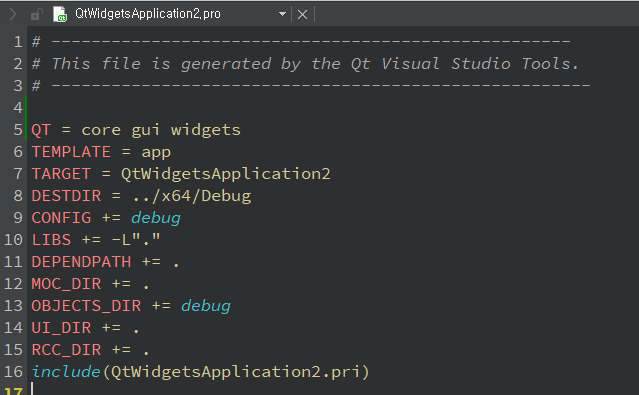
        351dd113-a1f2-416a-96ea-7ff163a89ce7-image.png

        Thanks a lot, I have one more question
        I built each in Release and Debug mode, but only one executable file came out because the build output path was one.
        I want to receive each executable file built in release mode, how can I do that?

        jsulmJ 1 Reply Last reply
        0
        • I IknowQT

          @sierdzio said in Build error when loading vs2019 project from qt creator:

          QT = core gui widgets

          351dd113-a1f2-416a-96ea-7ff163a89ce7-image.png

          Thanks a lot, I have one more question
          I built each in Release and Debug mode, but only one executable file came out because the build output path was one.
          I want to receive each executable file built in release mode, how can I do that?

          jsulmJ Offline
          jsulmJ Offline
          jsulm
          Lifetime Qt Champion
          wrote on last edited by
          #4

          @IknowQT You can define build folders for debug and release in QtCreator under Projects/Build & Run.
          Also, I would remove CONFIG += debug, debug/release mode is handled in QtCreator.

          https://forum.qt.io/topic/113070/qt-code-of-conduct

          1 Reply Last reply
          0

          • Login

          • Login or register to search.
          • First post
            Last post
          0
          • Categories
          • Recent
          • Tags
          • Popular
          • Users
          • Groups
          • Search
          • Get Qt Extensions
          • Unsolved