Skip to content
  • Categories
  • Recent
  • Tags
  • Popular
  • Users
  • Groups
  • Search
  • Get Qt Extensions
  • Unsolved
Collapse
Brand Logo
  1. Home
  2. Qt Development
  3. Qt Creator and other tools
  4. No value for composite variables during debugging in QtCreator

No value for composite variables during debugging in QtCreator

Scheduled Pinned Locked Moved Solved Qt Creator and other tools
3 Posts 2 Posters 531 Views 1 Watching
  • Oldest to Newest
  • Newest to Oldest
  • Most Votes
Reply
  • Reply as topic
Log in to reply
This topic has been deleted. Only users with topic management privileges can see it.
  • M Offline
    M Offline
    MasterBlade
    wrote on last edited by
    #1

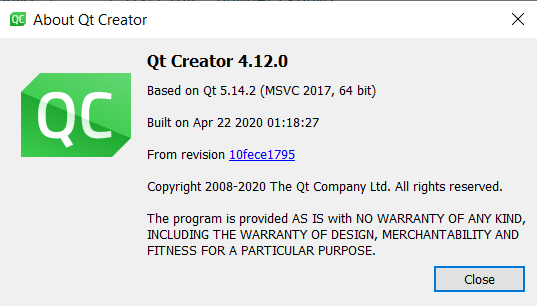
    Hello I am using Qt 6.1.2/MSVC 2019, QtCreator 4.12.0. While I was debugging a program, all composite variables, including QString, QStringList, either have no value or are <not accessible>.

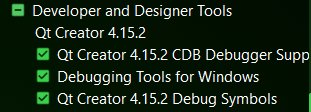
    I searched Internet and added Qt Debug Information, Debugging Tools for Windows and QtCreator 4.15.2 Debug Symbols with online installer, but still with no luck.

    One thing I'm not so sure is that QtCreator reports its version to be 4.12.0, while the online installer sees it to be 4.15.2 and doesn't offer any upgrades.
    1.png 2.png 3.png 4.png

    jsulmJ 1 Reply Last reply
    0
    • M MasterBlade

      Hello I am using Qt 6.1.2/MSVC 2019, QtCreator 4.12.0. While I was debugging a program, all composite variables, including QString, QStringList, either have no value or are <not accessible>.

      I searched Internet and added Qt Debug Information, Debugging Tools for Windows and QtCreator 4.15.2 Debug Symbols with online installer, but still with no luck.

      One thing I'm not so sure is that QtCreator reports its version to be 4.12.0, while the online installer sees it to be 4.15.2 and doesn't offer any upgrades.
      1.png 2.png 3.png 4.png

      jsulmJ Offline
      jsulmJ Offline
      jsulm
      Lifetime Qt Champion
      wrote on last edited by
      #2

      @MasterBlade said in No value for composite variables during debugging in QtCreator:

      QtCreator reports its version to be 4.12.0, while the online installer sees it to be 4.15.2

      You probably have more than one QtCreator version installed.
      Check in c:\Qt and start QtCreator directly from its installation folder there.

      https://forum.qt.io/topic/113070/qt-code-of-conduct

      M 1 Reply Last reply
      2
      • jsulmJ jsulm

        @MasterBlade said in No value for composite variables during debugging in QtCreator:

        QtCreator reports its version to be 4.12.0, while the online installer sees it to be 4.15.2

        You probably have more than one QtCreator version installed.
        Check in c:\Qt and start QtCreator directly from its installation folder there.

        M Offline
        M Offline
        MasterBlade
        wrote on last edited by
        #3

        @jsulm said in No value for composite variables during debugging in QtCreator:

        @MasterBlade said in No value for composite variables during debugging in QtCreator:

        QtCreator reports its version to be 4.12.0, while the online installer sees it to be 4.15.2

        You probably have more than one QtCreator version installed.
        Check in c:\Qt and start QtCreator directly from its installation folder there.

        Yes I found another standalone 4.12.0 Creator installed. It is now uninstalled. Running the latest version gives me no trouble. Thanks!

        1 Reply Last reply
        1

        • Login

        • Login or register to search.
        • First post
          Last post
        0
        • Categories
        • Recent
        • Tags
        • Popular
        • Users
        • Groups
        • Search
        • Get Qt Extensions
        • Unsolved