Solved More Layout queries...
-
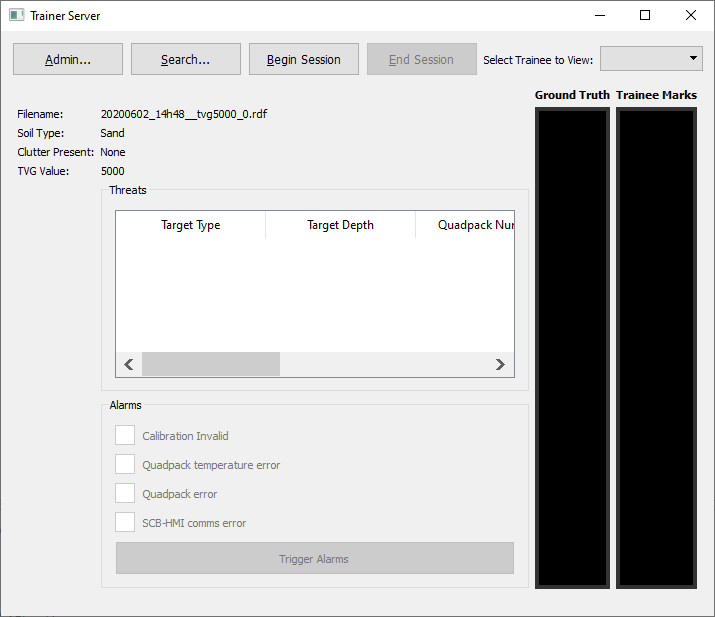
Here is the form:
Here is the structure:
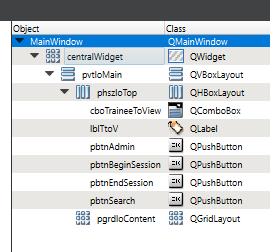
What I would like to do is have the QGroupBox span the width of the form, for some reason that escapes me, perhaps because the layout is a QFormLayout the group has to occupy the right column.Is there anyway for it to span both columns or would it be easier to use another QGridLayout ?
-
https://doc.qt.io/qt-5/layout.html
    QWidget *window = new QWidget;
    QPushButton *button1 = new QPushButton("One");
    QPushButton *button2 = new QPushButton("Two");
    QPushButton *button3 = new QPushButton("Three");
    QPushButton *button4 = new QPushButton("Four");
    QPushButton *button5 = new QPushButton("Five");

    QGridLayout *layout = new QGridLayout(window);
    layout->addWidget(button1, 0, 0);
    layout->addWidget(button2, 0, 1);
    layout->addWidget(button3, 1, 0, 1, 2);
    layout->addWidget(button4, 2, 0);
    layout->addWidget(button5, 2, 1);

    window->show();
The third QPushButton spans 2 columns. This is possible by specifying 2 as the fifth argument to QGridLayout::addWidget().
I try to learn English.
-
https://doc.qt.io/qt-5/layout.html
    QWidget *window = new QWidget;
    QPushButton *button1 = new QPushButton("One");
    QPushButton *button2 = new QPushButton("Two");
    QPushButton *button3 = new QPushButton("Three");
    QPushButton *button4 = new QPushButton("Four");
    QPushButton *button5 = new QPushButton("Five");

    QGridLayout *layout = new QGridLayout(window);
    layout->addWidget(button1, 0, 0);
    layout->addWidget(button2, 0, 1);
    layout->addWidget(button3, 1, 0, 1, 2);
    layout->addWidget(button4, 2, 0);
    layout->addWidget(button5, 2, 1);

    window->show();
The third QPushButton spans 2 columns. This is possible by specifying 2 as the fifth argument to QGridLayout::addWidget().
I try to learn English.
-
@TheGringerEye , thank you, I'm in the process of replacing QFormLayout with QGridLayout.
