Skip to content
  • Categories
  • Recent
  • Tags
  • Popular
  • Users
  • Groups
  • Search
  • Get Qt Extensions
  • Unsolved
Collapse
Brand Logo
  1. Home
  2. Qt Development
  3. General and Desktop
  4. QPushButton background

QPushButton background

Scheduled Pinned Locked Moved Solved General and Desktop
9 Posts 3 Posters 737 Views 2 Watching
  • Oldest to Newest
  • Newest to Oldest
  • Most Votes
Reply
  • Reply as topic
Log in to reply
This topic has been deleted. Only users with topic management privileges can see it.
  • D Offline
    D Offline
    delilong1
    wrote on last edited by
    #1

    Hi guys. I'm using Qt5 c++ to create Dashboard user panel.
    I want to change a background of a button when it's selected until I click in another button.
    I had a look to a Qt documentation, but I didn't find such signal in QPushButton nor in QAbstractButton.
    Anyone can help me?

    Pl45m4P 1 Reply Last reply
    0
    • D delilong1

      Hi guys. I'm using Qt5 c++ to create Dashboard user panel.
      I want to change a background of a button when it's selected until I click in another button.
      I had a look to a Qt documentation, but I didn't find such signal in QPushButton nor in QAbstractButton.
      Anyone can help me?

      Pl45m4P Offline
      Pl45m4P Offline
      Pl45m4
      wrote on last edited by
      #2

      @delilong1

      Use Stylesheet:

      setStyleSheet("QPushButton#YourButton { background:Some_Color; }");
      

      @delilong1 said in QPushButton background:

      when it's selected

      Selected? You mean hasFocus? Or what kind of button do you have?


      If debugging is the process of removing software bugs, then programming must be the process of putting them in.

      ~E. W. Dijkstra

      D 1 Reply Last reply
      1
      • Pl45m4P Pl45m4

        @delilong1

        Use Stylesheet:

        setStyleSheet("QPushButton#YourButton { background:Some_Color; }");
        

        @delilong1 said in QPushButton background:

        when it's selected

        Selected? You mean hasFocus? Or what kind of button do you have?

        D Offline
        D Offline
        delilong1
        wrote on last edited by
        #3

        @Pl45m4 Yeah. But I want the background color to be changed after I clicked the button and until I click another button. Then the background-color is passed the last button I clicked over. "As in a navigation bar indicating which button is displaying a content of my application"

        mrjjM 1 Reply Last reply
        0
        • D delilong1

          @Pl45m4 Yeah. But I want the background color to be changed after I clicked the button and until I click another button. Then the background-color is passed the last button I clicked over. "As in a navigation bar indicating which button is displaying a content of my application"

          mrjjM Offline
          mrjjM Offline
          mrjj
          Lifetime Qt Champion
          wrote on last edited by mrjj
          #4

          @delilong1

          Hi
          What you can do is to create QButtonGroup and add the QPushButtons to it.
          If using UI files you can just select all buttons and right click and add it.
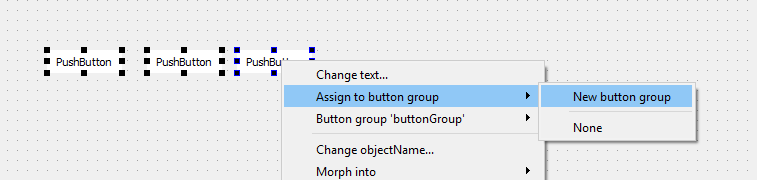
          alt text
          Else it must be done in code.
          https://doc.qt.io/qt-5/qbuttongroup.html

          • For each button set the CheckAble to true
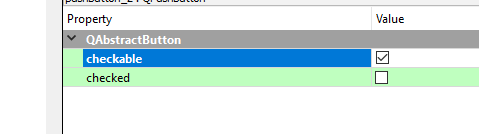
            alt text

          • then apply a style sheet to the form holding the buttons

          QPushButton { background-color: white; border: none; }
          QPushButton:checked { background-color: red;}
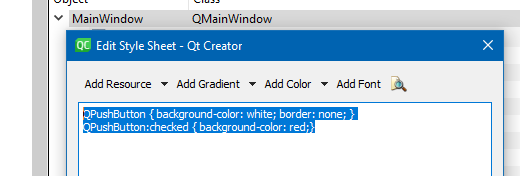
          

          alt text

          • then it should work as you want
            alt text
          D 1 Reply Last reply
          1
          • mrjjM mrjj

            @delilong1

            Hi
            What you can do is to create QButtonGroup and add the QPushButtons to it.
            If using UI files you can just select all buttons and right click and add it.
            alt text
            Else it must be done in code.
            https://doc.qt.io/qt-5/qbuttongroup.html

            • For each button set the CheckAble to true
              alt text

            • then apply a style sheet to the form holding the buttons

            QPushButton { background-color: white; border: none; }
            QPushButton:checked { background-color: red;}
            

            alt text

            • then it should work as you want
              alt text
            D Offline
            D Offline
            delilong1
            wrote on last edited by
            #5

            @mrjj Thank you very much!!! . That's what I need

            mrjjM 1 Reply Last reply
            0
            • D delilong1

              @mrjj Thank you very much!!! . That's what I need

              mrjjM Offline
              mrjjM Offline
              mrjj
              Lifetime Qt Champion
              wrote on last edited by
              #6

              @delilong1
              np :)
              Do notice that there are signals for the button being checked or unchecked just like the
              ones for clicked if you need to do stuff when its checked.
              But the normal clicked signal still works so might not be needed.

              D 1 Reply Last reply
              0
              • mrjjM mrjj

                @delilong1
                np :)
                Do notice that there are signals for the button being checked or unchecked just like the
                ones for clicked if you need to do stuff when its checked.
                But the normal clicked signal still works so might not be needed.

                D Offline
                D Offline
                delilong1
                wrote on last edited by
                #7

                @mrjj Yep. And I try it with focus like in CSS. It's still working too.
                QPushButton:focus{background-color:rgb(int, int, int);}
                I don't know if there is some problem using it

                mrjjM 1 Reply Last reply
                0
                • D delilong1

                  @mrjj Yep. And I try it with focus like in CSS. It's still working too.
                  QPushButton:focus{background-color:rgb(int, int, int);}
                  I don't know if there is some problem using it

                  mrjjM Offline
                  mrjjM Offline
                  mrjj
                  Lifetime Qt Champion
                  wrote on last edited by
                  #8

                  Hi
                  if it looks like you want no issues. :)

                  https://doc.qt.io/qt-5/stylesheet-reference.html
                  "List of Pseudo-States"
                  show the states Qt knows. Its not full CSS

                  D 1 Reply Last reply
                  0
                  • mrjjM mrjj

                    Hi
                    if it looks like you want no issues. :)

                    https://doc.qt.io/qt-5/stylesheet-reference.html
                    "List of Pseudo-States"
                    show the states Qt knows. Its not full CSS

                    D Offline
                    D Offline
                    delilong1
                    wrote on last edited by
                    #9

                    @mrjj 👍. Thanks

                    1 Reply Last reply
                    0

                    • Login

                    • Login or register to search.
                    • First post
                      Last post
                    0
                    • Categories
                    • Recent
                    • Tags
                    • Popular
                    • Users
                    • Groups
                    • Search
                    • Get Qt Extensions
                    • Unsolved