Skip to content
  • Categories
  • Recent
  • Tags
  • Popular
  • Users
  • Groups
  • Search
  • Get Qt Extensions
  • Unsolved
Collapse
Brand Logo
  1. Home
  2. Qt Development
  3. Qt for Python
  4. Resize issues with QScrollArea inside of QDockWidget

Resize issues with QScrollArea inside of QDockWidget

Scheduled Pinned Locked Moved Solved Qt for Python
6 Posts 3 Posters 1.6k Views
  • Oldest to Newest
  • Newest to Oldest
  • Most Votes
Reply
  • Reply as topic
Log in to reply
This topic has been deleted. Only users with topic management privileges can see it.
  • M Offline
    M Offline
    midnightdim
    wrote on last edited by midnightdim
    #1

    Unfortunately I can't provide a minimal code example of this issue because it's hard to extract the code that causes it from my app. I'm using PySide2.

    Here's the problem.
    There's one QMainWindow that opens another QMainWindow when a button is pressed (via window.show()).
    This second window has QDockWidgets - there are 2 dock widgets in the left sidebar.
    In one of the dock widgets there's a QScrollArea with some controls.

    Here's a mockup that illustrates it:
    da172b58-14fa-4b92-af09-9298c2c11502-изображение.png

    The problem is: if I resize the left sidebar (by dragging it), then close the window and then reopen it again, the contents of the scroll area disappear. I thought it's a QDockWidget bug, but then I found that if I remove the scroll area from this and use some layout inside the dock widget, it works just fine.

    I also noticed that if I set the minimumSize in Qt Designer for the scroll area, it doesn't disappear in this scenario, but it gets strangely placed and it uses this minimum size as its vertical size (with horizontal size it's fine - it expands to the full width of the dock widget).
    So the problem is that the scroll area doesn't stretch properly after its parent dock widget is resized.

    Here's how it looks in this scenario (resize the left sidebar, close the window and then reopen it):
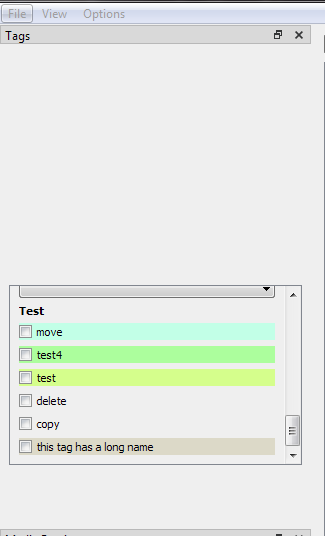
    36878df2-f43c-41ed-9069-10718d2bbf86-изображение.png

    It kind of sticks to this height and this position regardless of how I resize the dock widget.
    The expected result is that it stretches across all available space in the dock widget.

    Any hints or ideas are welcome. Maybe I'm not setting the sizePolicy correctly.

    Here's what I have inside the dock widget in QT designer.
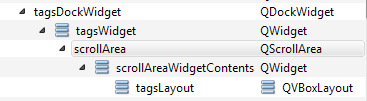
    194669c1-b840-4513-948b-384969f928c0-изображение.png

    Maybe there's an alternative solution. I basically need to show some controls in this dock widget and make it scrollable if the controls don't fit the dock widget.

    jsulmJ 1 Reply Last reply
    0
    • M midnightdim

      Unfortunately I can't provide a minimal code example of this issue because it's hard to extract the code that causes it from my app. I'm using PySide2.

      Here's the problem.
      There's one QMainWindow that opens another QMainWindow when a button is pressed (via window.show()).
      This second window has QDockWidgets - there are 2 dock widgets in the left sidebar.
      In one of the dock widgets there's a QScrollArea with some controls.

      Here's a mockup that illustrates it:
      da172b58-14fa-4b92-af09-9298c2c11502-изображение.png

      The problem is: if I resize the left sidebar (by dragging it), then close the window and then reopen it again, the contents of the scroll area disappear. I thought it's a QDockWidget bug, but then I found that if I remove the scroll area from this and use some layout inside the dock widget, it works just fine.

      I also noticed that if I set the minimumSize in Qt Designer for the scroll area, it doesn't disappear in this scenario, but it gets strangely placed and it uses this minimum size as its vertical size (with horizontal size it's fine - it expands to the full width of the dock widget).
      So the problem is that the scroll area doesn't stretch properly after its parent dock widget is resized.

      Here's how it looks in this scenario (resize the left sidebar, close the window and then reopen it):
      36878df2-f43c-41ed-9069-10718d2bbf86-изображение.png

      It kind of sticks to this height and this position regardless of how I resize the dock widget.
      The expected result is that it stretches across all available space in the dock widget.

      Any hints or ideas are welcome. Maybe I'm not setting the sizePolicy correctly.

      Here's what I have inside the dock widget in QT designer.
      194669c1-b840-4513-948b-384969f928c0-изображение.png

      Maybe there's an alternative solution. I basically need to show some controls in this dock widget and make it scrollable if the controls don't fit the dock widget.

      jsulmJ Offline
      jsulmJ Offline
      jsulm
      Lifetime Qt Champion
      wrote on last edited by
      #2

      @midnightdim said in Resize issues with QScrollArea inside of QDockWidget:

      So the problem is that the scroll area doesn't stretch properly after its parent dock widget is resized.

      You should put the scroll area in a layout applied to the dock widget.

      https://forum.qt.io/topic/113070/qt-code-of-conduct

      M 1 Reply Last reply
      1
      • jsulmJ jsulm

        @midnightdim said in Resize issues with QScrollArea inside of QDockWidget:

        So the problem is that the scroll area doesn't stretch properly after its parent dock widget is resized.

        You should put the scroll area in a layout applied to the dock widget.

        M Offline
        M Offline
        midnightdim
        wrote on last edited by
        #3

        @jsulm Thanks.

        But I think it was inside the layout. Just in case - I tried to rearrange it like so (added a QVBoxLayout between the dock widget and the scroll area):
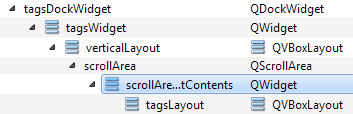
        f824765f-e533-40ee-bcca-a95dc459ded1-изображение.png

        The problem is still there. Maybe I need to set some specific size policy to some of these elements?

        1 Reply Last reply
        0
        • M Offline
          M Offline
          midnightdim
          wrote on last edited by
          #4

          I found a fix for this. Not sure if it's a proper one though.
          Inside the code that shows the second window (in the first window class) I call a method of the second window class that re-initializes the elements in tagsLayout and then I run scrollArea.setWidgetResizable(True).
          Somehow it fixes the issue, but it looks a bit awkward.

          JonBJ 1 Reply Last reply
          0
          • M midnightdim

            I found a fix for this. Not sure if it's a proper one though.
            Inside the code that shows the second window (in the first window class) I call a method of the second window class that re-initializes the elements in tagsLayout and then I run scrollArea.setWidgetResizable(True).
            Somehow it fixes the issue, but it looks a bit awkward.

            JonBJ Offline
            JonBJ Offline
            JonB
            wrote on last edited by
            #5

            @midnightdim
            Getting scroll areas right is a black art in Qt, just as in HTML and others ;-) It rings a bell that you have to do scrollArea.setWidgetResizable(True) to make contained widget sort out its size. I'm not sure but that attribute may be settable in Designer on your scrollarea element.

            M 1 Reply Last reply
            0
            • JonBJ JonB

              @midnightdim
              Getting scroll areas right is a black art in Qt, just as in HTML and others ;-) It rings a bell that you have to do scrollArea.setWidgetResizable(True) to make contained widget sort out its size. I'm not sure but that attribute may be settable in Designer on your scrollarea element.

              M Offline
              M Offline
              midnightdim
              wrote on last edited by
              #6

              @JonB Thanks.

              that attribute may be settable in Designer on your scrollarea element

              It's already set there, but doesn't fix the problem by itself.
              Moreover, I have to call scrollArea.setWidgetResizable(True) every time this second window is open, if I just call it on the window initialization it also doesn't fix the bug.

              1 Reply Last reply
              0

              • Login

              • Login or register to search.
              • First post
                Last post
              0
              • Categories
              • Recent
              • Tags
              • Popular
              • Users
              • Groups
              • Search
              • Get Qt Extensions
              • Unsolved