Skip to content
  • Categories
  • Recent
  • Tags
  • Popular
  • Users
  • Groups
  • Search
  • Get Qt Extensions
  • Unsolved
Collapse
Brand Logo
  1. Home
  2. Qt Development
  3. QML and Qt Quick
  4. White Areas Outside of Flickable(?)
Qt 6.11 is out! See what's new in the release blog

White Areas Outside of Flickable(?)

Scheduled Pinned Locked Moved Unsolved QML and Qt Quick
3 Posts 2 Posters 433 Views 1 Watching
  • Oldest to Newest
  • Newest to Oldest
  • Most Votes
Reply
  • Reply as topic
Log in to reply
This topic has been deleted. Only users with topic management privileges can see it.
  • A Offline
    A Offline
    aek3450
    wrote on last edited by
    #1

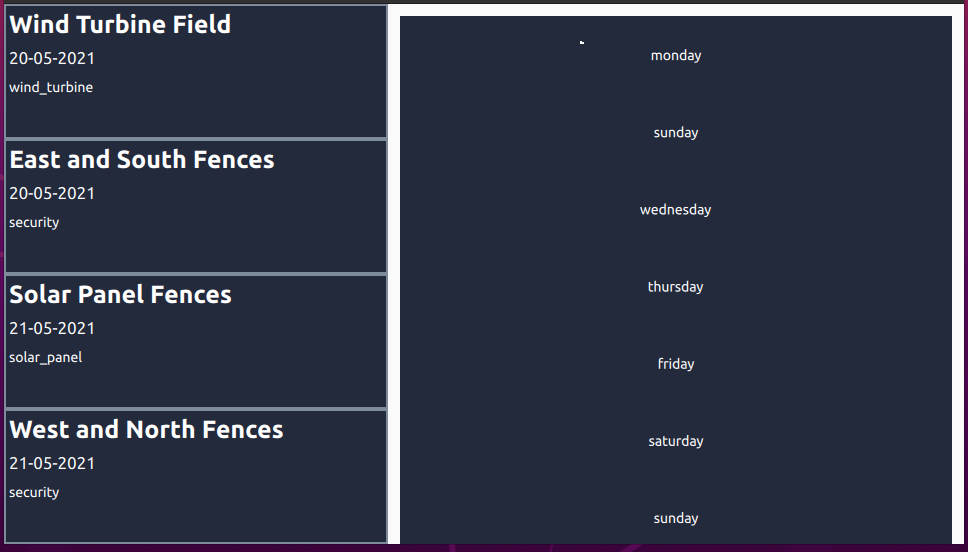
    ca2f002e-a434-47be-b8a6-260f1ecd71e1-image.png
    Hello guys, i am trying to make an ui. I chosed my colour and tried it literally every where (creating rectangles at everywhere to set colour ) to get rid of white areas around days. I could not find the reason what causing this, do you know anything about it?

    Here is my main code (i believe the problem is here).

    import QtQuick 2.12
    import QtQuick.Controls 2.5
    import QtQml 2.12
    import QtQuick 2.7
    import QtQuick.Layouts 1.3
    import QtQuick.Controls.Material 2.2
    import "components"
    
    
    ApplicationWindow {
        id: applicationWindow
        visible: true
        width: 960
        height: 540
        title: qsTr("App")
    
        Column {
            id: mission
            width: 2*parent.width/5
            height: parent.height
            anchors.left: parent.left
            anchors.top: parent.top
            anchors.bottom: parent.bottom
    
            ScrollView {
                id: scrollView
                anchors.fill: parent
    
                ListView {
                    width: parent.width
                    model: Missioninfo{}
                    delegate: Missiondelegate{}
                }
            }
        }
    
        Column {
            id: weather
            width: 3*parent.width/5
            height: parent.height
            anchors.right: parent.right
            anchors.top: parent.top
            anchors.bottom: parent.bottom
    
            ScrollView{
                id:deneme
                anchors.fill: parent
    
                Flickable {
                    id: flickable
                    anchors.fill: parent
                    contentHeight: root.implicitHeight
                    boundsBehavior: Flickable.OvershootBounds
    
                    Pane {
                        id: root
                        width: weather.width
                        height: weather.height
                        anchors.fill: parent
                        clip: true
    
    
                        Column {
                            //                        anchors.right: parent.right
                            anchors.fill: parent
                            anchors.verticalCenter: parent.verticalCenter
    
                            //                    Label {
                            //                        anchors { left: parent.left; right: parent.right }
                            //                        topPadding: 10
                            //                        bottomPadding: 10
                            //                        font.pixelSize: 20
                            //                        horizontalAlignment: Qt.AlignHCenter
                            //                        text: qsTr("Example")
                            //                    }
    
                            Repeater {
                                model: Weatherinfo{}
                                delegate:
                                    Column {
                                    property bool showList: false
                                    anchors.left: parent.left
                                    anchors.right: parent.right
    
                                    Rectangle{
                                        property bool showList: false
                                        color: "#232A3B"
                                        width:parent.width
                                        height: applicationWindow.height/7
                                        anchors.left: parent.left
                                        anchors.right:  parent.right
    
                                        Label{
                                            text:qsTr(model.day)
                                            anchors.centerIn: parent
                                            color:"white"
                                        }
    
                                        MouseArea{
                                            anchors.fill: parent
                                            onClicked: paneSettingsList.shown = !paneSettingsList.shown
                                        }
                                    }
    
                                    Pane {
                                        id: paneSettingsList
    
                                        // ## relevant part ##
                                        property bool shown: false
                                        visible: height > 0
                                        height: shown ? implicitHeight : 0
                                        Behavior on height {
                                            NumberAnimation {
                                                easing.type: Easing.InOutQuad
                                            }
                                        }
                                        clip: true
                                        // ## relevant part ##
                                        Material.background: "#293145"
                                        padding: 0
                                        anchors.left: parent.left
                                        anchors.right: parent.right
    
                                        Column {
                                            anchors.right: parent.right
                                            anchors.left: parent.left
    
                                            Repeater {
                                                id: listSettings1
                                                model:details
                                                delegate: Weatherdelegate{}
                                            }
                                        }
                                    }
                                }
                            }
    
                        }
                    }
                }
    
                ScrollIndicator.vertical: ScrollIndicator { }
    
            }
        }
    }
    
    
    1 Reply Last reply
    0
    • sierdzioS Offline
      sierdzioS Offline
      sierdzio
      Moderators
      wrote on last edited by
      #2

      I think your Flickable does nothing... it's contents are the same size as the Flickable (because you have anchors.fill: parent in your root Pane. So it will never scroll. What actually does the scrolling in your case is the ScrollView.

      I don't see any reason for the white padding in your code. Perhaps all those Pane components insert some platform-dependent padding? Try overriding their background property with a custom Rectangle.

      (Z(:^

      A 1 Reply Last reply
      1
      • sierdzioS sierdzio

        I think your Flickable does nothing... it's contents are the same size as the Flickable (because you have anchors.fill: parent in your root Pane. So it will never scroll. What actually does the scrolling in your case is the ScrollView.

        I don't see any reason for the white padding in your code. Perhaps all those Pane components insert some platform-dependent padding? Try overriding their background property with a custom Rectangle.

        A Offline
        A Offline
        aek3450
        wrote on last edited by
        #3

        @sierdzio Thanks for answering, overriding worked. Also for your information, i am a beginner so may be wrong but without ScrollView, it still can be scrolled.

        1 Reply Last reply
        0

        • Login

        • Login or register to search.
        • First post
          Last post
        0
        • Categories
        • Recent
        • Tags
        • Popular
        • Users
        • Groups
        • Search
        • Get Qt Extensions
        • Unsolved