Skip to content
  • Categories
  • Recent
  • Tags
  • Popular
  • Users
  • Groups
  • Search
  • Get Qt Extensions
  • Unsolved
Collapse
Brand Logo
  1. Home
  2. Qt Development
  3. General and Desktop
  4. How to deploy dlls?

How to deploy dlls?

Scheduled Pinned Locked Moved Unsolved General and Desktop
6 Posts 4 Posters 650 Views
  • Oldest to Newest
  • Newest to Oldest
  • Most Votes
Reply
  • Reply as topic
Log in to reply
This topic has been deleted. Only users with topic management privileges can see it.
  • P Offline
    P Offline
    Pavel Hudecek
    wrote on last edited by
    #1

    Hi, I'm trying to deploy a dll that uses the QSerialPortInfo.

    QT is version 5.12.6 and project using MSVC2017 64b

    windeployqt.exe writed this:
    Direct dependencies: Qt5Core Qt5SerialPort
    All dependencies : Qt5Core Qt5SerialPort
    To be deployed : Qt5Core Qt5SerialPort
    Warning: Cannot find Visual Studio installation directory, VCINSTALLDIR is not set.
    Qt5Core.dll is up to date.
    Qt5SerialPort.dll is up to date.
    Patching Qt5Core.dll...
    Creating qt_ar.qm...
    Creating qt_bg.qm...
    Creating qt_ca.qm...
    Creating qt_cs.qm...
    Creating qt_da.qm...
    Creating qt_de.qm...
    Creating qt_en.qm...
    Creating qt_es.qm...
    Creating qt_fi.qm...
    Creating qt_fr.qm...
    Creating qt_gd.qm...
    Creating qt_he.qm...
    Creating qt_hu.qm...
    Creating qt_it.qm...
    Creating qt_ja.qm...
    Creating qt_ko.qm...
    Creating qt_lv.qm...
    Creating qt_pl.qm...
    Creating qt_ru.qm...
    Creating qt_sk.qm...
    Creating qt_uk.qm...
    Creating qt_zh_TW.qm...

    I copied my dll and other files that added by windeployqt to right program directory, but doesnt work, program cannot load this. If i create this dll without QSerialPortInfo, program dll correctly loading.

    jsulmJ 1 Reply Last reply
    0
    • P Pavel Hudecek

      Hi, I'm trying to deploy a dll that uses the QSerialPortInfo.

      QT is version 5.12.6 and project using MSVC2017 64b

      windeployqt.exe writed this:
      Direct dependencies: Qt5Core Qt5SerialPort
      All dependencies : Qt5Core Qt5SerialPort
      To be deployed : Qt5Core Qt5SerialPort
      Warning: Cannot find Visual Studio installation directory, VCINSTALLDIR is not set.
      Qt5Core.dll is up to date.
      Qt5SerialPort.dll is up to date.
      Patching Qt5Core.dll...
      Creating qt_ar.qm...
      Creating qt_bg.qm...
      Creating qt_ca.qm...
      Creating qt_cs.qm...
      Creating qt_da.qm...
      Creating qt_de.qm...
      Creating qt_en.qm...
      Creating qt_es.qm...
      Creating qt_fi.qm...
      Creating qt_fr.qm...
      Creating qt_gd.qm...
      Creating qt_he.qm...
      Creating qt_hu.qm...
      Creating qt_it.qm...
      Creating qt_ja.qm...
      Creating qt_ko.qm...
      Creating qt_lv.qm...
      Creating qt_pl.qm...
      Creating qt_ru.qm...
      Creating qt_sk.qm...
      Creating qt_uk.qm...
      Creating qt_zh_TW.qm...

      I copied my dll and other files that added by windeployqt to right program directory, but doesnt work, program cannot load this. If i create this dll without QSerialPortInfo, program dll correctly loading.

      jsulmJ Offline
      jsulmJ Offline
      jsulm
      Lifetime Qt Champion
      wrote on last edited by
      #2

      @Pavel-Hudecek You can use https://www.dependencywalker.com/ to see which libs are missing.

      https://forum.qt.io/topic/113070/qt-code-of-conduct

      1 Reply Last reply
      2
      • P Offline
        P Offline
        Pavel Hudecek
        wrote on last edited by
        #3

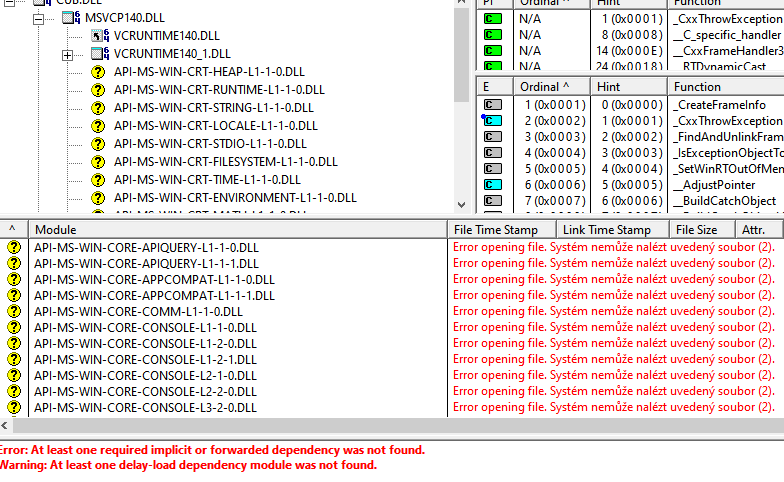
        Thank you, I try it, but many errors "System cannot find file" occured. These errors occurs with both "loadable" and "no-loadable" dlls. Help in this program doesnt work.
        alt text

        1 Reply Last reply
        0
        • P Offline
          P Offline
          Pavel Hudecek
          wrote on last edited by
          #4

          I tried to deploy a exe with this component, it works. Next i copied all files around deployed exe to directory of the dll, but dll not work, the program cannot load this. I think the problem is not with the wrong deploy of the dll, but with the method of on demand loading the dll into the program.

          This is crazy. It's relative big software, hunderds of cpp files, full build time is more than 10 minutes. First author was genius, he wrote everything self, but without any comment and documentation... and he left:-) Now, more people are trying to continue in the project.

          I find that the program use winapi LoadLibraryW to on demand loading of a dlls. And if dll is using a QT component, LoadLibraryW cannot load it.

          Any hint what i can change in my dll, or i must change main program?

          1 Reply Last reply
          0
          • kkoehneK Offline
            kkoehneK Offline
            kkoehne
            Moderators
            wrote on last edited by
            #5

            @Pavel-Hudecek , you can ignore the 'yellow entries' with API-MS_WIN .. in dependency walker.

            There might be multiple reasons why a .dll isn't loaded in the original program. Try to also load the actual executable (that does LoadLibrary calls) into dependency walker. Then run it with 'Start profiling...'. There are multiple options available, but the defaults should be fine.

            Does depends.exe give you any output when it tries to load your .dll?

            Director R&D, The Qt Company

            1 Reply Last reply
            1
            • hskoglundH Offline
              hskoglundH Offline
              hskoglund
              wrote on last edited by
              #6

              Hi, there's one difference between a Qt .EXE file and a Qt DLL: when Qt loads the plugins it needs, for an .EXE usually all that's needed is to copy the Qt .dlls and plugins to the same directory as the .EXE file, because Qt looks for the dlls in the current working directory, i.e. where the .exe file is, this works fine.

              However, if your Qt .DLL is not in the same directory as the .EXE file that loads it, the current working directory method of location the needed Qt plugins will not work, this might be why QSerialPortInfo fails to load.

              One way to fix this problem is in your Qt Dll main.cpp, just before constructing the QApplication, is to call addLibraryPath and specify the directory where your .DLL is.

              1 Reply Last reply
              1

              • Login

              • Login or register to search.
              • First post
                Last post
              0
              • Categories
              • Recent
              • Tags
              • Popular
              • Users
              • Groups
              • Search
              • Get Qt Extensions
              • Unsolved