Skip to content
  • Categories
  • Recent
  • Tags
  • Popular
  • Users
  • Groups
  • Search
  • Get Qt Extensions
  • Unsolved
Collapse
Brand Logo
  1. Home
  2. Qt Development
  3. General and Desktop
  4. Opening dynamically created buttons
Qt 6.11 is out! See what's new in the release blog

Opening dynamically created buttons

Scheduled Pinned Locked Moved Solved General and Desktop
7 Posts 3 Posters 1.4k Views 3 Watching
  • Oldest to Newest
  • Newest to Oldest
  • Most Votes
Reply
  • Reply as topic
Log in to reply
This topic has been deleted. Only users with topic management privileges can see it.
  • R Offline
    R Offline
    Romi11
    wrote on last edited by
    #1

    I tried to make some dynamically created buttons but the appllication closed when I try to do it or make every buttons in one position in a frame (when a I do it in new window it works but I need in a special created frame several buttons)

    void MainWindow::createButtons(){

    QVBoxLayoutlayout=qobject_cast<QVBoxLayout>(ui->frame->layout());
    //this line makes a problem

    // QVBoxLayout *layout=new QVBoxLayout(); //this works

    QPushButton *przyc =new QPushButton(buttontext, ui->frame);
    layout->insertWidget(1,przyc);
    QPushButton *przyc2 =new QPushButton(buttontext, ui->frame);
    layout->insertWidget(2,przyc2)
    przyc->show();
    przyc2->show();

    }

    My QT creator 2.7.2 on base qt 5.1.0 version under linux mint

    1 Reply Last reply
    0
    • SGaistS Offline
      SGaistS Offline
      SGaist
      Lifetime Qt Champion
      wrote on last edited by
      #2

      Hi and welcome to devnet,

      @Romi11 said in Opening dynamically created buttons:

      QVBoxLayoutlayout=qobject_cast<QVBoxLayout>(ui->frame->layout());

      You do not check whether the value is null.

      I guess that you did not apply a layout on your frame in designer.

      Interested in AI ? www.idiap.ch
      Please read the Qt Code of Conduct - https://forum.qt.io/topic/113070/qt-code-of-conduct

      1 Reply Last reply
      2
      • R Offline
        R Offline
        Romi11
        wrote on last edited by
        #3

        You right the pointer is null however I applied in Qt creator layout and frame . How to do it correctly?

        mrjjM 1 Reply Last reply
        0
        • R Romi11

          You right the pointer is null however I applied in Qt creator layout and frame . How to do it correctly?

          mrjjM Offline
          mrjjM Offline
          mrjj
          Lifetime Qt Champion
          wrote on last edited by
          #4

          @Romi11

          Hi
          Go to Designer and look what the Layout really is named.
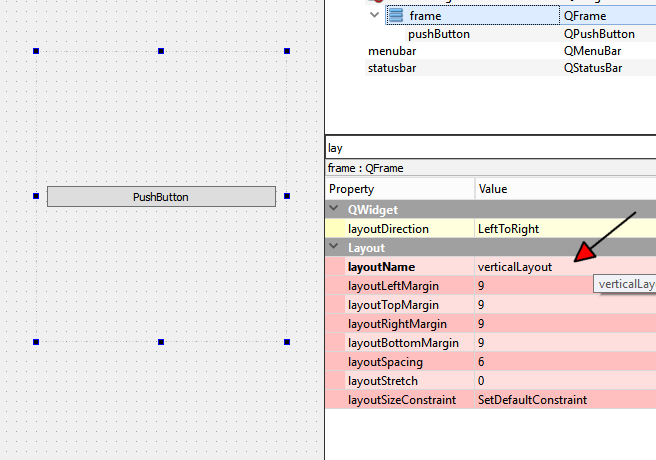
          alt text

          Then it's available as
          ui->verticalLayout

          and see if that works;

          Also you can avoud casting as its of correct layout type already.

          R 1 Reply Last reply
          3
          • mrjjM mrjj

            @Romi11

            Hi
            Go to Designer and look what the Layout really is named.

            alt text

            Then it's available as
            ui->verticalLayout

            and see if that works;

            Also you can avoud casting as its of correct layout type already.

            R Offline
            R Offline
            Romi11
            wrote on last edited by
            #5

            now it works how I supposed. I think its difficult to achieve it, without your support I would have spent many hours until find it correctly

            mrjjM 1 Reply Last reply
            1
            • R Romi11

              now it works how I supposed. I think its difficult to achieve it, without your support I would have spent many hours until find it correctly

              mrjjM Offline
              mrjjM Offline
              mrjj
              Lifetime Qt Champion
              wrote on last edited by
              #6

              @Romi11
              Hi
              Well, Its unclear why layout() didn't work.
              It does return the layout for me in a small example.

              So I think maybe you changed the type of the layout
              and hence when you cast it becomes zero as it was not the right type.

              Or something like that.

              R 1 Reply Last reply
              0
              • mrjjM mrjj

                @Romi11
                Hi
                Well, Its unclear why layout() didn't work.
                It does return the layout for me in a small example.

                So I think maybe you changed the type of the layout
                and hence when you cast it becomes zero as it was not the right type.

                Or something like that.

                R Offline
                R Offline
                Romi11
                wrote on last edited by
                #7

                @mrjj I think I do it how in example but the philosophy of qt frames and layouts I should to learn more.
                Thanks for quick answers :)

                1 Reply Last reply
                0

                • Login

                • Login or register to search.
                • First post
                  Last post
                0
                • Categories
                • Recent
                • Tags
                • Popular
                • Users
                • Groups
                • Search
                • Get Qt Extensions
                • Unsolved